77
English
Ŷ Unit
1
Press <MENU (Unit)> for several
times and display the [Setup] menu.
2
Select [OSD language] with , and
then press and hold <ENTER (Unit)>
for more than 5 seconds.
3
Select [YES] with <- (Unit)> or <+
(Unit)> and press <ENTER (Unit)>.
The message [Shipping (wait a moment)] will be
displayed.
4
After the message [Please turn off
the power] is displayed, turn the
power off pressing <Main Power On /
Off switch>.
Shipping condition
You can reset the settings / the adjusted values of the
following menus to the factory settings:
[Picture], [Sound], [Setup], [Position], [Options]
Ŷ Remote control
1
Press <SETUP> to display the [Setup]
menu.
2
Select [OSD language] with
and press <ENTER> for more than 3
seconds.
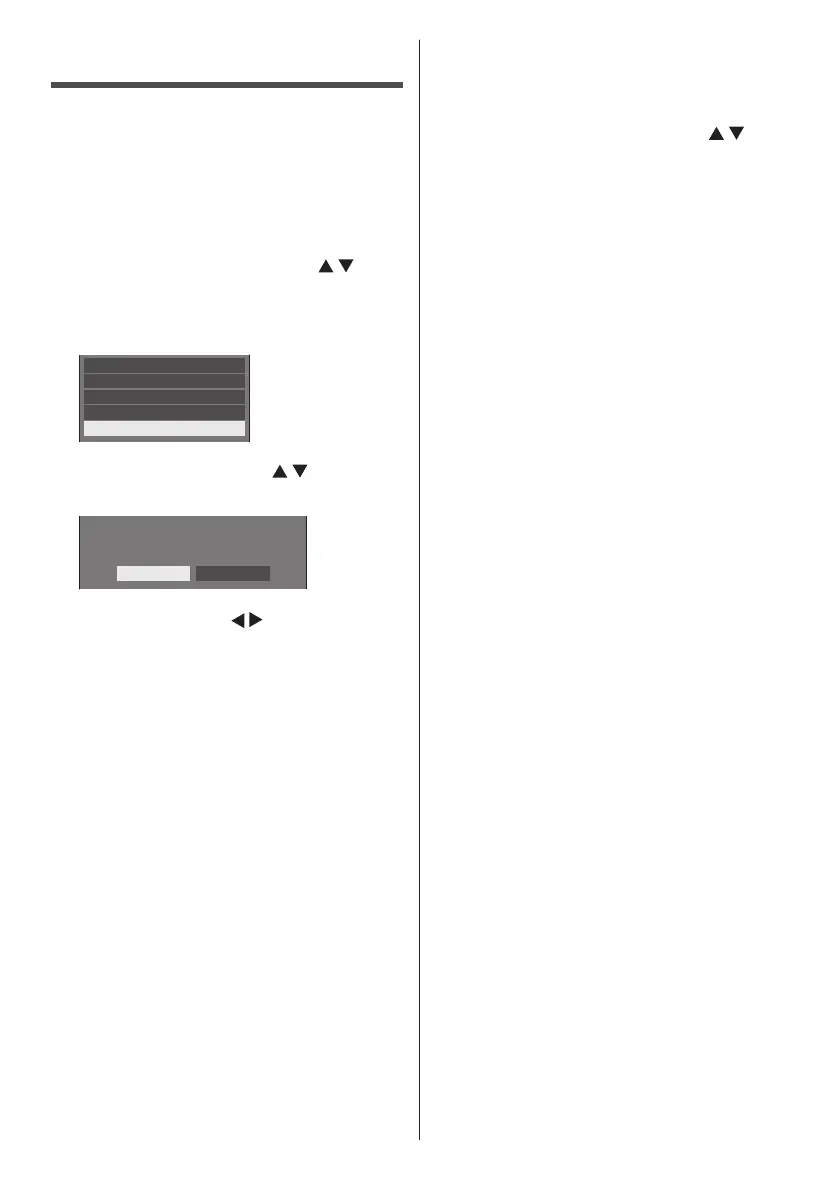
The following screen will be displayed.
Options
Display serial number
Shipping
USB data cloning
Software licenses
3
Select [Shipping] with and press
<ENTER>.
Shipping
YES NO
4
Select [YES] with and press
<ENTER>.
The message [Shipping (wait a moment)] will be
displayed.
5
After the message [Please turn off
the power] is displayed, turn the
power off pressing <Main Power On /
Off switch>.









 To Next Page