English
9
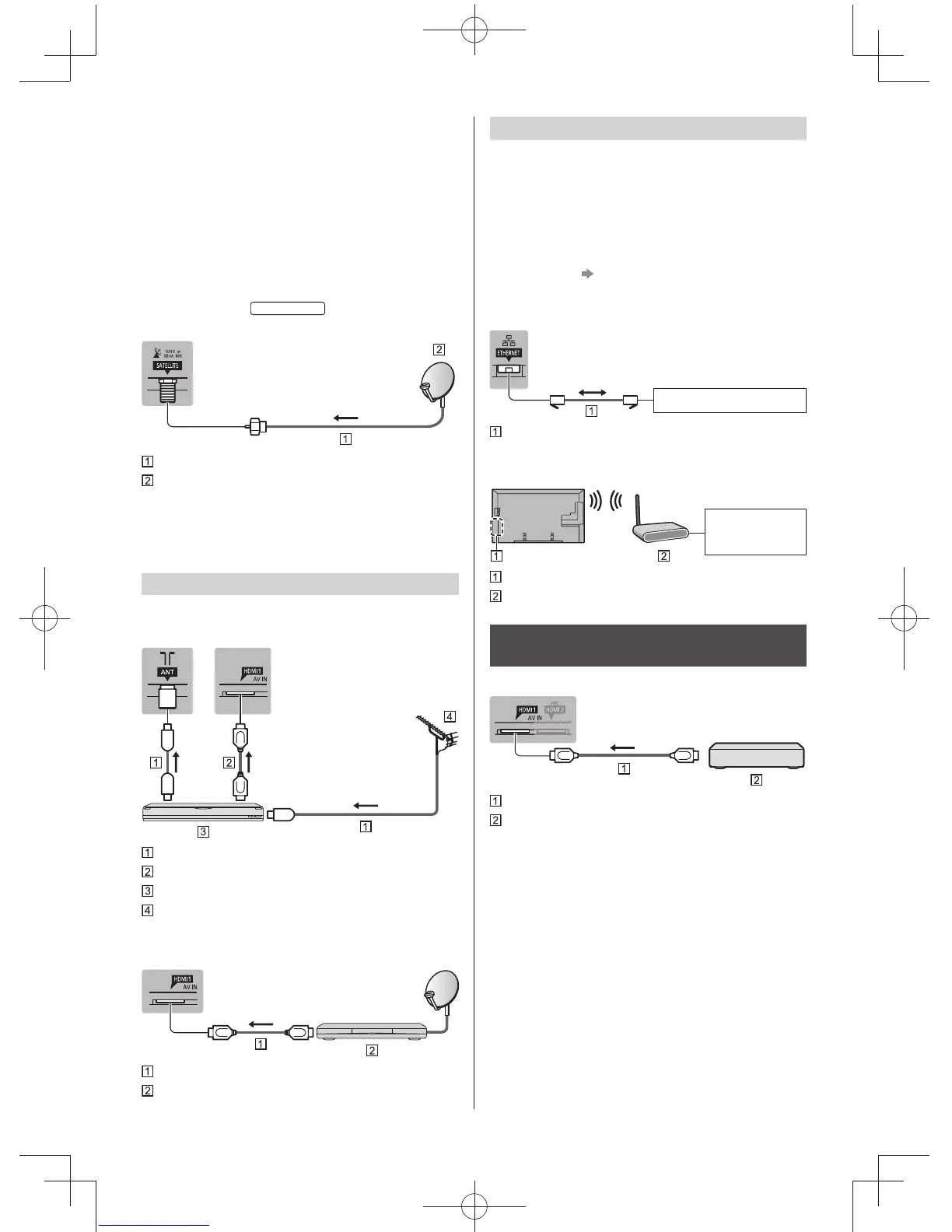
Network
A broadband network environment is required to be able
to use internet services.
●
If you do not have any broadband network services,
please consult your retailer for assistance.
●
Prepare the internet environment for wired connection
or wireless connection.
●
Setup of the network connection will start when first
using the TV. (p. 13)
■ Wired connection
TV
Internet environment
LAN cable (Shielded)
●
Use Shielded Twist Pair (STP) LAN cable.
■ Wireless connection
Internet
environment
Built-in wireless LAN
Access point
Connections for 4K compatible
equipment
TV
HDMI cable
4K compatible equipment
●
Connect the 4K compatible equipment to HDMI
terminal and you can watch contents of 4K format.
●
When connecting to HDMI terminal, use a 4K
compatible cable.
●
If a communal aerial system is used, you may require
the correct connection cable and plug between the
wall aerial socket and the TV.
●
Your local Television Service Centre or dealer may
be able to assist you in obtaining the correct aerial
system for your particular area and the accessories
required.
●
Any matters regarding aerial installation, upgrading
of existing systems or accessories required, and
the costs incurred, are the responsibility of you, the
customer.
■ Satellite dish
New Zealand
TV
Satellite cable
Satellite dish
●
For Satellite TV
●
To ensure your satellite dish is correctly installed,
please consult your local dealer. Also consult the
received satellite broadcasting companies for details.
AV devices
■ DVD Recorder / VCR
TV
RF cable
HDMI cable
DVD Recorder / VCR
Aerial
■ Set top box
TV
HDMI cable
Set top box





 To Next Page