30
1
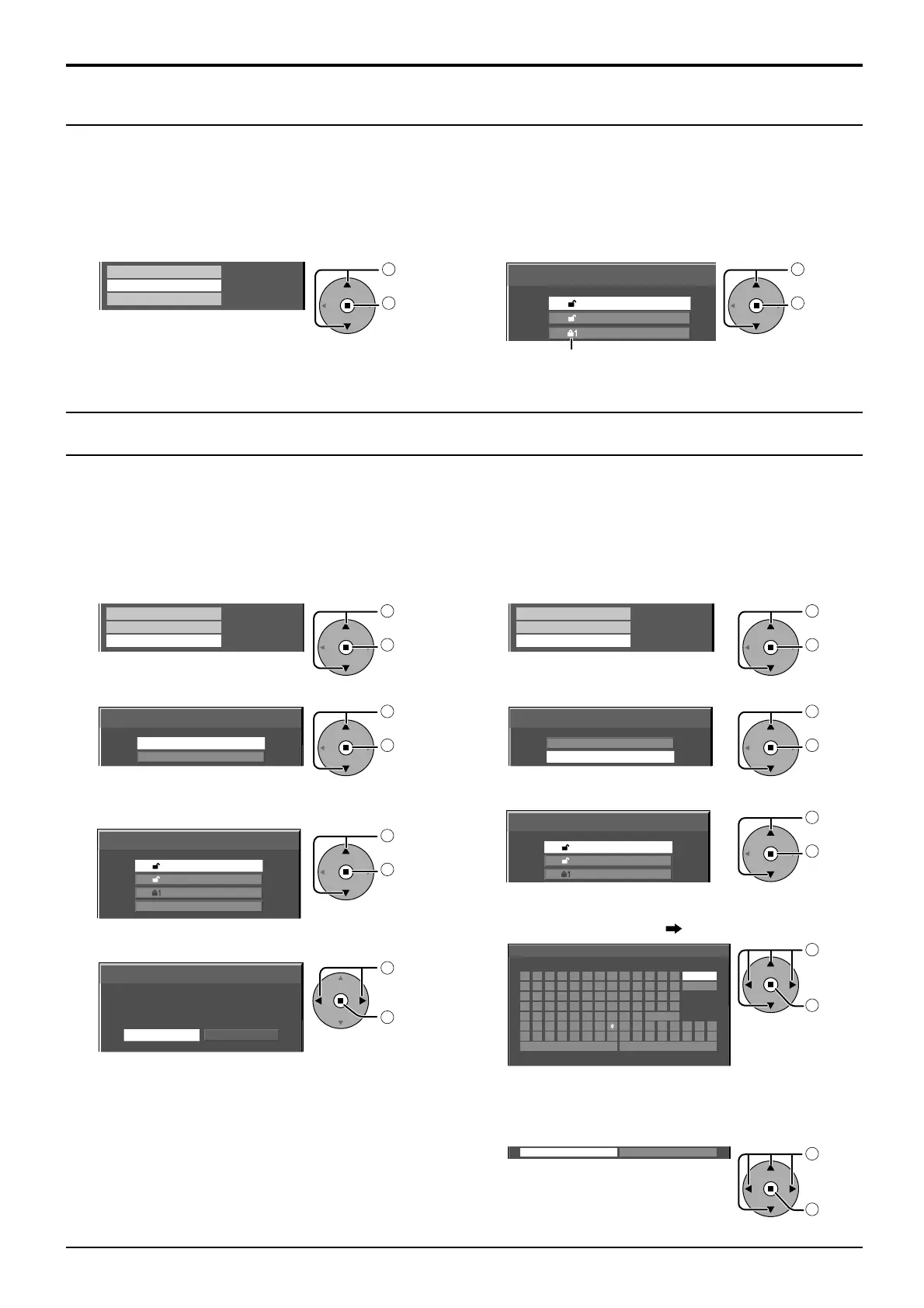
In the Picture menu, select “Memory load”.
Memory save
Memory load
Memory edit
1
select
2
access
Loading profi les
Load profi les and apply the picture adjustment values to the display as follows.
Notes:
•
Loaded profi les are stored in memory according to the selected input terminal (SLOT1, 2, 3 or PC IN). (see page 14)
• When the settings are locked in “Extended life settings”, profi les cannot be loaded.
Picture Profi les
2
Select the profi le to load.
Memory load
1.
[
]
2.
[
]
3.
[
]
MEMORY2
MEMORY3
MEMORY1
1
select
2
set
Profi les are labeled with these icons to indicate their locked
status. (see page 31)
Delete or rename profi les as follows.
<Deleting profi les>
Note:
Locked profi les cannot be deleted.
1
In the Picture menu, select “Memory edit”.
Memory save
Memory load
Memory edit
1
select
2
access
2
Select “Memory delete”.
Memory edit
Memory name change
Memory delete
1
select
2
set
3
Select the profi le to delete.
To delete all profi les, select “All delete”.
Memory delete
All delete
1.
[
]
2.
[
]
3.
[
]
MEMORY2
MEMORY3
MEMORY1
1
select
2
set
4
Select “Ok”.
Memory delete
Cancel
Delete the MEMORY1 data.
Ok
1
select
2
set
<Renaming profi les>
Note:
Locked profi les cannot be renamed.
1
In the Picture menu, select “Memory edit”.
Memory save
Memory load
Memory edit
1
select
2
access
2
Select “Memory name change”.
Memory edit
Memory name change
Memory delete
1
select
2
set
3
Select the profi le to rename.
Memory name change
1.
[
]
2.
[
]
3.
[
]
MEMORY2
MEMORY3
MEMORY1
1
select
2
set
4
Enter a name for the profi le.
Entering profi le names page 29
Memory name input
█
EMORY1M
Ok
ABCDEFGH I J KLM All delete
N O P Q R S T U V W X Y Z Delete
Space
abcde fgh i j k lm
nopqr s t uvwxyz
0123456789
!”#$%&’ +–/=?
_` |~<>() [ ] {} ,
@\ ˆ
.;:
Cancel
1
select
2
set
5
When you fi nished entering the profi le name, select
“Ok”.
To cancel renaming the profi le, select “Cancel”.
Ok
Cancel
1
select
2
set
Editing profi les









 To Next Page