English - 5 -
Environmental Information
This television is designed to be environment friendly.
To reduce energy consumption, you can follow these
steps:
If you set the Energy Saving to Minimum, Medium,
Maximum or Auto the TV will reduce the energy
consumption accordingly. If you like to set the
BacklightCustom and adjust
the Backlight (located under the Energy Saving
setting) manually using Left or Right buttons on the
remote. Set as
Note: Available Energy Saving options may dier depending
on the selected Mode in the Settings>Picture menu.
The Energy Saving settings can be found in the Set-
tings>Picture menu. Note that some picture settings
will be unavailable to be changed.
If pressed Right button or Left button consecutively,
“
Proceed and press
OK
Press any button on the remote or on the TV to turn
the screen on again.
Note: Screen O option is not available if the Mode is set
to Game.
When the TV is not in use, please switch off or
disconnect the TV from the mains plug. This will also
reduce energy consumption.
Removing the pedestal from the TV
Be sure to remove the pedestal in the following way
when using the wall-hanging bracket or repacking
the TV.
• Put the TV onto a work table with the screen panel
down on the clean and soft cloth. Leave the stand(s)
protruding over the edge of the surface.
•
• Remove the stand(s).
When using the wall-hanging bracket
Please contact your local Panasonic dealer to
purchase the recommended wall-hanging bracket.
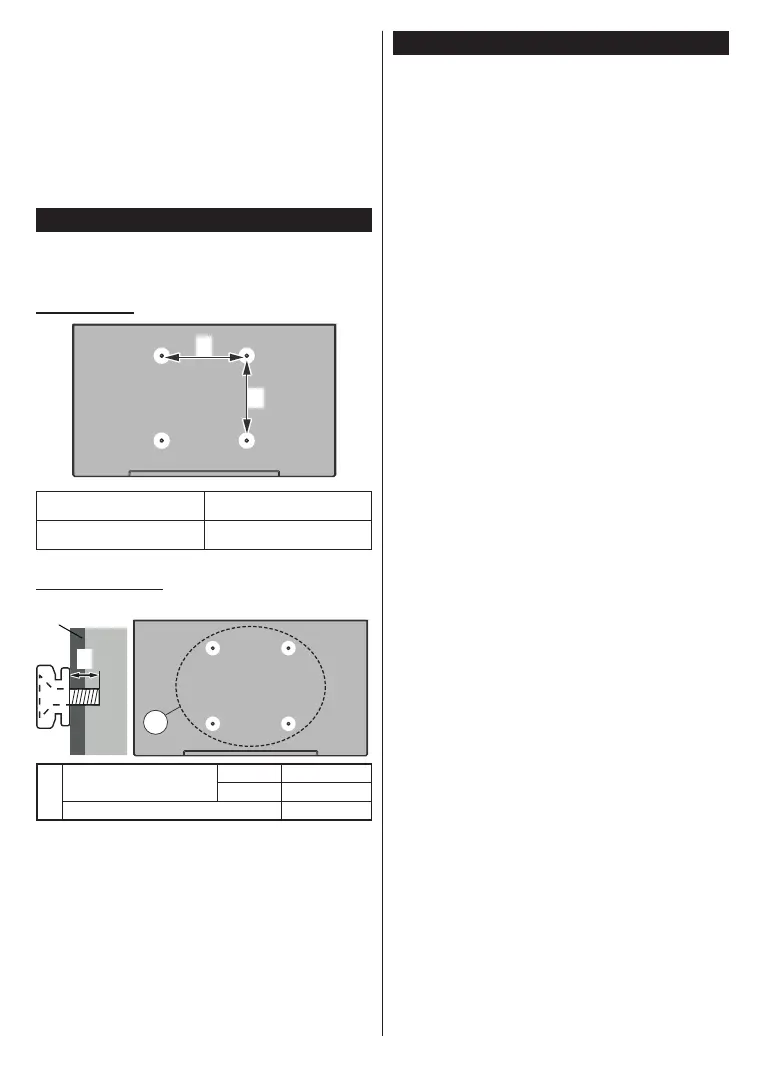
Holes for wall-hanging bracket installation;
Rear of the TV
a
b
a (mm)
75
b (mm)
75
View from the side
c
VESA
Bracket
d
(d)
Depth of screw (c)
min. 7 mm
max. 10 mm
Diameter M4
Note: The screws for xing the TV onto the wall-hanging
bracket are not supplied with the TV.








 To Next Page