32
Normally stereo reproduction uses left and right sp eakers, but Dolby Pro Logic Surround also uses a centre channel and a rear
channel. The centre channel sharpens sound perspective and dialogue clarity w hilst the rear channel is used to im merse the v iewer
in ambience and special effects.
To u se D olby Pro Logic Surround when receiv ing television programmes that have been encoded with Dolby Surround
inform ation, y ou must be able to receive NI CA M Stereo tra nsm issions. If N I CA M Stereo transmissions are not tra nsm itted in y our
area then the Dolb y Surround information will not be present and Pro Logic decoding will produce a centre channel only output
(unless you are playing back from a stereo V CR , Digital Versatile Disc etc.).
Dolby Pro Logi c Surround operates best with videos, laserdiscs and TV programmes that bear the Dolby Surround logo, bu t ca n
also b e u sed to good effect with stere o sou rces not encod ed in Dolb y Surroun d and mono sources, aff ord in g compatib ili ty w ith any
source.
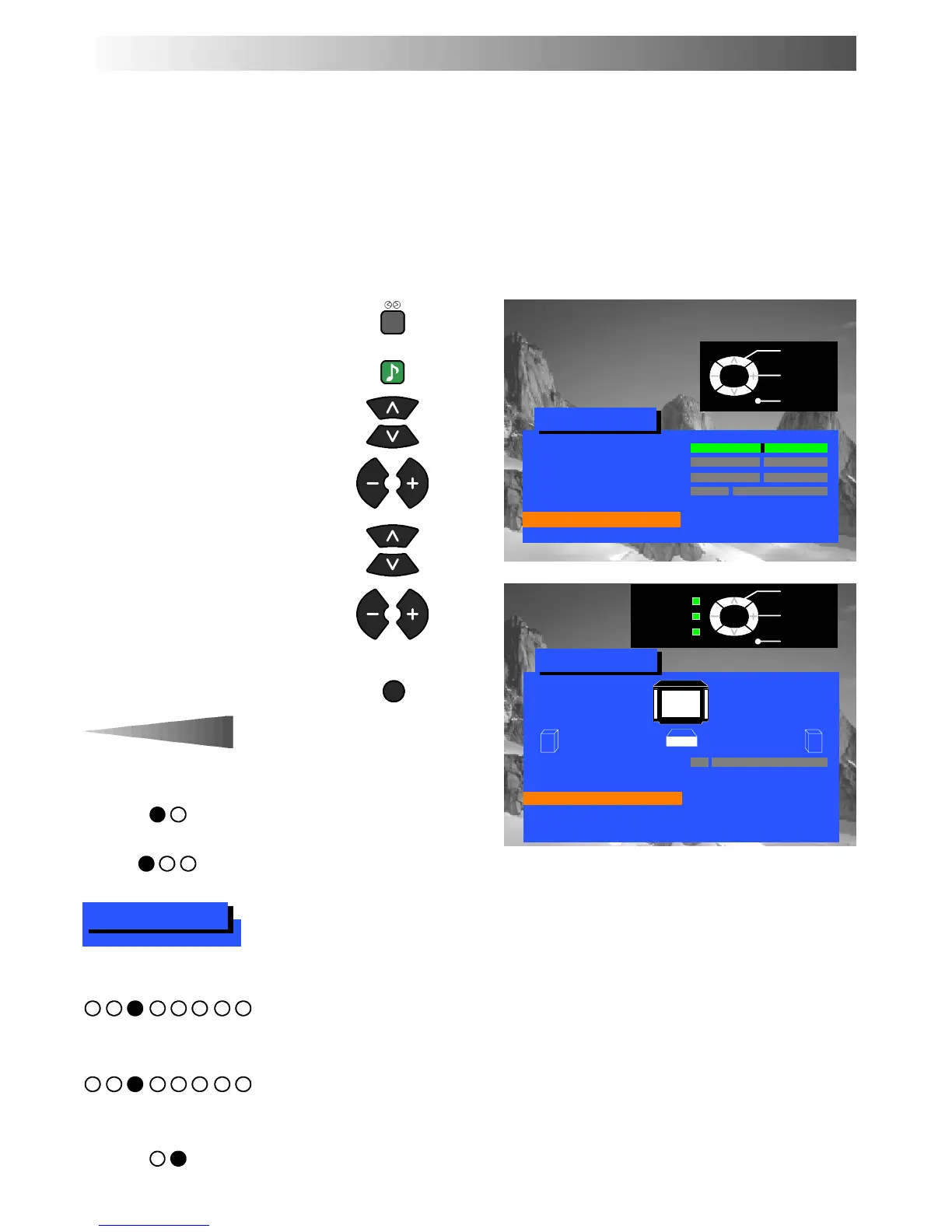
Ensure that the “Surround”
feature is switched On
Open the Sound menu
Move to Surround menu
Access Surround menu
Move to your choice
Increase or decrease levels, set
optionsoraccessfurthermenus
Press the TV/AV button to exit
The volume adjustment sets the overal l
Surround output volume.
Choosing Pro Logic allows selection of
Normal, Phantom or 3 Stereo modes,
as described on page 33.
Choosing Simulated allows selection of
Disco, Movie or Stadium mode s, as
described on page 34.
Allows adjustment of the output levels for each channel, as described on page 34.
Allows setting of the distance from the listening position to the front speakers.
Allows setting of the distance from the listening position to the re ar speakers. If the rear surround speakers
are closer to you than the centre speaker, you may hear dialogue “le akage” from the rear surround
speakers. It may be necessary to reduce the output level of the rear channel to rectify this phenomenon.
Normally set to On, but, when separate external amplified front speakers are connected, then the internal
speakers can be switched Off. See page 41 for connection details.
SURROUND MENU
Select
Access
Exit
TV/AV
Sound menu
Volume
Bass
Treble
Headphone volume
3D Subwoofer Normal
NICAM On
Surround menu Access
Return --
Select
Access
Exit
TV/AV
Surround menu
Volume
Surround mode Pro Logic
Pro Logic setting Normal
Speaker level Access
Front distance 3m
Rear distance 3m
Internal speaker On
SOUND
TV/AV
Volume
Speaker level
Surround mode
Pro Logic/Simulated setting
Front distance
Rear distance
Internal speaker




 To Next Page