English
29
Using Home Network
DLNA
®
This TV is a DLNA Certified™ product.
DLNA (Digital Living Network Alliance) is a standard
that makes DLNA Certified digital electronics easier and
more convenient to use on a home network. To learn
more, visit www.dlna.org.
To use DLNA features, you need a home network
environment and you can operate the features without a
broadband network environment.
●
For details, refer to [eHELP] (Network).
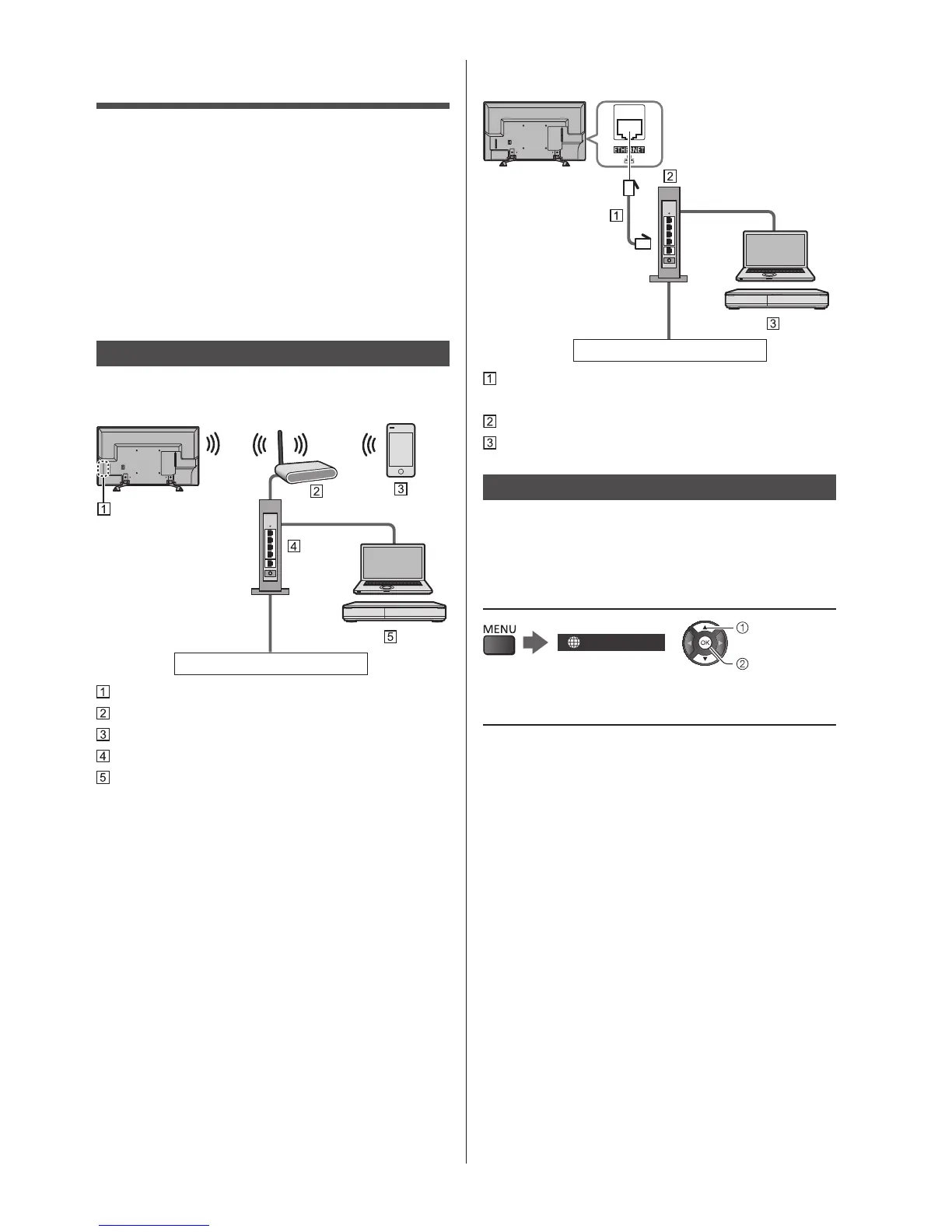
Network connections
■ Wireless connection (For DLNA and
internet service)
Internet environment
Built-in wireless LAN
Access point
Smartphone, etc.
Hub / Router
DLNA Certified media server (PC, etc.)
■ Wired connection (For DLNA and internet
service)
Internet environment
LAN cable (Shielded)
●
Use Shielded Twist Pair (STP) LAN cable.
Hub / Router
DLNA Certified media server (PC, etc.)
Network settings
●
Ensure the connections are completed before starting
Network Setup.
1 Display the menu and select
[Network]
Network
select
access
2 Select [Network Connection]
●
Follow the on-screen instructions.





 To Next Page