English
13
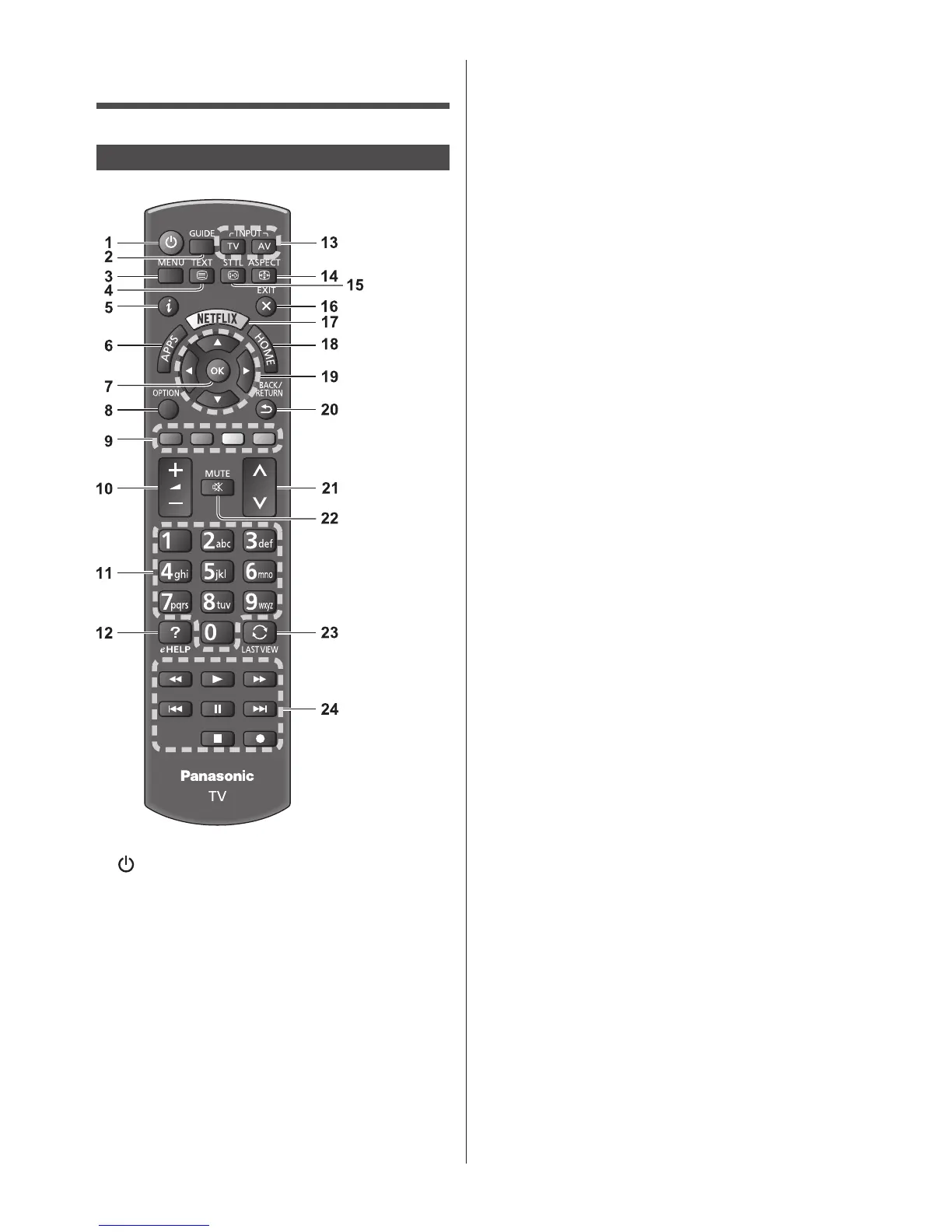
Identifying Controls
Remote Control
1 [ ]: Standby On / Off switch
2 TV Guide
●
DisplaysElectronicProgrammeGuide.
3 [Main Menu]
●
PresstoaccessPicture,Sound,Network,Timer,
SetupandHelpMenus,etc.
4 Teletext button
5 Information
●
Displayschannelandprogrammeinformation.
6 APPS
●
Displays[APPSList](applicationslist).
7 OK
●
Confirmsselectionsandchoices.
●
Pressafterselectingchannelpositionstoquickly
changechannel.
●
Displayschannellist.
8 [Option Menu]
●
Easyoptionalsettingforviewing,sound,etc.
9 Coloured buttons
(red-green-yellow-blue)
●
Usedfortheselection,navigationandoperationof
variousfunctions.
10
Volume Up / Down
11
Numeric buttons
●
Changeschannelandteletextpages.
●
Setscharacters.
●
WheninStandbymode,switchesTVon.
12
[eHELP]
●
Displays[eHELP](Built-inOperatingInstructions).
13
Input mode selection
●
TV-switchestoDVB-S/DVB-C/DVB-T/
DVB-via-IP/Analogue.
●
AV-switchestoAVinputmodefromInput
Selectionlist.
14
Aspect
●
Changesaspectratio.
15
Subtitles
●
Displayssubtitles.
16
Exit
●
Returnsto[HomeScreen].
17
Netflix
●
AccessesNETFLIXservicedirectly.
●
Abroadbandnetworkenvironmentisrequiredin
ordertofullyusethisfunction.
●
Thisservicemaybestoppedorchangedwithout
notice.
18
HOME
●
Displays[HomeScreen].
19
Cursor buttons
●
Makesselectionsandadjustments.
20
Return
●
Returnstothepreviousmenu/page.
21
Channel Up / Down
22
Sound Mute On / Off
23
Last view
●
Switchestopreviouslyviewedchannelorinput
mode.
24
Operations for contents, connected equipment,
etc.











 To Next Page