English
16
Operations
Turn power on
(TV)
or
(RemoteControl)
●
MainspowerOn/Offswitchshouldbeon.
(p.14)
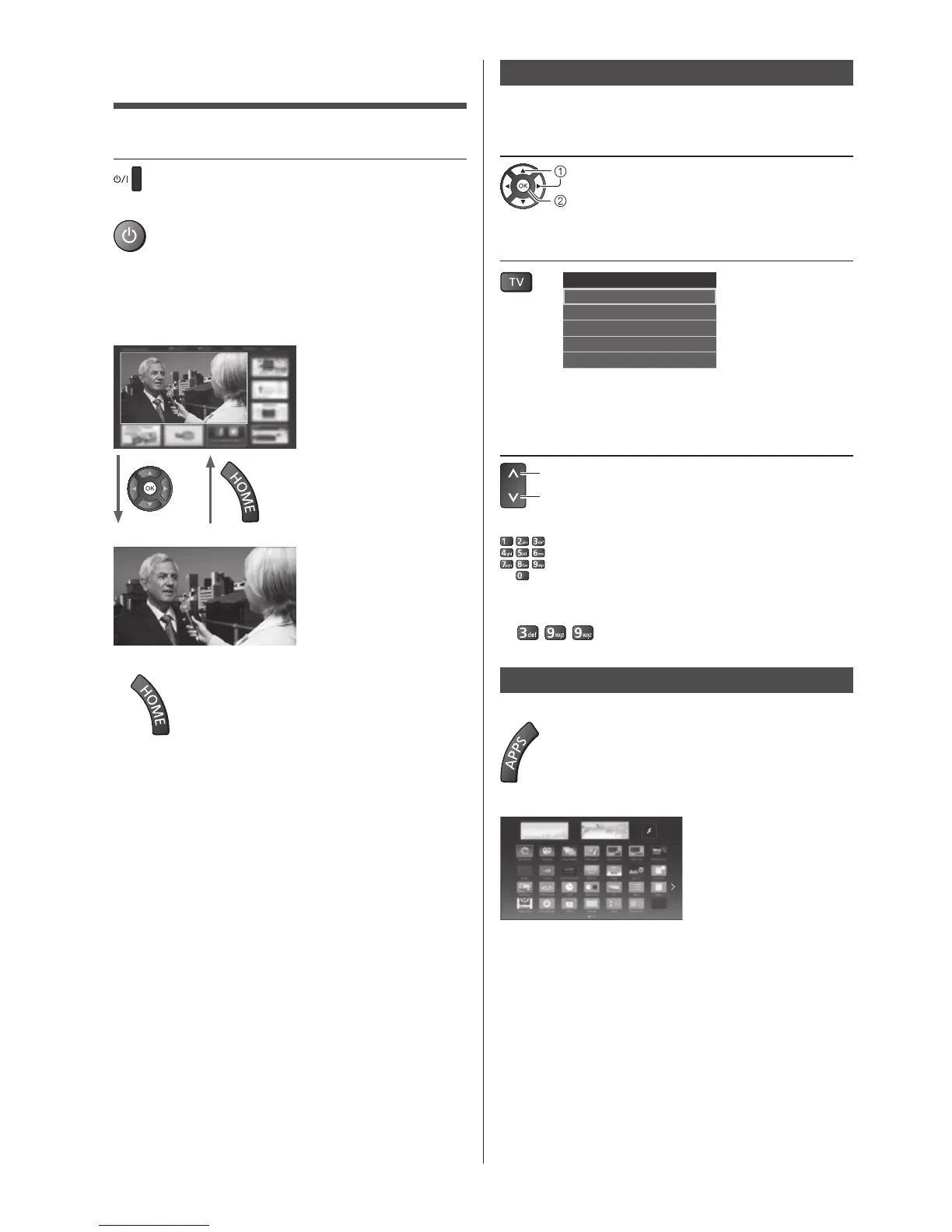
Thelastviewed[HomeScreen]isdisplayed.
Example:[TVHomeScreen]
Example:Selectedcontentscreen
●
Toreturnto[HomeScreen]atanytime
●
The[HomeScreen]canbesetuptodisplaydesired
information,toaccessspecificfeatureseasily,to
selectthedefault[HomeScreen],etc.Fordetails,
followtheon-screeninstructionsorreferto[eHELP]
(myHomeScreen>myHomeScreen).
Watching TV
1 Select the TV viewer from [Home
Screen]
select
access
2 Select the mode
TV Selection
DVB-S
DVB-C
DVB-T
DVB-via-IP
Analogue
●
Selectablemodesvarydependingonthechannels
stored.
3 Select a channel
up
down
or
●
Toselectachannelpositionwith2ormore-digit,e.g.
399
To access each feature
Access [APPS List] and select a feature
Example:[APPSList]
●
APPSistheapplications(features)oftheTV.
●
Foroperationsofeachfeatureandthesetupof
[APPSList],followtheon-screeninstructionsorrefer
to[eHELP](myHomeScreen>APPSList).








 To Next Page