6.4. Hotel mode
1. Purpose
Restrict a function for hotels.
2. Access command to the Hotel mode setup menu
In order to display the Hotel mode setup menu, please
enter the following command (within 2 second).
[TV] : Vol. [Down] + [REMOTE] : AV (3 times)
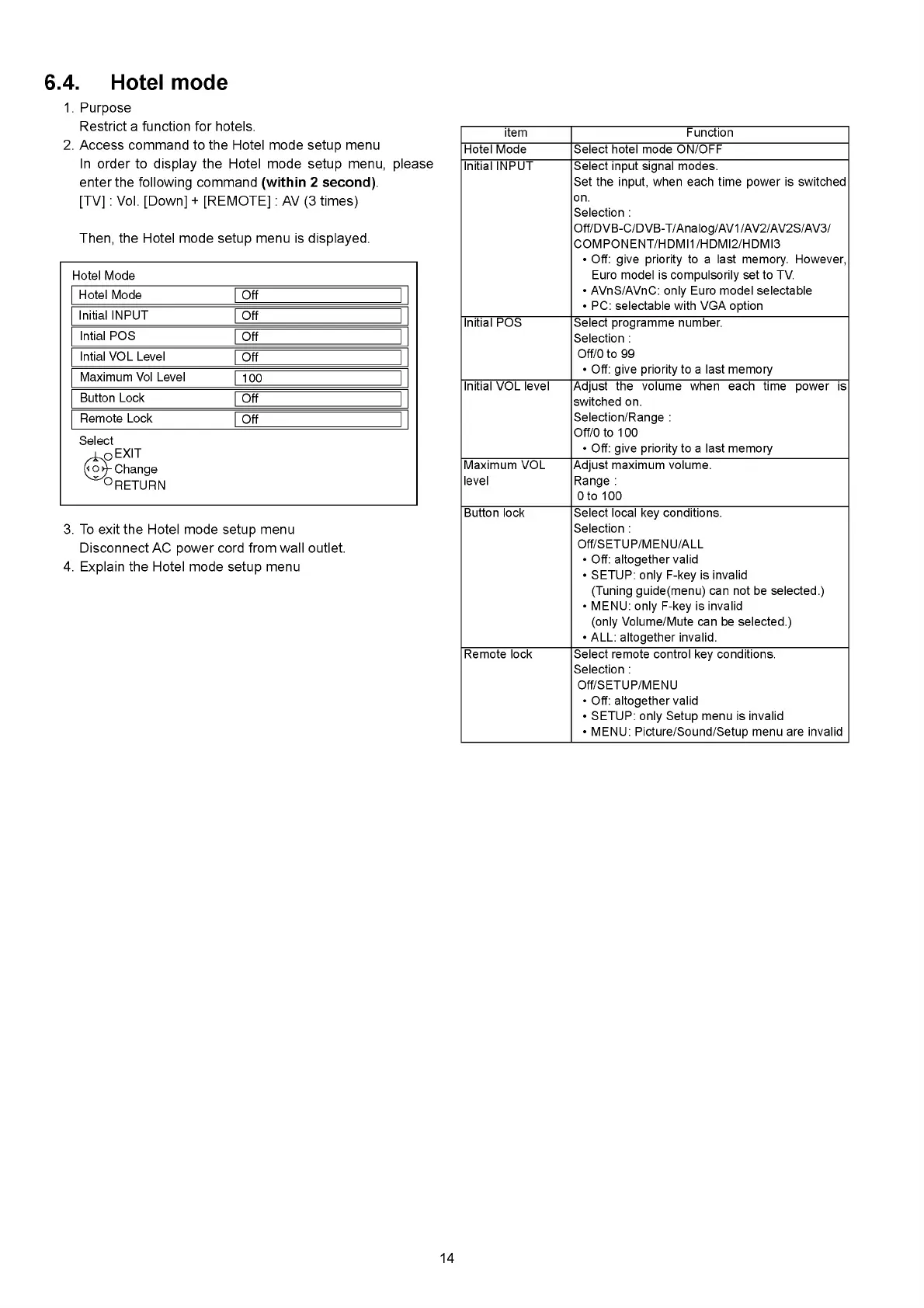
Then, the Hotel mode setup menu is displayed.
Hotel Mode
Hotel Mode
1 Off
_______________________
|
Initial INPUT
1 Off 1
Intial POS
1 Off 1
Intial VOL Level
Г о т |
Maximum Vol Level
1 100 I
Button Lock
Г о т |
Remote Lock
Г Ш |
Select
^ o E X IT
(< ой- Change
~ °R ETU R N
3. To exit the Hotel mode setup menu
Disconnect AC power cord from wall outlet.
4. Explain the Hotel mode setup menu
item Function
Hotel Mode Select hotel mode ON/OFF
Initial INPUT Select input signal modes.
Set the input, when each time power is switched
on.
Selection :
Off/DVB-C/DVB-T/Analog/AV1/AV2/AV2S/AV3/
COMPONENT/HDMI1/HDMI2/HDMI3
• Off: give priority to a last memory. However,
Euro model is compulsorily set to TV.
• AVnS/AVnC: only Euro model selectable
• PC: selectable with VGA option
Initial POS Select programme number.
Selection :
Off/0 to 99
• Off: give priority to a last memory
Initial VOL level Adjust the volume when each time power is
switched on.
Selection/Range :
Off/0 to 100
• Off: give priority to a last memory
Maximum VOL
level
Adjust maximum volume.
Range :
0 to 100
Button lock Select local key conditions.
Selection :
Off/SETUP/MENU/ALL
• Off: altogether valid
• SETUP: only F-key is invalid
(Tuning guide(menu) can not be selected.)
• MENU: only F-key is invalid
(only Volume/Mute can be selected.)
• ALL: altogether invalid.
Remote lock Select remote control key conditions.
Selection :
Off/SETUP/MENU
• Off: altogether valid
• SETUP: only Setup menu is invalid
• MENU: Picture/Sound/Setup menu are invalid
14







 To Next Page