7 Troubleshooting Guide
Use the self-check function to test the unit.
1. Checking the IIC bus lines
2. Power LED Blinking timing
7.1. Check of the IIC bus lines
7.1.1. How to access
7.1.1.1. Self-check indication only:
Produce TV reception screen, and while pressing [VOLUME ( - )] button on the main unit, press [OK] button on the remote control
for more than 3 seconds.
7.1.1.2. Self-check indication and forced to factory shipment setting:
Caution:
New key will be generated and previous TV programmes recorded in USB HDD will not be viewed. (See Chap.5)
Produce TV reception screen, and while pressing [VOLUME ( - )] button on the main unit, press [MENU] button on the remote con
trol for more than 3 seconds.
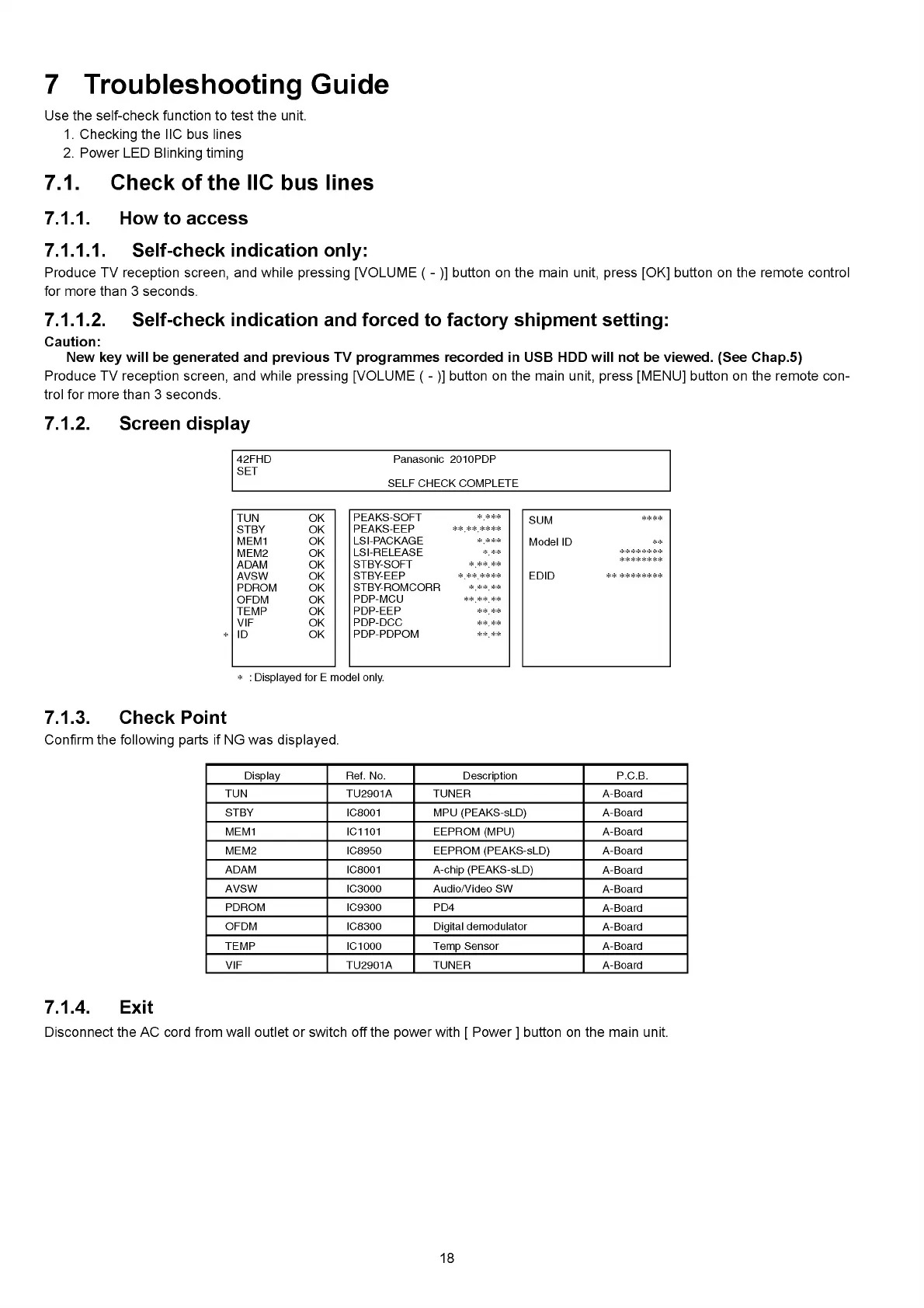
7.1.2. Screen display
42FHD Panasonic 2010PDP
SET
SELF CHECK COMPLETE
PEAKS-SOFT
* _***
PEAKS-EEP
* * * * * * * *
LSI-PACKAGE
*_***
LSI-RELEASE
* **
STBY-SOFT
*****
STBY-EEP
*******
STBY-ROMCORR
*****
PDP-MCU
******
PDP-EEP
**_ **
PDP-DCC
**_ **
PDP-PDPOM
**_ **
SUM
****
Model ID
**
********
* * * * * * * *
EDID
TUN OK
STBY OK
MEM1 OK
MEM2 OK
ADAM OK
AVSW OK
PDROM OK
OFDM OK
TEMP OK
VIF OK
ID OK
* : Displayed for E model only.
7.1.3. Check Point
Confirm the following parts if NG was displayed.
Display Ref. No. Description P.C.B.
TUN TU2901A TUNER A-Board
STBY IC8001 MPU (PEAKS-sLD) A-Board
MEM1 IC1101 EEPROM (MPU) A-Board
MEM2 IC8950 EEPROM (PEAKS-sLD) A-Board
ADAM IC8001 А-chip (PEAKS-sLD)
A-Board
AVSW IC3000 Audio/Video SW
A-Board
PDROM IC9300 PD4
A-Board
OFDM IC8300 Digital demodulator
A-Board
TEMP IC1000 Temp Sensor A-Board
VIF TU2901A TUNER A-Board
7.1.4. Exit
Disconnect the AC cord from wall outlet or switch off the power with [ Power ] button on the main unit.
18







 To Next Page