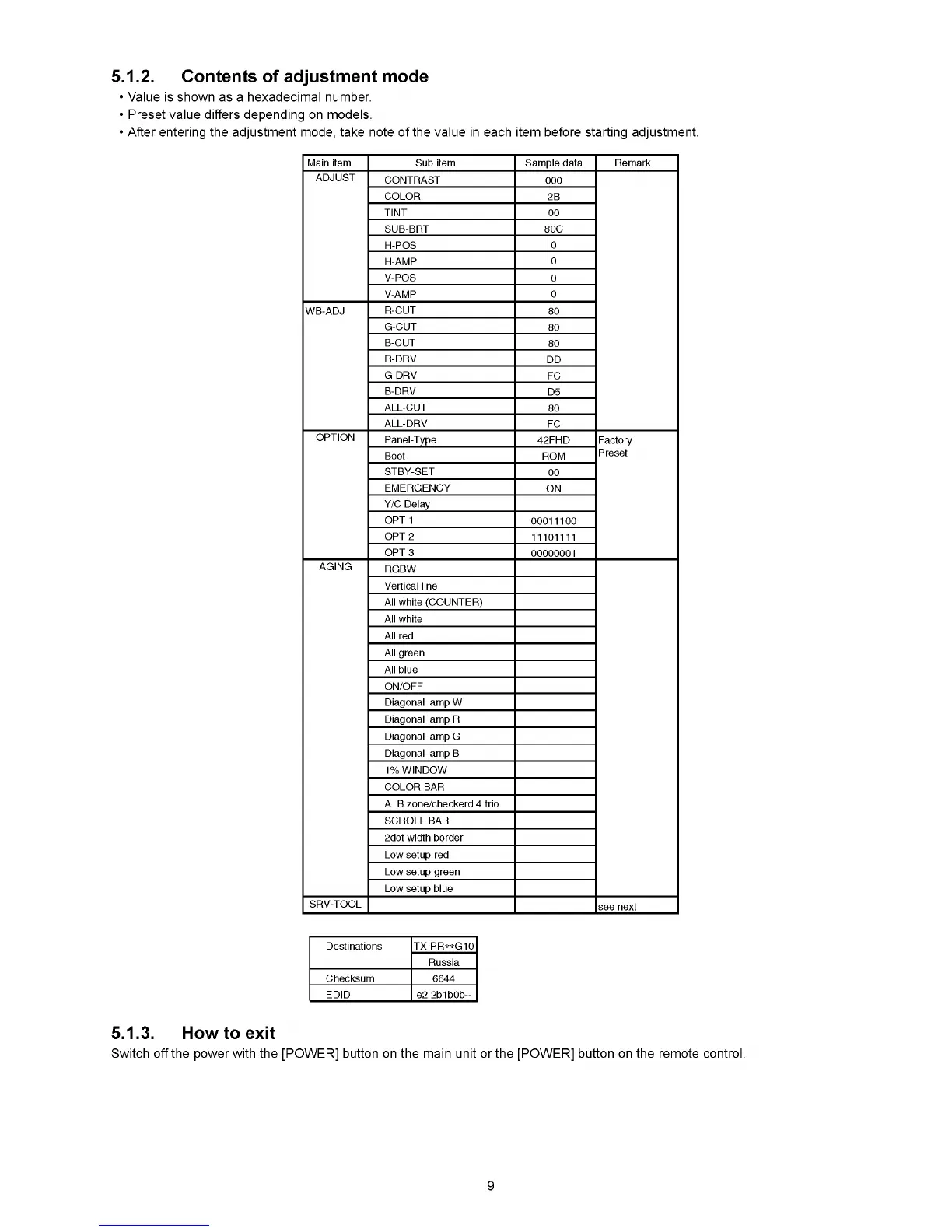
5.1.2. Contents of adjustment mode
• Value is shown as a hexadecimal number.
• Preset value differs depending on models.
• After entering the adjustment mode, take note of the value in each item before starting adjustment.
Main item Sub item Sample data Remark
ADJUST
CONTRAST
000
COLOR
2B
TINT 00
SUB-BRT 80С
H-POS
0
H-AMP
0
V-POS
0
V-AMP
0
WB-ADJ
R-CUT
80
G-CUT
80
B-CUT
80
R-DRV
DD
G-DRV
FC
B-DRV
D5
ALL-CUT
80
ALL-DRV
FC
OPTION
Panel-Type
42FHD Factory
Boot
ROM
Preset
STBY-SET
00
EMERGENCY
ON
Y/С Delay
OPT 1
00011100
OPT 2
11101111
ОРТЗ
00000001
AGING
RGBW
Vertical line
All white (COUNTER)
All white
All red
All green
All blue
ON/OFF
Diagonal lamp W
Diagonal lamp R
Diagonal lamp G
Diagonal lamp В
1% WINDOW
COLOR BAR
A В zone/checkerd 4 trio
SCROLL BAR
2dot width border
Low setup red
Low setup green
Low setup blue
SRV-TOOL
see next
Destinations TX-PR**G10
Russia
Checksum 6644
EDID e2 2b1b0b—
5.1.3. How to exit
Switch off the power with the [POWER] button on the main unit or the [POWER] button on the remote control.
9











 To Next Page