– 190 –
Chapter 11 Network Connection — Preparing for connection
For wireless module other than AJ-WM30/AJ-WM50
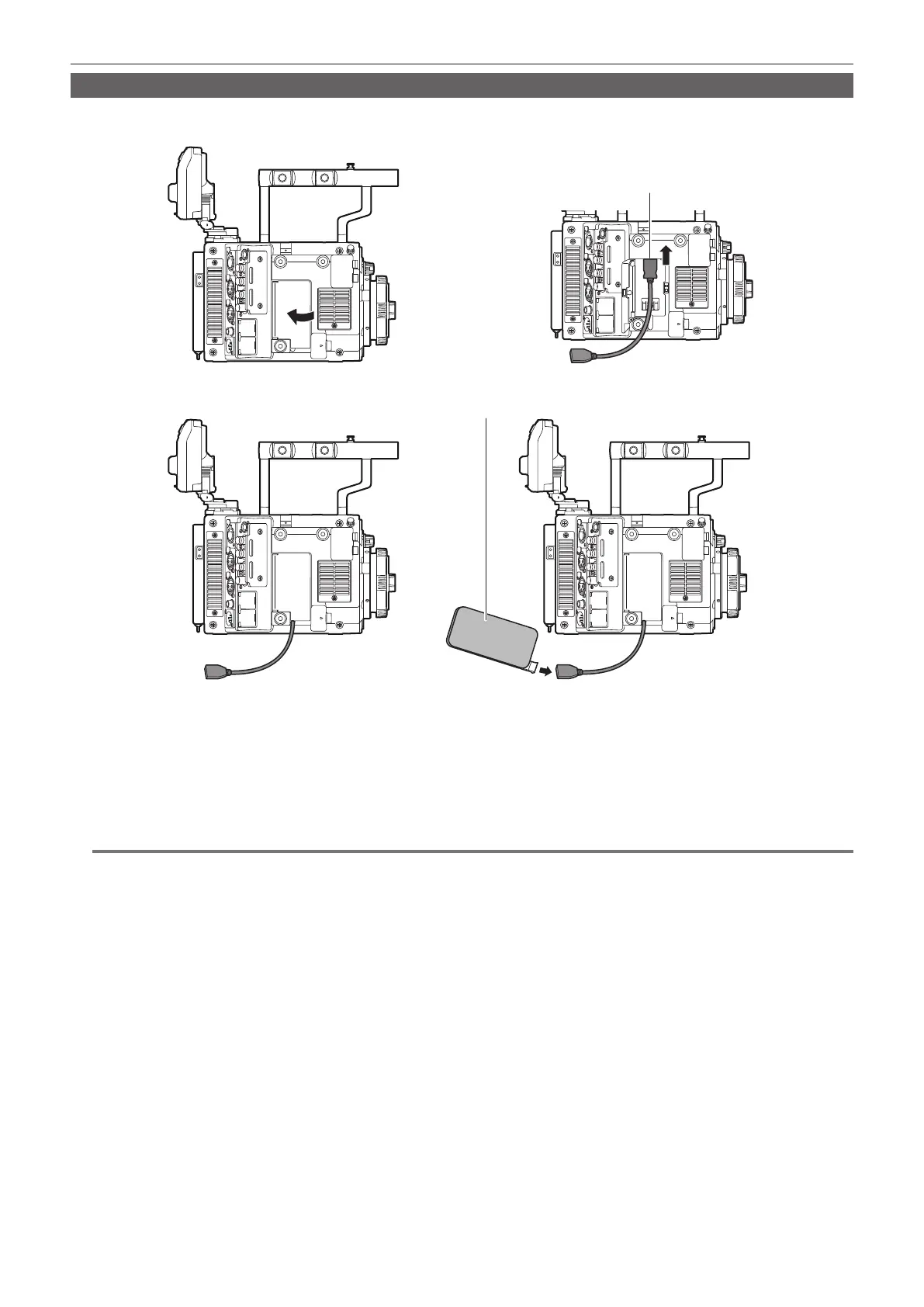
Attach the wireless module other than AJ-WM30/AJ-WM50 (optional) to the camera.
Turn off the power of the camera before connecting or disconnecting the wireless module.
<USB HOST> terminal
Wireless module
Fig. 2
Fig. 3
Fig. 4
Fig. 1
1
Open the cover. (Fig. 1)
2
Attach the USB 2.0 extension cable to the <USB HOST> terminal. (Fig. 2)
3
Close the cover while the USB 2.0 extension cable runs through the groove in the cover. (Fig. 3)
4
Connect the wireless module. (Fig. 4)
@@
NOTE
t For the USB 2.0 extension cable (optional), using a cable of A type male/female, 0.5 m or shorter, and with double shielding process for noise
suppression is recommended.
t For details on wireless modules that can be connected, refer to the support desk at the following website:
http://pro-av.panasonic.net/en/sales_o/p2/server/4glte.html
http://pro-av.panasonic.net/en/sales_o/p2/server/wireless_module.html







 To Next Page