EasyManua.ls Logo

Panasonic WV-BL200 - Page 9

Panasonic WV-BL200
20 pages
Print Icon
To Next Page IconTo Next Page
To Previous Page IconTo Previous Page
Loading...
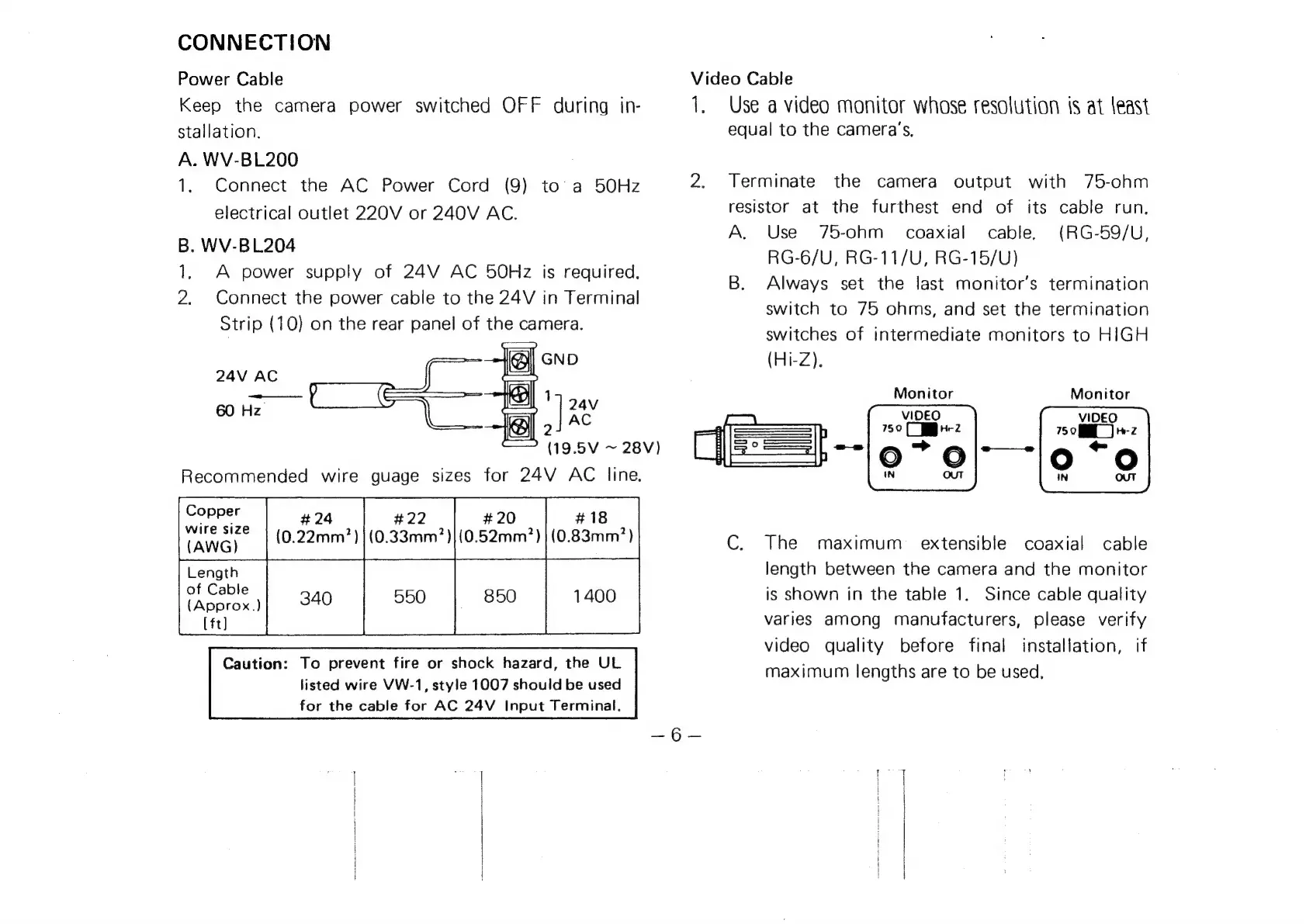
CONNECTION
Power
Cable
Keep
the
camera
power
switched
OFF
during
in-
Sstallation.
A.
WV-BL200
1.
Connect
the
AC
Power
Cord
(9)
to
a
50Hz
electrical
outlet
220V
or
240V
AC.
B.
WV-BL204
1.
A
power
supply
of
24V
AC
50Hz
is
required.
2.
Connect
the
power
cable
to
the
24V
in
Terminal
Strip
(10)
on
the
rear
panel
of
the
camera.
GND
24V
AC
1
24V
60
Hz
|
AC
(19.5V
~
28V)
Recommended
wire
guage
sizes
for
24V
AC
line.
#
24
#22
#
18
(0.22mm7?)
|
(0.33mm?)|(0.52mm?)
|
(0.83mm7?)
1400
Copper
wire
size
(AWG)
Length
of
Cable
{(Approx.)
[ft]
Caution:
To
prevent
fire
or
shock
hazard,
the
UL
listed
wire
VW-1,
style
1007
should
be
used
for
the
cable
for
AC
24V
Input
Terminal.
Video
Cable
Te
Use
a
video
monitor
whose
resolution
{s
at
least
equal
to
the
camera’s.
Terminate
the
camera
output
with
75-ohm
resistor
at
the
furthest
end
of
its
cable
run.
A.
Use
75-ohm
coaxial
cable,
(RG-59/U,
RG-6/U,
RG-11/U,
RG-15/U)
B.
Always
set
the
last
monitor's
termination
switch
to
75
ohms,
and
set
the
termination
switches
of
intermediate
monitors
to
HIGH
(Hi-Z).
Monitor
Monitor
C.
The
maximum
extensible
coaxial
cable
length
between
the
camera
and
the
monitor
is
shown
in
the
table
1.
Since
cable
quality
varies
among
manufacturers,
please
verify
video
quality
before
final
installation,
if
maximum
lengths
are
to
be
used,