EasyManua.ls Logo

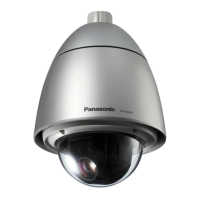
Panasonic WV-SW396 - User Manual

Panasonic WV-SW396
61 pages
Print Icon
To Next Page IconTo Next Page
Loading...
ORDER NO. AVS1102282C0
S02
Network Camera
Model No. WV-SW396,WV-SW396E
SPECIFICATIONS
Panasonic System Networks Co., Ltd.
A l l r i g h t s r e s e r v e d . U n a u t h o r i z e d c o p y i n g a n d
d i s t r i b u t i o n i s a v i o l a t i o n o f l a w .
©
2 0 1 1
The Product with PbF
• Basic
Power source: 24 V AC or PoE+ (IEEE802.3at compliant)
Power consumption:
24 V AC*: 50 Hz/60 Hz: 43 W/1.8 A, PoE+: Approx. 25 W/460 mA (Class 4 device)
* FOR UL LISTED MODEL(S), ONLY CONNECT 24 V AC CLASS 2 POWER SUPPLY.
Ambient operating temperature: –50 °C to +55 °C {–58 °F to +131 °F} (24 V AC)
*1*2
–30 °C to +55 °C {–22 °F to +131 °F} (PoE+)
Ambient operating humidity: Less than 90 % (no condensation)
Monitor output (for adjustment): VBS: 1.0 V [p-p] / 75 , composite (BNC)
External I/O terminals:
ALARM IN 1/ DAY/NIGHT IN/ ALARM IN 2/ ALARM OUT/ ALARM IN 3/ AUX OUT (x1 each)
Microphone/line input: ø3.5 mm monaural mini jack
Input impedance: Approx. 2 k
For microphone input: Applicable microphone: Plug-in power type
Supply voltage: 2.5 V ±0.5 V
For line input: Input level: Approx. –10 dBV
Audio output: ø3.5 mm stereo mini jack (monaural output)
Output impedance: Approx. 600
Line level
Water resistance: IEC60529 (IP66, Against ingress of water with harmful effects powerful jetting)
Heater unit: Turns on automatically when the inside temperature drops below 10 °C {50 °F}.
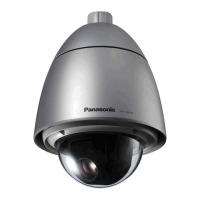
Dimensions:
ø229 mm x 344 (H) mm {ø9-1/32 inches x 13-9/16 inches (H)},
diameter of the dome: 150 mm {5-29/32 inches}
Mass: Main body: Approx. 4.6 kg {10.15 lbs}
Finish: Main body:
Aluminum die cast with glazed melamine coating (Coating color: Natural silver)
Sunshields*
3
: ASA resin coating (Coating color: Natural silver)
Dome section: Clear polycarbonate resin

Other manuals for Panasonic WV-SW396

Questions and Answers

  • K
    Kyle MclaughlinAug 13, 2025
    How to troubleshoot power issues on a Panasonic WV-SW396?
    • M
      Michelle MorganAug 13, 2025
      If the Panasonic Security Camera isn't powering on, first ensure the power cable is securely connected to a power source meeting the necessary specifications. Also, confirm that the housing base is firmly attached to the camera. If using a PoE+ device, verify that it's IEEE802.3at compliant and properly connected with a category 5e or better STP LAN cable. Note that some PoE+ devices might stop power supply if the total power limit is exceeded. Disconnect the power supply from the PoE/PoE+ device if you are using both 24 V AC power and PoE/PoE+.
  • S
    Sharon GeorgeAug 17, 2025
    Why is the live indicator blinking orange on my Panasonic WV-SW396 Security Camera?
    • J
      Jeffery GonzalezAug 17, 2025
      If the live indicator on your Panasonic Security Camera blinks orange every 2 seconds, it could indicate a UPnP error due to the router not being powered. Ensure the router is powered on and the connections are established. If the router doesn't support UPnP, configure port forwarding and disable auto port forwarding on the camera. If the router's UPnP function is disabled, enable it in the router settings.
  • M
    Michelle WallaceAug 21, 2025
    How to fix audio input noise on a Panasonic WV-SW396 Security Camera?
    • M
      Matthew SullivanAug 21, 2025
      If you're experiencing noise in the audio input of your Panasonic Security Camera, check the grounding of the camera, switching hub, and any peripheral devices. Ensure the camera isn't placed near an electrical power line or devices producing strong magnetic fields or radio waves, such as TV/radio antennas, air conditioning motors, or transformers. If the issue persists, consider using a powered microphone or connecting an audio output with low output impedance.
  • G
    gordontimAug 25, 2025
    What does it mean when the live indicator light is red on my Panasonic Security Camera?
    • M
      mbennettAug 26, 2025
      If the live indicator on your Panasonic Security Camera is red, verify that the write protect switch on the SDHC/SD memory card is not set to "LOCK". Also, ensure the SDHC/SD memory card was formatted on the camera. If not, use a card formatted on the camera, or install the appropriate software on your PC to format it. If the card is faulty, replace it with a working one.
  • D
    Diane SmithAug 28, 2025
    How to fix inaccurate preset positions on a Panasonic WV-SW396?
    • J
      Jonathan PetersonAug 28, 2025
      If your Panasonic Security Camera is not moving to the preset positions accurately, you can correct the positions by executing the position refresh function. Also, you can set "Position refresh" for the created schedule, so the camera position will be corrected periodically. If problems persist, reconfigure the preset positions.
  • M
    Monica FigueroaSep 1, 2025
    What to do if Panasonic WV-SW396 stops panning/tilting and makes noise?
    • C
      Christopher MartinSep 1, 2025
      If your Panasonic Security Camera stops panning/tilting and makes mechanical noise, the camera position may have become inaccurate. To resolve this, carry out the refresh position function from the [Default reset] tab of the "Maintenance" page of the setup menu.
  • Y
    Yvonne ClarkSep 5, 2025
    Why does my Panasonic WV-SW396 Security Camera start panning on its own?
    • S
      Steven WhitneySep 5, 2025
      If your Panasonic Security Camera starts panning unpredictably, this may be caused by noise. Check the exogenous noise level around the camera.
  • A
    amy57Sep 9, 2025
    Why is the live indicator not lighting up on my Panasonic WV-SW396 Security Camera?
    • F
      fcunninghamSep 9, 2025
      If the live indicator on your Panasonic Security Camera never lights up, check if "Off" is selected for "Link/Access LED" on the "Basic" page. If so, select "On" or "On(Access)" for the indicator setting.

Summary

PRODUCT SPECIFICATIONS

Product Details

Key specifications for the product, including basic features and operating conditions.

Camera, Lens, and Platform Specs

Detailed specifications for camera sensor, lens optics, and pan/tilt functionality.

Network Interface Specifications

Details on network connectivity, resolutions, compression, and protocols.

SAFETY INFORMATION AND PRECAUTIONS

General Safety Warnings

Critical warnings and cautions for service personnel and product operation.

Component Specific Precautions

Guidelines for lead-free solder and lithium battery handling.

SYSTEM DIAGRAMS AND CONTROLS

Major Operating Controls

Identification and function of external controls, connectors, and indicators.

Wiring and Block Diagrams

Internal wiring connections and overall system functional block diagram.

Schematic Diagrams

Detailed circuit schematics for internal electronic boards.

CIRCUIT BOARD LAYOUTS

Conductor View - Component Side

Component placement layout for various circuit boards.

Conductor View - Pattern Side

Trace layout for various circuit boards.

ASSEMBLY AND PARTS REFERENCE

Exploded Views

Diagrams illustrating disassembly and assembly of major camera units.

Replacement Parts List

Comprehensive list of part numbers for all components, accessories, and packaging.

Panasonic WV-SW396 Specifications

General IconGeneral
IK codeIK10
Form factorDome
WeatherproofYes
Mounting typeCeiling
Product colorSilver
Protection featuresShock resistant, Vandal proof
International Protection (IP) codeIP66
Sensor typeMOS
Number of sensors1
Optical sensor size1/4 \
Bit rate controlConstant Bit Rate (CBR)
Total megapixels1.3 MP
Gain control typeAuto
Maximum resolution1280 x 960 pixels
Video compression formatsH.264, M-JPEG, MPEG4
Analog signal format systemNTSC, PAL
Supported graphics resolutions320 x 180, 320 x 240, 640 x 360, 640 x 480 (VGA), 800 x 600 (SVGA), 1280 x 720 (HD 720), 1280 x 960
Pan range0 - 360 °
Pan speed120 °/sec
White balanceATW, AWC
Pan preset speed400 °/sec
Tilt angle range-15 - 185 °
Camera shutter speed1/10000 - 1/30 s
Minimum illumination0.004 lx
TypeIP security camera
PTZ modesAuto pan, Preset sequence
CertificationUL, C-UL, DOC, CE, FCC
Placement supportedIndoor & outdoor
Connectivity technologyWired
Digital zoom12 x
Optical zoom72 x
Focal length range3.3 - 119 mm
Maximum aperture number22
Minimum aperture number1.4
Closest focusing distance2 m
Audio output channels1 channels
Audio formats supportedG.711, G.726
Built-in HDD-
Compatible memory cardsSD, SDHC
Maximum memory card size32 GB
Mobile operating systems supportedAndroid, iOS 4.2
Windows operating systems supportedWindows 7, Windows 8, Windows 8.1, Windows Vista, Windows XP
Number of users14 user(s)
Streaming methodMulticast, Unicast
Networking standardsIEEE 802.3at
Ethernet interface typeFast Ethernet
Supported network protocolsIPv6 : TCP/IP, UDP/IP, HTTP, HTTPS, RTP, FTP, SMTP, DNS, NTP, SNMP, DHCPv6, ICMP, ARP IPv4 : TCP/IP, UDP/IP, HTTP, HTTPS, RTSP, RTP, RTP/RTCP, FTP, SMTP, DHCP, DNS, DDNS, NTP, SNMP, UPnP, IGMP, ICMP, ARP
AC input voltage24 V
Power source typeAC, PoE
AC input frequency50 - 60 Hz
Power consumption (max)43 W
Power consumption (Power over Ethernet (PoE))24 W
Weight and Dimensions IconWeight and Dimensions
Width229 mm
Height379 mm
Weight4600 g

Related product manuals