20
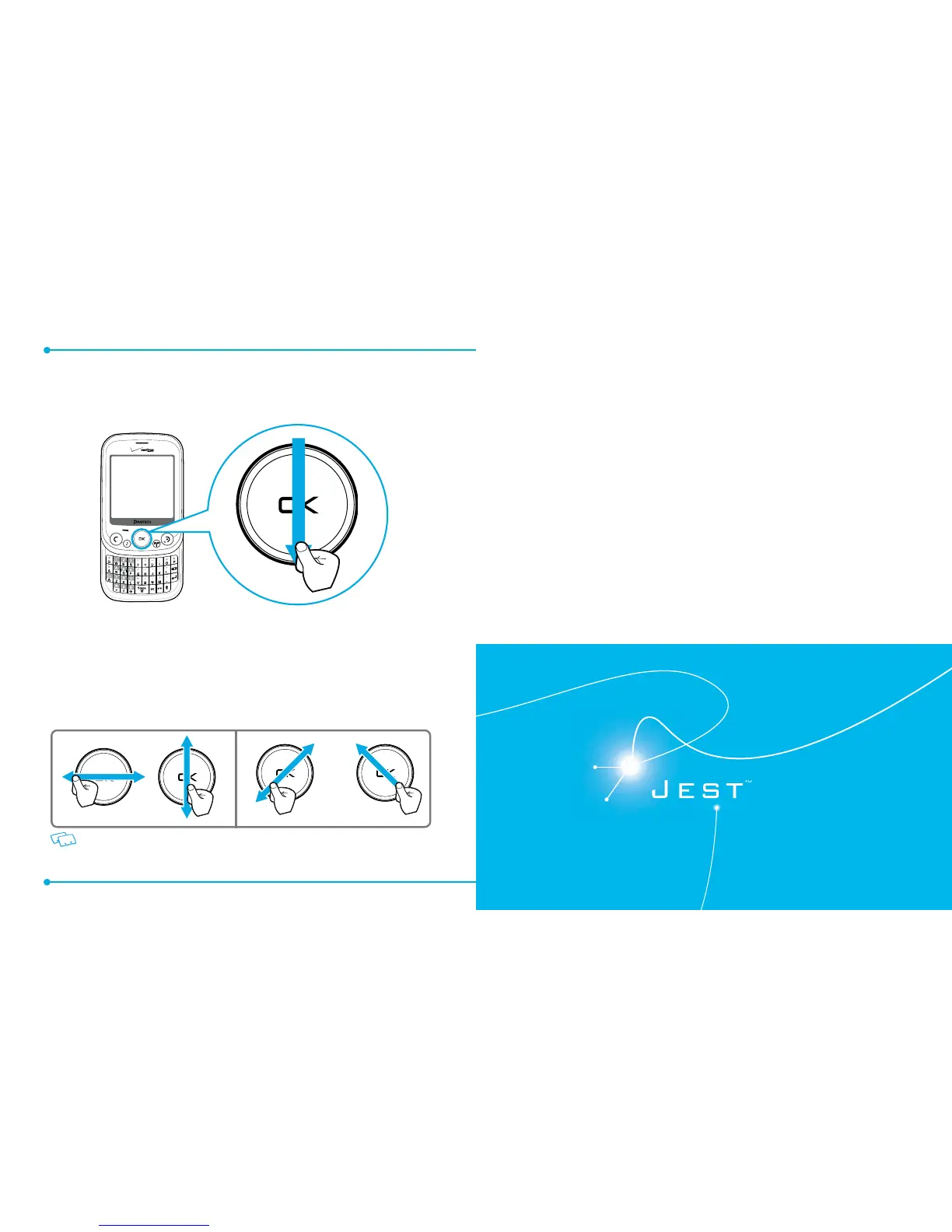
USING THE DIRECTIONAL KEY
Swipe left, right, up or down to scroll through menus or to access shortcuts from
idle mode.
To navigate down, swipe your nger along the OK Key from top to bottom, as
illustrated above.
Swipe
and
Hold
your nger or thumb from the top of the OK Key and holding at
the bottom of the OK Key to scroll down.
Scrolling will only work correctly if you swipe up, down, left or right through the
center of the OK Key.
This advanced Directional Key is provided to improve the usability by reducing
searching time.
Correct Incorrect
2
BASIC OPERATION
Turning the phone on/o
Accessing the menu
Using the Task Bar
Quick switching between the main menus
Menu summary
Making a call
Answering calls
Missed Call notication
Wait/Pause feature
Making an international call
3-way calling
Call waiting function
Calling a number from contacts
Adjusting volume
Caller ID function
Vibrate mode
Speakerphone mode
Using auto keypad lock function
Available options during a call
Making an emergency call
Dialing Letters
This chapter addresses and explains the basic features for
JEST
TM
including:



 To Next Page