12
13
02
03
04
05
06
07
01
13. OK Key:
Allows you to access the menu screen. It also allows you to accept
choices when navigating through a menu.
14. Display Screen:
Displays the digital clock, messages, phone status and
indicator icons.
15. Earpiece:
Allows you to hear the other caller.
16. Task Bar Key:
Press to access the Task Bar menu.
17. [ ] Camera/Video Key:
Press to access the built-in camera. Press and hold to
activate the Video Camera.
18. [ ] Charging/ Data Jack:
Connects the phone to the USB/Wall Charger, or
other compatible accessories.
19. Self-Portrait Mirror:
Displays your reection when taking pictures or videos.
20. External Speaker:
Music, Ringtones and Sounds are played through the
speaker.
21. Wrist Strap Eyelet:
Accessory eyelet (attach optional straps and lanyards -
purchased separately).
22. microSD Card Slot:
Insert a microSD card(sold separately) here to increase
memory capacity.
23. Camera Lens:
The lens of your built-in camera/camcorder.
24. Headset Jack:
Allows you to plug in an optional headset for convenient,
hands-free conversations or for listening to music.
25. [ / ] Volume Keys:
Press to adjust master volume in idle mode, adjust the
earpiece volume during a call or volume when playing music.
26. Speakerphone Key:
Press to turn Speakerphone On or O.
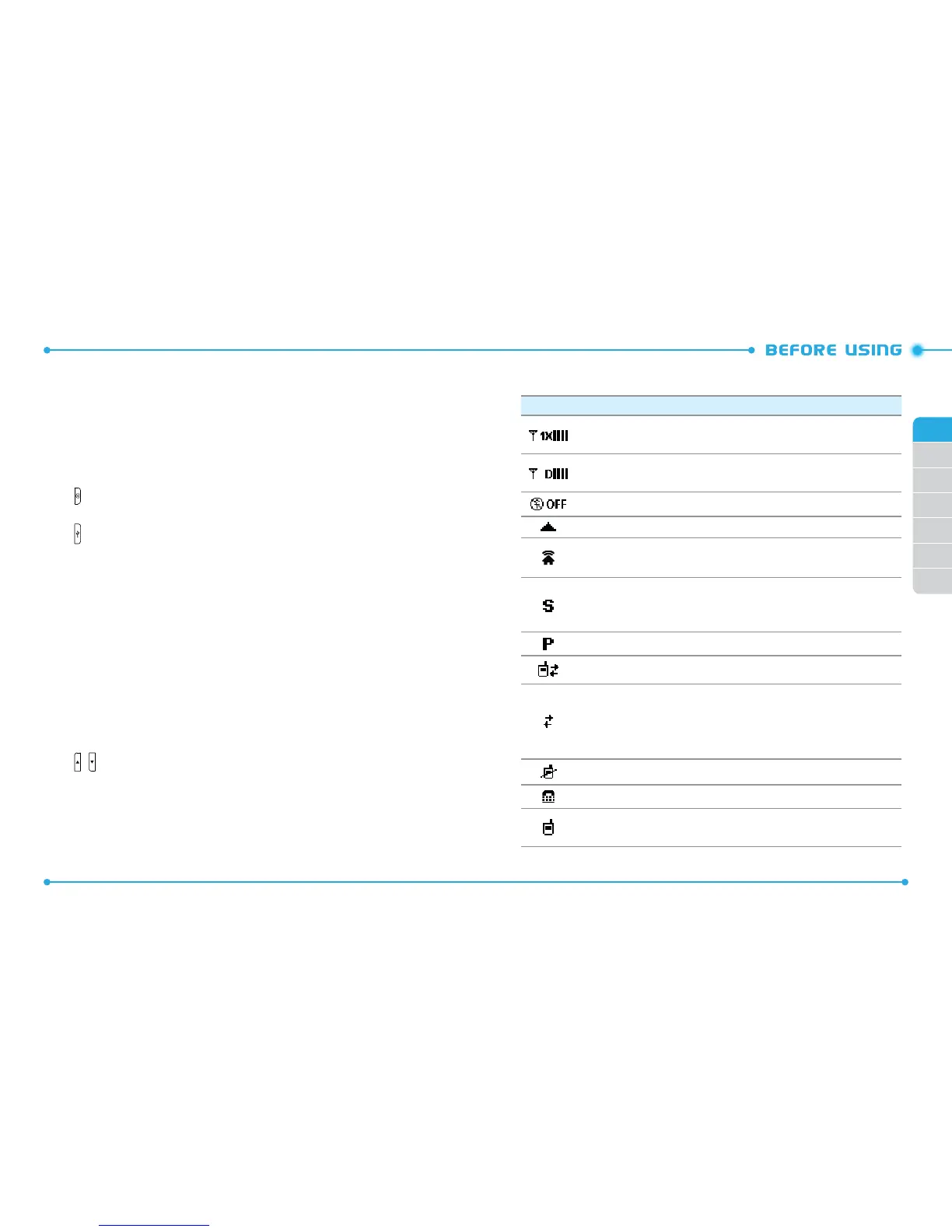
DISPLAY INDICATORS
Icon Icon Descriptions
1X Signal Strength:
Indicates your phone is in the CDMA 1X network.
More bars indicate a stronger signal.
D Signal Strength:
Indicates your phone is receiving digital data. More
bars indicate a stronger signal.
Airplane Mode:
Transmitting and receiving information is restricted.
Roaming: The phone is outside of the home service area.
Femto Cell: Indicates that this area is internet accessed area and you are
available to call without network.
SSL (Secured Socket Layer):
Indicates that secure communication
between client and server has been established during data
communication using encryption.
Voice Privacy:
Indicates Voice Privacy mode is active.
Data Call:
Indicates a Data Session is in progress.
Dormant:
Indicates phone is in a dormant state during a data call. Phone
reverts to Dormant mode when there hasn't been activity on a page for
some time - the connection is still active and you can make and receive
calls.
No Service:
Phone cannot receive signal from the system.
TTY:
TTY mode is active.
Voice Call:
A call is in progress.
* No icon indicates the phone is in idle mode.



 To Next Page