118
119
01
02
03
04
06
07
05
•
Manage My Music:
Allows you to manage your music les with following options:
Erase
/
Lock
/
Unlock
/
Move To Card
/
Move To Phone
•
Music Settings:
Allows you to set following player settings:
Repeat
/
Shue
/
Sound Eects
/
Player Skin
/
Music Only Mode
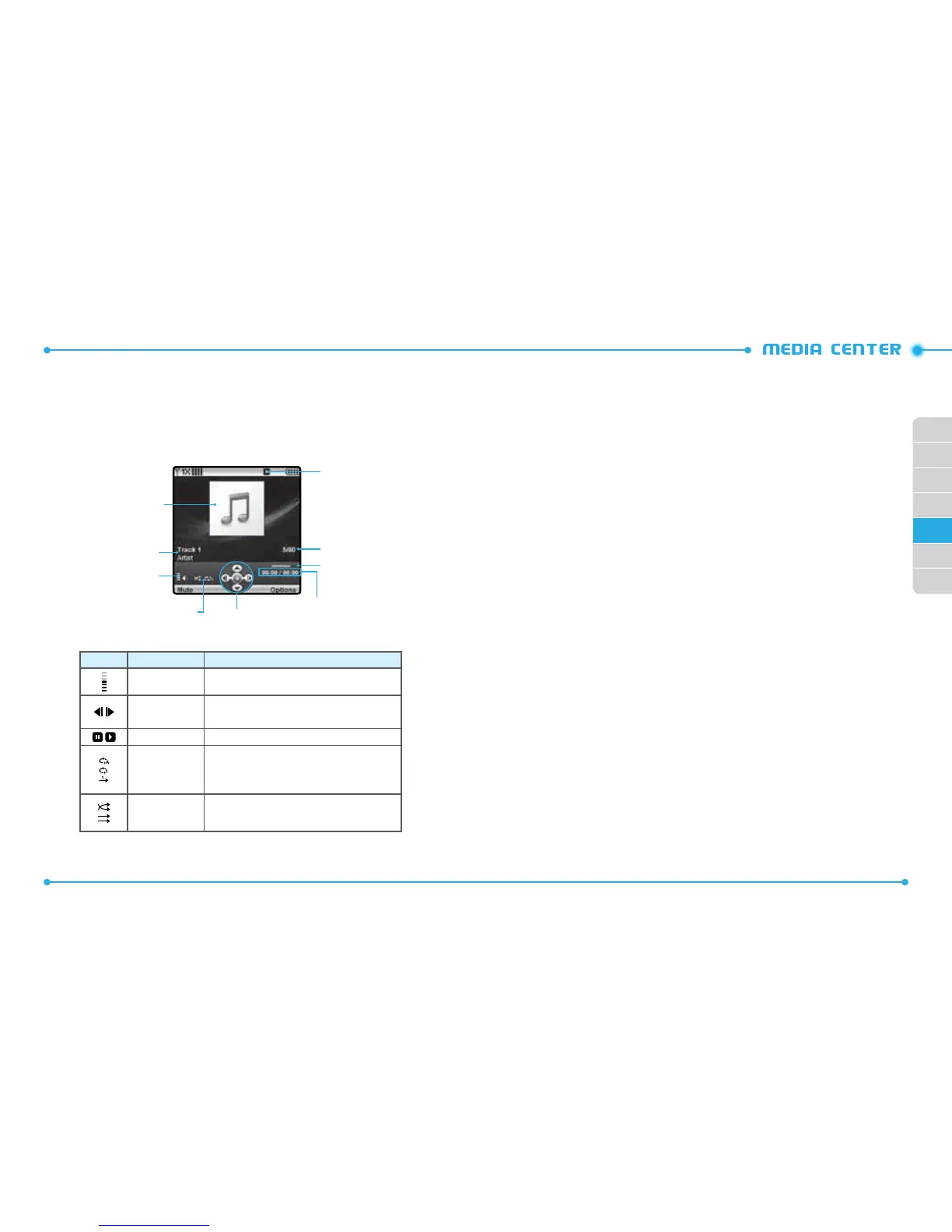
NATIVE MUSIC PLAYER
Icon Name
Descriptions
Volume indicator Indicates current music volume level
Previous / Next
Swipe: Previous, Next
Swipe and Hold: Rewind, Fast Forward
Pause/Play Indicates player’s status
Repeat
Repeat All
Repeat One
Off
Shuffle
On
Off
Album jacket image
Skin & File info
Volume indicator
Repeat / Shuffle
Visual Guide
Elapsed time / Total Time
Progress Bar
Index
Playing Icon
V CAST MUSIC I RHAPSODY ®
V CAST Music with Rhapsody®
— V CAST Music with Rhapsody® is a digital music
service that lets you listen to millions of songs from thousands of artists. Discover
new and old favorites in an extensive music catalog. Download V CAST Music with
Rhapsody® to sync tracks, albums and playlists to your new compatible phone, while
managing your existing PC music library all in one place.
PURCHASE SONGS ON YOUR WIRELESS DEVICE *
When you purchase music from your wireless device, you also get a second
copy that can be downloaded to your PC from the V CAST with Rhapsody®
software.
*Per-song charges apply.
PURCHASE SONGS ON YOUR WIRELESS DEVICE *
• Pentium III 1.0 GHz or higher
• 128 MB RAM
• 380 MB available hard disk space (This is the minimum disk space required
to install the program. Additional disk space is necessary for downloading
music les.)
• Windows Media Player 10
DOWNLOAD MUSIC TO YOUR PC
1. Open V CAST Music with Rhapsody®. Don’t have V CAST Music with
Rhapsody®? Download it for free at www.verizonwireless.com/music.
2. Log in.
3. For each V CAST Music track you’ve downloaded to your phone, you can
download a copy to your computer at no additional charge. Song tracks
available for download will pop-up upon log in completion.
4. Check the boxes of songs you wish to download.
5. Select “Download Tracks”.



 To Next Page