Page 11 paragonconcessions.com
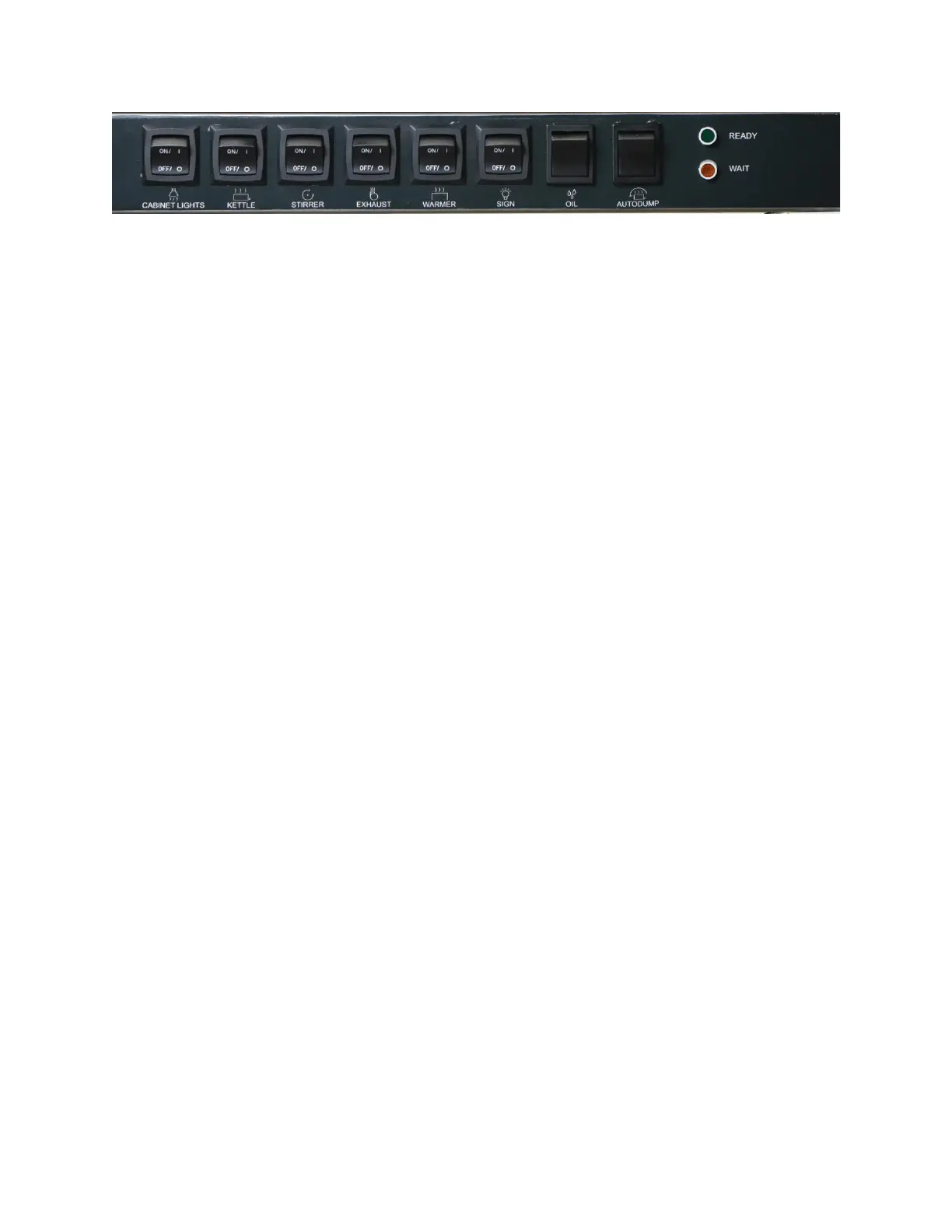
Control Panel for Paragon 32 Ounce Popcorn Machines
Additional Details and Important Notes for Select Controls:
KETTLE:
The kettle switch enables power to the kettle’s heating elements. When in the ON position, the kettle
will heat up to the target popping temperature which is indicated by two LED lights. Those are the green
colored READY light or amber colored WAIT light. Further information about each light and their
meanings are discussed below. If neither the READY or WAIT lights are illuminated and the kettle switch
is in the ON position, please see the kettle portion of the troubleshooting section.
STIRRER:
Activates the motor which evenly distributes kernels with oil, seasoning, and heat to create the best
product possible. For best results, the STIRRER switch MUST be ON when there is popcorn (popped or
un-popped) in the kettle.
WARMER:
The warmer switch controls both the cabinet base heating element and blower. When in the ON
position, both will be active. This creates a warm airflow from the base of the machine into the cabinet
to help keep popped popcorn in the cabinet warm and crisp.
SIGN: (if equipped)
The sign switch ONLY ENABLES power to the LED sign. To turn on the sign, put the sign switch in the ON
position and then use the power button on the remote.
OIL: (if equipped)
The oil switch has three functions that allow control of the BIB oil dispensing system. The three
functions are as follows:
1. Dispense Oil for Set Time: To dispense a saved amount of oil, PRESS and RELEASE the oil switch.
This will activate the timer-controlled BIB pump and dispense oil for the saved amount of time.
To adjust the dispensing time, see the programming portion of the BIB oil system section.
2. Cancel Dispensing: If the BIB oil system is actively pumping oil and needs to be canceled, PRESS
and RELEASE the oil switch. This will immediately stop the BIB pump. NOTE: If canceled, there
may be a slight delay (up to 25 seconds) before the pump can be used to dispense more oil as
the BIB system finishes its timer logic.
3. Dispense Until Switch Released: To dispense oil without a timer, PRESS and HOLD the oil switch.
This will continuously dispense oil until oil switch is released.
AUTODUMP: (if equipped)


 To Next Page