Information Prepare Operate Help Technology
Operating the Check Control
General
74
11. Operating the Check Control
11.1 Navigation in the menu structure
The Check Control is the communication element for the
driving system. Operator and service technicians can use the
SEL push buttons to call up the basic information of the driving
system after the system has been started.
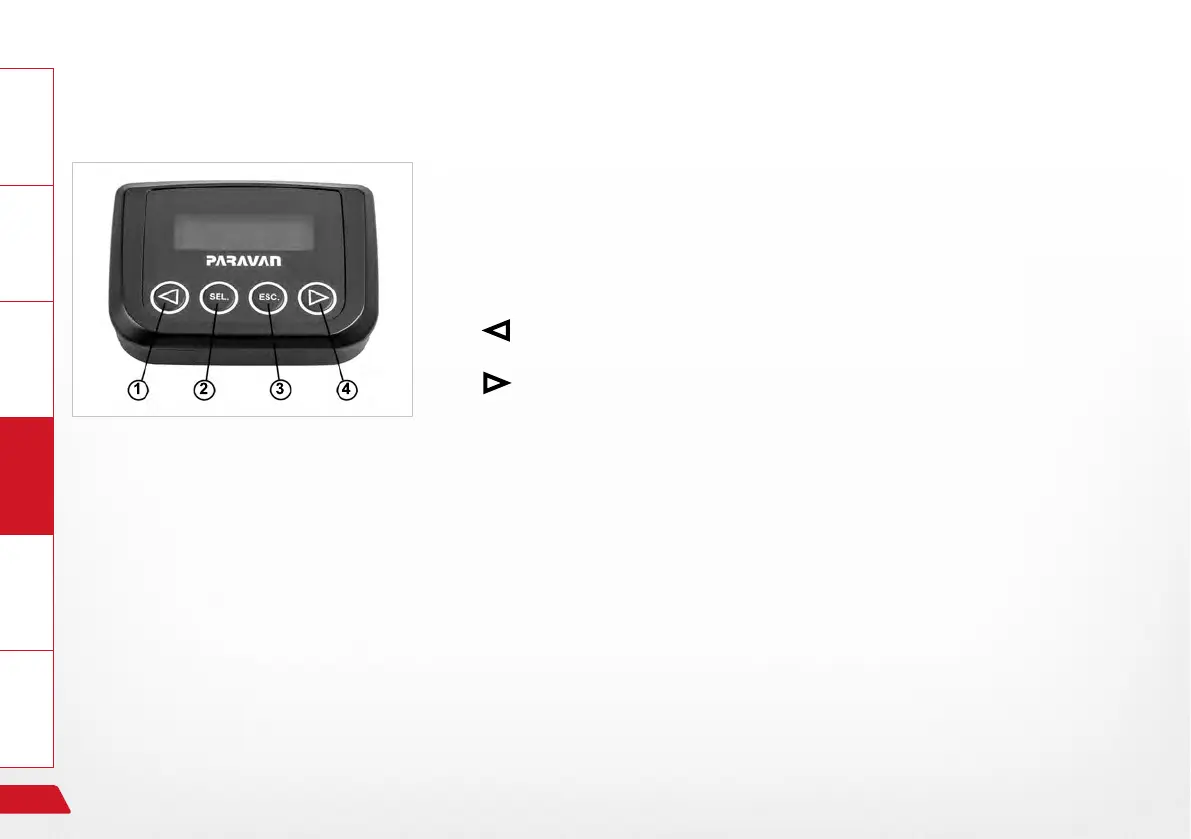
Operating panel of the Check Control:
›
Scroll backwards in the menu or change parameter (smaller).
›
Scroll forwards in the menu or change parameter (larger).
› SEL.
-> The menu entry shown on the display is selected.
-> The function of the displayed menu entry is executed.
-> Input into Check Control is conrmed/stored.
› ESC.
-> Leave the menu selected.
-> Jump back to the previous menu.
See Section "11.1.1 Menu structure Check Control"
Fig. 21: Operating panel Check Control


 To Next Page