EasyManua.ls Logo

Parkside PPSK 40 B2 - User Manual

Parkside PPSK 40 B2
45 pages
Go to English
Print Icon
To Next Page IconTo Next Page
Loading...
DE
IAN 418546_2210
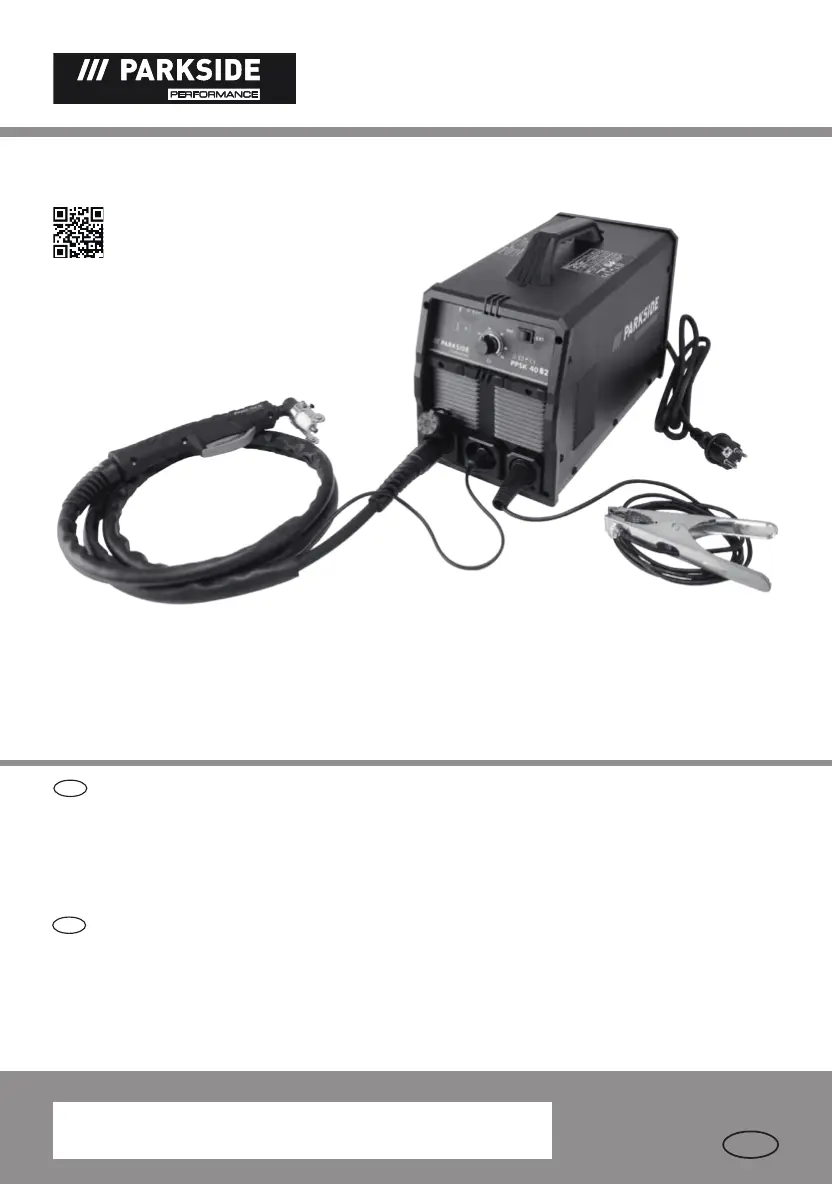
PLASMA CUTTER WITH
INTEGRATED COMPRESSOR
PLASMASCHNEIDER
MIT KOMPRESSOR
Operation and Safety Notes
Translation of the original instructions
Bedienungs- und Sicherheitshinweise
Originalbetriebsanleitung
GB
DE
PLASMASCHNEIDER MIT KOMPRESSOR PPSK 40 B2
PLASMA CUTTER WITH INTEGRATED COMPRESSOR PPSK 40 B2

Table of Contents

Questions and Answers

  • T
    Travis HenryAug 19, 2025
    What to do if the arc stops during cutting with Parkside Welding System?
    • D
      Donald ChristianAug 19, 2025
      If the arc stops during cutting with your Parkside Welding System, it might be due to several reasons. The cutting speed might be too low, so try increasing it. The plasma burner might be too high or far from the material; lower it to the recommended height. Also, check for worn plasma burner parts and replace them if necessary. Finally, ensure the workpiece is properly connected to the earthing cable.
  • J
    Jeanne BrownAug 21, 2025
    Why is there insufficient penetration with my Parkside PPSK 40 B2 Welding System?
    • H
      Harry KingAug 21, 2025
      If you're experiencing insufficient penetration with your Parkside Welding System, several factors could be at play. Check if your cutting speed is too fast and slow it down. Ensure the burner sleeve is straight; adjust the inclination if it's not. If the metal is too thick, multiple cycles may be needed. Also, inspect the plasma burner components for wear and replace them as necessary.
  • C
    Chris BrownAug 23, 2025
    Why do consumables wear quickly on my Parkside PPSK 40 B2 Welding System?
    • J
      James PetersonAug 25, 2025
      If consumables are wearing quickly on your Parkside Welding System, it could be due to several reasons. The performance might be overstretched because the material is too thick, increase the angle to avoid material from being blown back into the tip. Avoid controlling the arc for more than 5 seconds. Check the plasma burner assembly, start with contact between the burner sleeve and metal or with a 3 mm distance to the metal. Also, ensure sufficient air supply and that the pressure is 4–4.5 bar by checking the performance of the external air compressor. A faulty air compressor could also be the cause; check its performance to ensure the pressure is 4–4.5 bar.
  • J
    Jonathan HowardAug 26, 2025
    How to prevent slag formation on interfaces with Parkside PPSK 40 B2?
    • C
      Caitlin OrtizAug 26, 2025
      Slag formation on interfaces when using your Parkside Welding System can occur for a few reasons. The tool or material may be generating excessive heat; allow it to cool before continuing. If the cutting speed is too low or the current is too high, adjust them until the slag is minimized. Also, inspect the plasma burner components for wear and replace them as needed.
  • X
    xlittleAug 28, 2025
    Why do sparks fly upwards when using Parkside PPSK 40 B2?
    • N
      nicole69Aug 28, 2025
      If sparks are flying upwards instead of down through the material when using your Parkside Welding System, it indicates that the plasma beam isn't penetrating the material. Increase the current. If the burner sleeve is too far from the material, reduce the gap. Ensure the material is properly earthed. Also, reduce the lifting speed if it's too quick.
  • M
    Monica JohnsonAug 30, 2025
    What to do if the plasma burner 8 is not ready for operation on Parkside Welding System?
    • M
      Matthew PierceAug 30, 2025
      If the plasma burner on your Parkside Welding System isn't ready for operation, make sure the current switch is turned on. Check that the air supply isn't restricted. Also, verify that the workpiece is properly connected to the earthing terminal.
  • J
    Jennifer GreenSep 1, 2025
    Why does the warning lamp switch on for Parkside PPSK 40 B2?
    • J
      Jonathan HicksSep 1, 2025
      If the warning lamp on your Parkside Welding System is illuminated, it could be due to overheating protection being activated; allow the device to cool down. Alternatively, the input voltage might be too high; ensure it matches the specifications on the type plate.
  • M
    Michael BirdSep 4, 2025
    What to do if there is no output current from Parkside PPSK 40 B2 Welding System?
    • A
      ariassamanthaSep 4, 2025
      If there's no output current from your Parkside Welding System, the machine might be faulty and require repair. Another possibility is that the overvoltage protection has been activated; allow the device to cool down.
  • E
    Edward QuinnSep 6, 2025
    Why is the ignition bad on my Parkside Welding System?
    • T
      Tamara BlairSep 6, 2025
      If you're experiencing bad ignition with your Parkside Welding System, it could be due to damaged or worn burner wear parts. Replace the wear parts.
  • B
    Beth BeckerSep 8, 2025
    Why doesn't the output current decrease on my Parkside PPSK 40 B2?
    • J
      Jennifer RussellSep 8, 2025
      If the output current on your Parkside Welding System doesn't decrease, the input voltage might be too low; check the type plate for the correct voltage. Also, the connection cable cross-section might be too small; refer to the type plate for the correct input voltage.

Summary

Introduction and Scope

Parts Description

Technical Specifications

Safety Instructions

Electrical Safety

Details risks of electric shock, proper handling of cables, and grounding.

Hazards During Plasma Cutting

Addresses dangers from smoke, sparks, arc beams, and electromagnetic fields.

Welding Mask Safety

Specific safety advice for using welding masks and protective screens.

Operational Safety and Precautions

Plasma Cutting in Tight Spaces

Guidelines and precautions for cutting in confined or hazardous spaces.

Protection Against Rays and Burns

Instructions for protecting eyes and skin from arc rays and burns.

Protective Clothing

Specifies required protective clothing and face protection for safe operation.

Setup and General Information

Installation Environment

Requirements for a safe and suitable working environment for the device.

Setup and Connections

Device Operation

Troubleshooting

Maintenance and Disposal

Parkside PPSK 40 B2 Specifications

General IconGeneral
Welding rod diameter1.6 - 4.0 mm
Input voltage230 V
Protection classIP21S
Electrode Diameter1.6 - 4.0 mm
Electrode holderIncluded

Related product manuals