EasyManua.ls Logo

Parkside PPS 40 B2 - User Manual

Parkside PPS 40 B2
49 pages
Print Icon
To Next Page IconTo Next Page
Loading...
IAN 327358_1904
NIIE
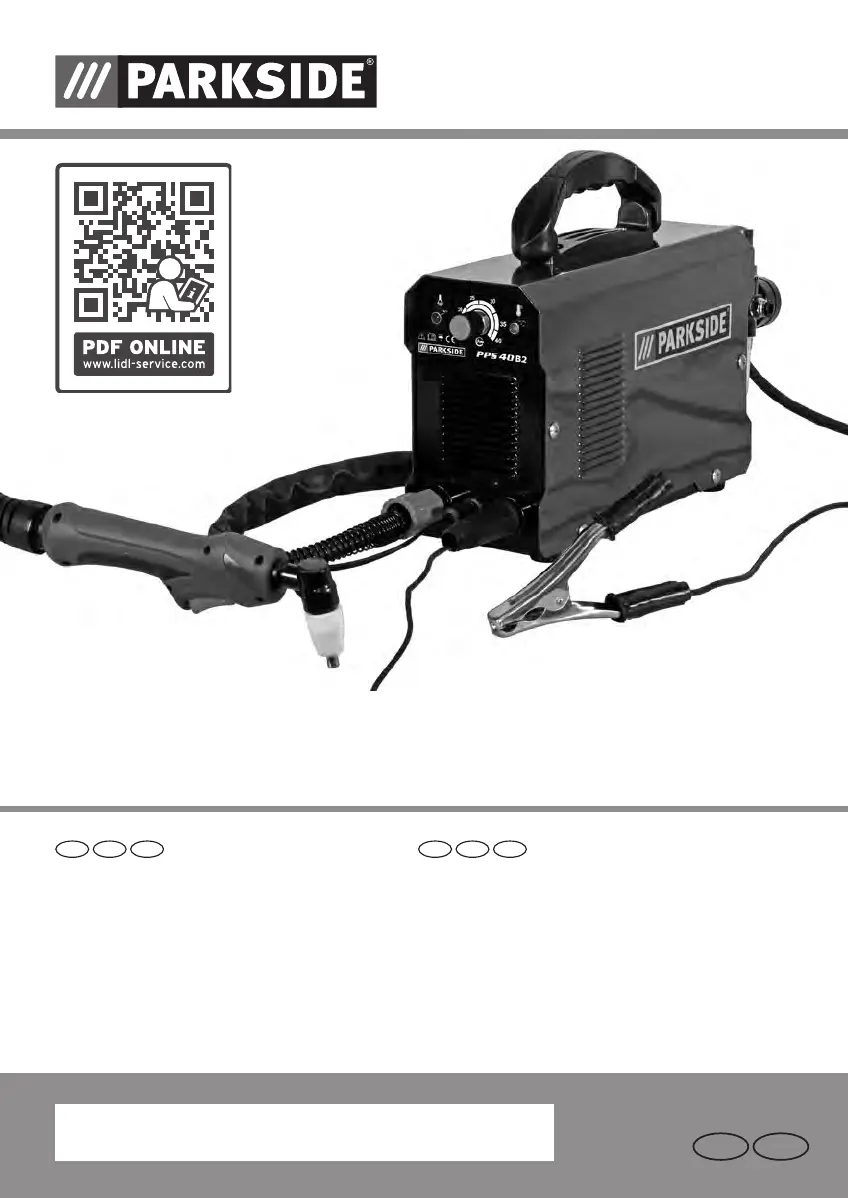
PLASMA CUTTER PLASMASCHNEIDER
Operation and Safety Notes
Translation of the original instructions
Bedienungs- und Sicherheitshinweise
Originalbetriebsanleitung
DE
GB
ATIE CHNI
PLASMA CUTTER PPS 40 B2
327358_Plasmaschneider_PPS_40_B2_cover_LB6_IE_NI.indd 3 06.09.2019 13:05:26

Other manuals for Parkside PPS 40 B2

Questions and Answers

  • T
    troybradyAug 19, 2025
    What to do if sparks fly upwards instead of down through the material with Parkside PPS 40 B2 Welding System?
    • D
      Donald HarrisAug 19, 2025
      If sparks fly upwards instead of down through the material, it could be due to several reasons: * The burner sleeve doesn't penetrate the material: Increase the current. * The burner sleeve is too far from the material: Reduce the distance. * Improper grounding: Check the connection for correct grounding. * Lifting speed is too quick: Reduce the speed.
  • S
    Scott WilsonAug 21, 2025
    Why is my Parkside PPS 40 B2 Welding System plasma burner 8 not ready for operation?
    • K
      Katherine HillAug 21, 2025
      The plasma burner might not be ready for operation due to a few reasons: * The current switch is off: Switch it to “on”. * Air transmission is restricted: Check the air supply. * The workpiece isn't connected to the ground terminal: Check the connections.
  • J
    Jerry LevineAug 23, 2025
    What to do if the arc stops during cutting with Parkside Welding System?
    • H
      herreracharlesAug 25, 2025
      If the arc stops during cutting, consider these potential causes: * Cutting speed is too low: Increase the cutting speed. * The plasma burner is too high or far from the material: Lower the burner to the recommended height. * Worn plasma burner parts: Check and replace parts 8b, 8c, 8d, and 8e. * The workpiece is disconnected from the grounding cable: Check the connections.
  • Q
    qwilsonAug 26, 2025
    Why do I have slag formation on interfaces with my Parkside PPS 40 B2 Welding System?
    • E
      Emma SolisAug 26, 2025
      Slag formation on interfaces can occur because: * The tool/material creates heat: Allow the material to cool down before continuing. * The cutting speed is too low or the current is too high: Increase the speed and/or reduce the current until the slag is minimized. * Plasma burner components are worn: Check and replace worn parts 8b, 8c, 8d, 8e.
  • W
    weavermargaretAug 28, 2025
    What causes bad ignition in Parkside PPS 40 B2 Welding System and how to fix it?
    • B
      Bradley GouldAug 28, 2025
      Bad ignition can be caused by: * Damaged or worn burner wear parts: Change the wear parts. * Issues with the HF spark gap: Set the spark gap.
  • M
    Michael AdamsAug 30, 2025
    What to do if I have insufficient penetration with Parkside Welding System?
    • K
      kelly59Aug 30, 2025
      Insufficient penetration can occur due to: * Cutting speed being too fast: Slow down the working speed. * The burner sleeve not being straight: Adjust the inclination. * Metal being too thick: Several cycles may be necessary. * Worn plasma burner parts: Check and replace parts 8b, 8c, 8d, and 8e.
  • W
    wardjonathanSep 1, 2025
    Why do consumables wear quickly on my Parkside Welding System?
    • R
      Rebecca ShawSep 1, 2025
      Quick wear of consumables can happen due to: * Over-stretched performance: The material is too thick, increase the angle to avoid material from being blown back into the tip. * Exceeded arc control time: Do not control the arc for more than 5 seconds. * Incorrect plasma burner assembly: Ensure correct assembly, starting with contact between the burner sleeve and metal or with a 3.2 mm distance. * Insufficient air supply: Check the air filter and increase the air pressure. * Faulty air compressor: Check the performance and ensure the inlet pressure is at least 100 PSI (6.8 bar).
  • D
    Deanna LyonsSep 3, 2025
    What to do if the indicator lamp does not light up on Parkside PPS 40 B2 Welding System?
    • S
      strevinoSep 3, 2025
      If the indicator lamp isn't lighting up, it could be due to: * No electrical connection: Check if the device is connected to the socket. * ON/OFF switch set to off: Set the switch to ON.
  • S
    sharon20Sep 5, 2025
    What to do if I get an initial cut but not completely drilled through with my Parkside Welding System?
    • L
      Laura HarperSep 5, 2025
      If you get an initial cut but not completely drilled through, it may indicate a potential connection problem. Check all connections.
  • M
    Margaret JohnsonSep 7, 2025
    Why is the ventilator not working on my Parkside PPS 40 B2 Welding System?
    • L
      Leonard HolmesSep 7, 2025
      If the ventilator is not working, it may be due to an interrupted power line. Check whether the device is connected to the socket.

Summary

Introduction

Intended Use

Defines the device's purpose and limitations for safe operation.

Safety Instructions

Protective Clothing and Gear

Recommendations for appropriate personal protective equipment (PPE) for safe operation.

General Plasma Explanations

Before Use

Crucial preparation steps and checks before operating the plasma cutter.

Using the Device

Operation

Step-by-step instructions for powering on and operating the plasma cutter.

Troubleshooting

Maintenance and Care

Warranty and Service Information

Warranty Period and Statutory Claims for Defects

Details the warranty duration and statutory rights for product defects.

Parkside PPS 40 B2 Specifications

General IconGeneral
BrandParkside
ModelPPS 40 B2
CategoryWelding System
LanguageEnglish

Related product manuals