EasyManua.ls Logo

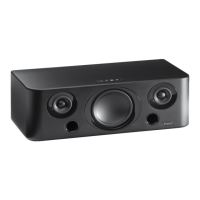
Parrot BOOMBOX - User Manual

Parrot BOOMBOX
56 pages
Print Icon
To Next Page IconTo Next Page
Loading...
60W
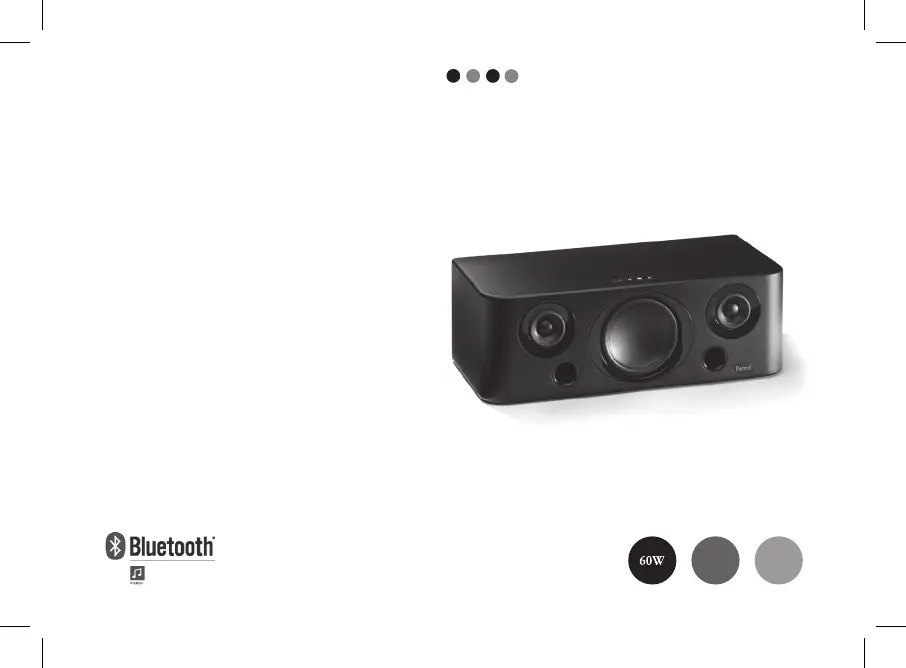
USER MANUAL
Parrot
BOOMBOX
HIFI WIRELESS
SOUND BOX
FOR BLUETOOTH
®
ENABLED
MOBILE PHONES, SMARTPHONES, PDA,
DIGITAL AUDIO PLAYERS AND COMPUTERS
FR
EN
ARA
Compatible
PC
Compatible
Mobile
TUR

Table of Contents

Other manuals for Parrot BOOMBOX

Questions and Answers

  • F
    Frank WilsonAug 12, 2025
    How to fix no sound on my Parrot BOOMBOX Speakers?
    • C
      Connor SmithAug 12, 2025
      If no sound is coming through your Parrot Speakers, ensure the device is properly connected. Also, verify that your device supports the Bluetooth A2DP profile and the source role.
  • R
    Rebecca PhillipsAug 15, 2025
    Why is there no sound when using a Cinch cable with my Parrot BOOMBOX Speakers?
    • S
      Sandra ObrienAug 16, 2025
      If you're not getting sound when using a Cinch audio cable with your Parrot Speakers, first, check that the Cinch audio cable is properly plugged into both the Parrot BOOMBOX and your audio player. Also, a Bluetooth connection will take priority over the Cinch connection, so ensure there is no active Bluetooth connection with another audio player.
  • D
    Danny JonesAug 20, 2025
    What to do if there is no sound from Parrot Stereo System when using PC as Bluetooth audio player?
    • M
      Michael MillerAug 20, 2025
      If you're using your PC as a Bluetooth audio player and there's no sound from your Parrot BOOMBOX, check that the «Sound playback» option is set to «High- quality Bluetooth Audio». This option can be found by navigating to Start/Settings/Control panel/Sound and Audio Devices/ Audio on your computer.
  • A
    Anthony RamseyAug 25, 2025
    What to do if Cinch audio cable has no sound on Parrot Stereo System?
    • S
      Scott GutierrezAug 25, 2025
      If you've connected your audio player with a Cinch audio cable but are getting no sound, first check that the Cinch audio cable is properly plugged into both the Parrot BOOMBOX and your audio player. Also, be aware that a Bluetooth connection will take priority over the Cinch connection, so ensure there is no active Bluetooth connection with another audio player.
  • M
    Mary SparksAug 27, 2025
    Why does my Parrot Stereo System make noise with Cinch cable?
    • B
      Brandon CurryAug 27, 2025
      If your Parrot BOOMBOX makes a noise when you use a Cinch audio cable, check that the Cinch audio cable is properly plugged in to the Parrot BOOMBOX and audio player.
  • A
    Andrew MooreAug 31, 2025
    What to do if Parrot Stereo System sound is not synchronized with the image?
    • M
      Michael MercerAug 31, 2025
      To address sound synchronization issues with video playback on your Parrot BOOMBOX, use the Parrot Audio Configuration Tool to ensure your system’s audio delay is correctly configured for this type of use.
  • M
    Melanie CombsSep 4, 2025
    What to do if I cannot connect my audio player to Parrot BOOMBOX?
    • A
      Ashley BarajasSep 4, 2025
      If you can't connect your audio player to the Parrot Speakers, hold down the Configuration button on the Parrot BOOMBOX for two seconds, then restart the search and connect.
  • A
    Andrea HallSep 7, 2025
    How to fix audio sync issues on Parrot BOOMBOX Speakers?
    • V
      vanessayoungSep 8, 2025
      If the sound from your Parrot Speakers is not synchronized with the image when watching a video, use the Parrot Audio Configuration Tool to check that your system’s audio delay is correctly configured for this type of use.

Summary

Safety Information

FCC Compliance Statement

Statement on compliance with FCC rules, subject to specific conditions.

Declaration of Conformity

Declaration of conformity with Radio Equipment and Telecommunication Equipment directive.

Correct Disposal of Product

Guidance for proper disposal of electrical and electronic equipment.

Protection and Personal Safety

Instructions for safe setup and operation to prevent hazards.

General Precautions

Precautions regarding temperature, humidity, and placement.

General Information

Copyrights

Legal notice regarding reproduction and storage of the manual.

Registered Trademarks

Information about trademarks mentioned in the document.

Modifications

Disclaimer about potential changes to product design or guide.

Licenses

Introduction

Warning: Wireless Technology

Kit Contents

Using the Parrot BOOMBOX

Mobile Streaming Audio

How to stream audio from mobile devices to the Parrot BOOMBOX.

PC Streaming Audio

How to stream audio from a computer to the Parrot BOOMBOX.

Compatibility

Mobile Device Compatibility

Details on compatible mobile devices for audio streaming.

PC Compatibility

Details on compatible PCs and peripherals for audio streaming.

Non-Bluetooth Device Support

Using non-Bluetooth devices with adapters or cables.

Parrot Audio Configuration Tool Software

First Time Setup

Device Placement and Installation

Instructions for physical placement and setup of the device.

Bluetooth Audio Player Usage

Bluetooth Pairing Procedure

Steps to pair your audio player with the Parrot BOOMBOX via Bluetooth.

Multiple Bluetooth Player Usage

Audio Cable Connection

Power Saving Mode

Audio Streaming Guide

Bluetooth Streaming Connection

How to establish a Bluetooth connection for audio streaming.

Audio Volume Adjustment

Playback Control Features

Audio Configuration Software

Software Configuration Options

Details on the application's functions for audio settings and device management.

Wireless Software Updates

Product Troubleshooting

Troubleshooting No Sound

Solutions for when no sound is coming through the BOOMBOX.

Troubleshooting Connection

Solutions for when audio player cannot connect to the BOOMBOX.

Troubleshooting Cinch Cable

Troubleshooting audio issues with a Cinch audio cable connection.

Troubleshooting PC Bluetooth

Solutions for no sound when using PC via Bluetooth.

Troubleshooting Video Sync

Solutions for audio delay when watching videos.

Customer Support Hotline

Product Technical Specifications

Parrot BOOMBOX Specifications

Audio Specifications IconAudio Specifications
built-in stereo audio amplifier power60W
frequency range80Hz – 20kHz
class D audio amplifier typedigital input
Memory IconMemory
flash memory32Mbit
SDRAM64Mbit
32-bit digital sound processingpresent
Power IconPower
power supply voltage110/220V
automatic voltage selectorpresent
power supply typeautomatic
Physical Dimensions IconPhysical Dimensions
dimensions430 x 225 x 150 mm
woofer and widebands3 drivers
removable speaker coverspresent

Related product manuals