EasyManua.ls Logo

Parrot TRAVIS - Description of the Control Screen; Flat Trim; Take off

Parrot TRAVIS
22 pages
Print Icon
To Next Page IconTo Next Page
To Previous Page IconTo Previous Page
Loading...
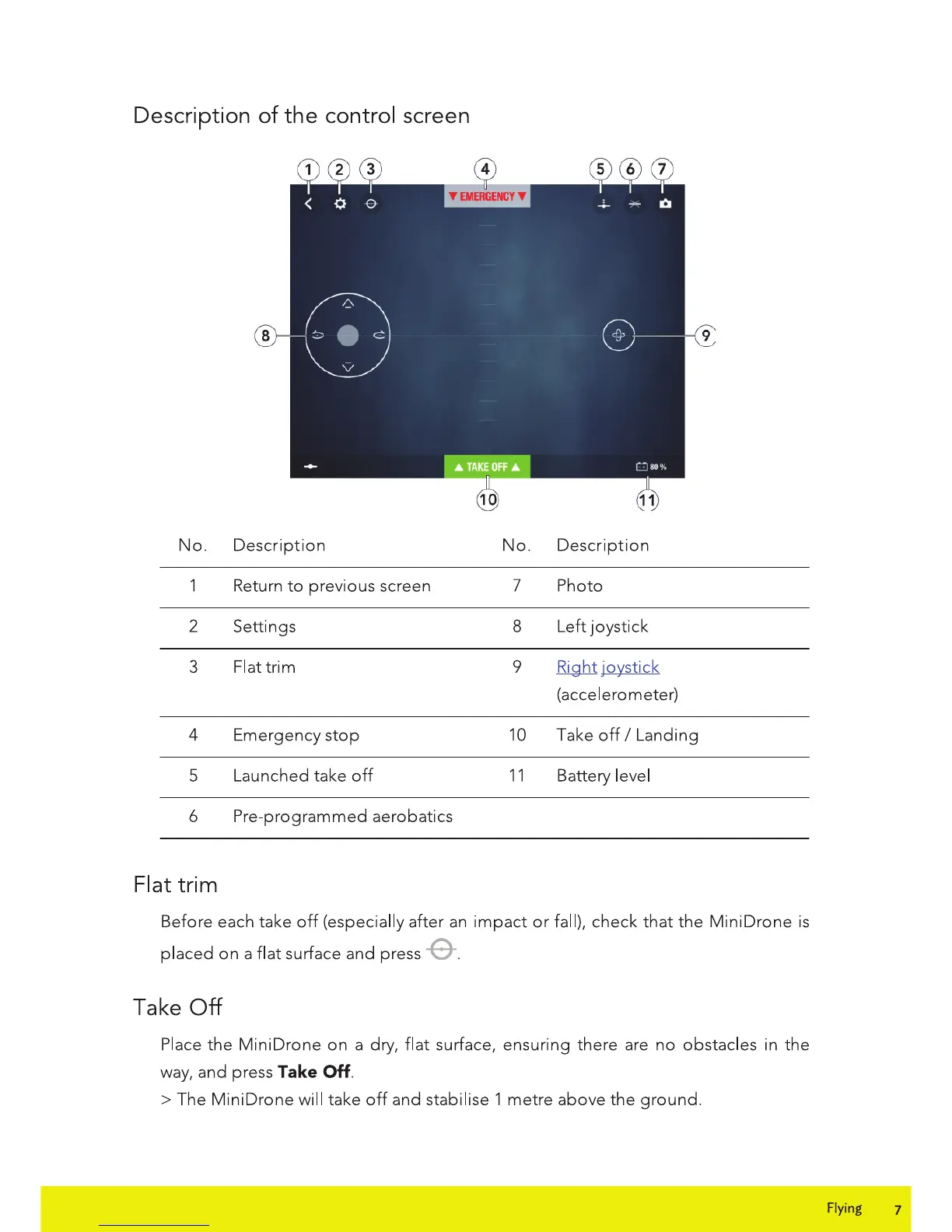
Description
of
the
control screen
No.
Description
1 Return
to
previous screen
2 Settings
3
Flattrim
4 Emergency
stop
5 Launched take
off
6 Pre-programmed aerobatics
Flat
trim
No.
Description
7 Photo
8 Left joystick
9
Right joystick
(accelerometer)
10 Take
off
I Landing
11
Battery level
Before each take
off
(especially after
an
impact
or
fall), check
that
the
Mini Drone
is
placed on a flat surface and press -6-.
Take
Off
Place the MiniDrone
on
a dry, flat surface, ensuring there are
no
obstacles in the
way,
and press Take OH.
>The
MiniDrone will take
off
and stabilise 1 metre above the ground.
Flying
7

Related product manuals