9
Spa Mode
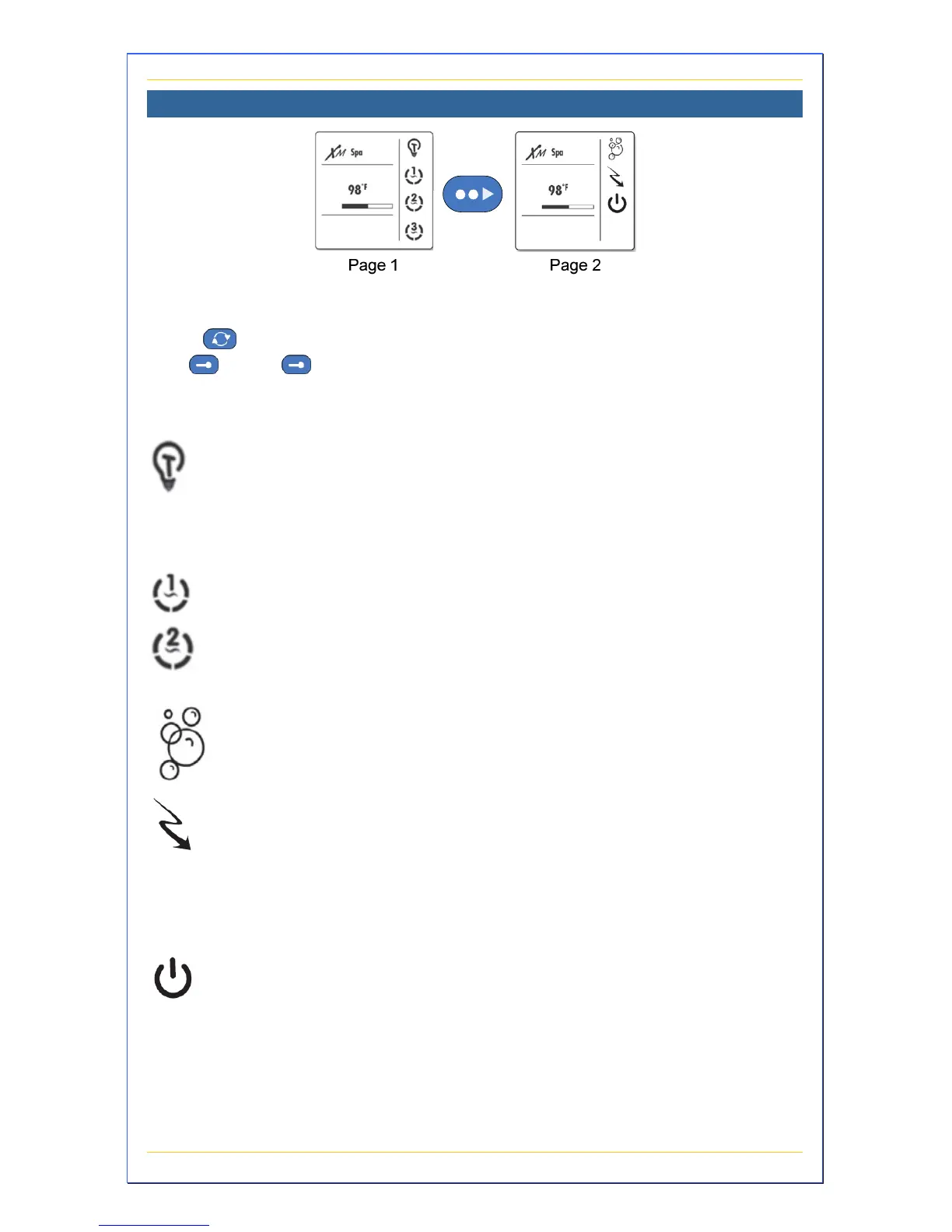
Spa mode allows you to control the basic devices of your spa plus
access Standby and Economy features. To access Spa mode, first
press to access the main menu and then select the Spa mode
with
. Press next to the feature or device you wish to operate
on that page to turn it on or off. The corresponding display icon
animates indicating its status.
Pressing this button turns the LED system on/off. Press
again to cycle through the five colors (red, blue, green,
white, and yellow). Once a desired color is found, pressing
again to stay on this color. A built-in timer turns it off after
120 minutes, unless you turn it off first.
Pumps 1 and 2 are both 2-speed pumps. Pressing the
corresponding button turns it on low speed, pressing
again turns it on high speed, pressing it a third time to
turns it off. A built-in timer turns this pump off after 20
minutes.
The blower is single-speed. Pressing this button turns it on
and off. A built-in timer turns the blower off after 20
minutes.
Typically used when you are planning to be away from
your spa for long periods of time, Economy mode allows
you to set back your spa’s water temperature by 20ºF
every day to help you lower your operating costs. Pressing
the function button manually turns this mode on/off. See
page 22 for more information on programming this mode.
Standby pauses the current pump settings. If you leave
your spa and want to save the current settings, press
Standby. Pressing Standby again, or when a filter purge
start time is reached, returns your spa to normal.


 To Next Page