Getting Started
Meter Functions
-
Resistance
(0)
IMPORTANT:
If
you are testing
an application that has capacitors
in
the circuit, be sure to turn the
power
OFF
on the test circuit and
discharge all capacitors. Accu-
rate measurement is not possible
if
external or residual voltage is
present.
3
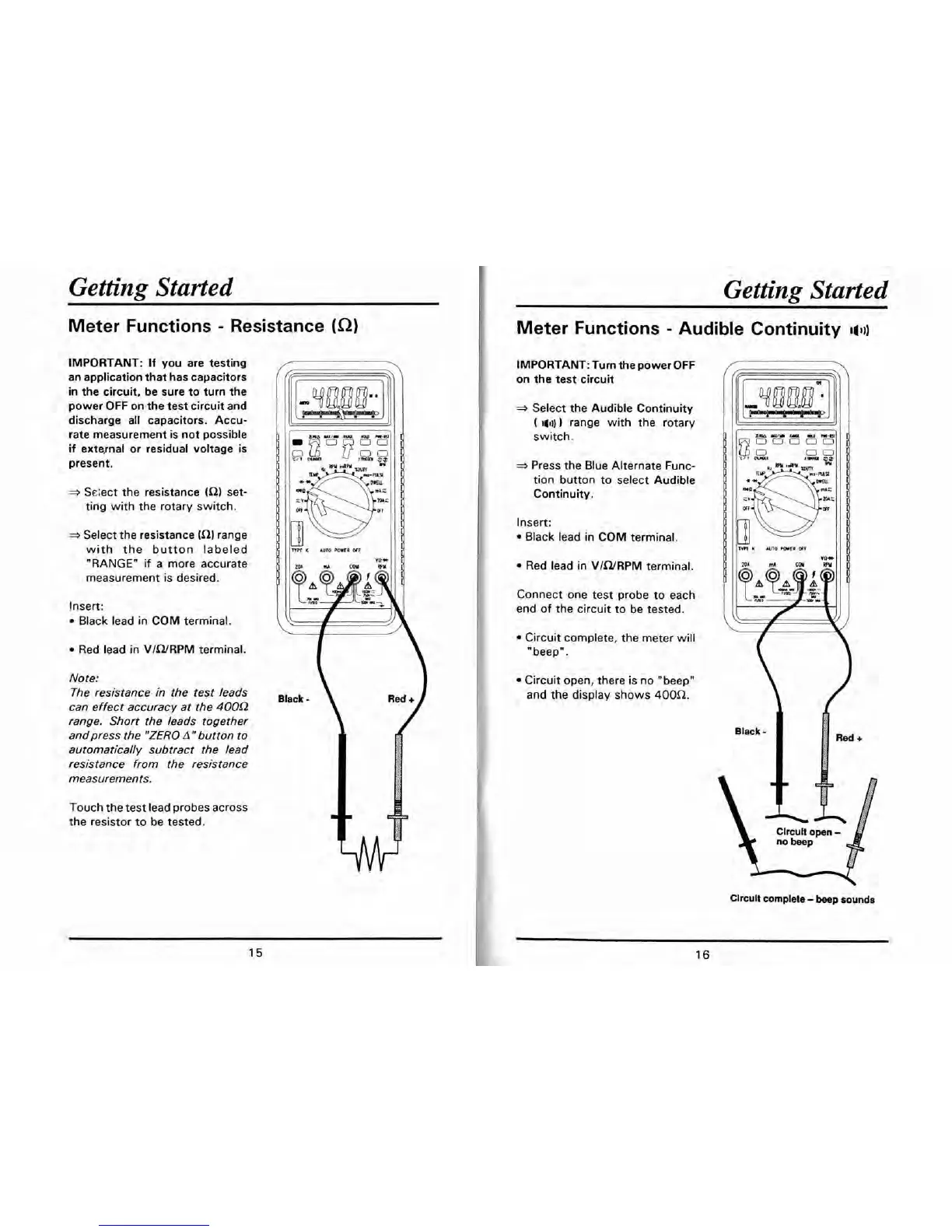
Seiect the resistance
(R)
set-
ting with the rotary switch.
-
Select the resistance
(R)
range
with the button labeled
"RANGEn
if
a more accurate
measurement is desired.
Insert:
Black lead in COM terminal.
Red lead in VIWRPM terminal.
Note:
The resistance in the test leads
can effect accuracy at the
400Q
range. Short the leads together
andpress the
"ZERO
Anbutton to
automatically subtract the lead
resistance from the resistance
measurements.
Touch the test lead probes across
the resistor to be tested.
Black
Getting Started
Meter Functions
-
Audible Continuity
I(]))
IMPORTANT: Tum the power OFF
on the test circuit
3
Select the Audible Continuity
(
I(I))
range with the rotary
switch.
Press the Blue Alternate Func-
tion button to select Audible
Continuity.
Insert:
Black lead in COM terminal.
Red lead in VIWRPM terminal.
Connect one test probe to each
end of the circuit to be tested.
am
wrn
U(I
*U
n-a
00000
0 0
1-
p
lwf
l(
AUTO
mil
w
Circuit complete, the meter will
"beep".
Circuit open, there is no "beep"
and the display shows
400a.
Clrcult complete
-
beep
sounds


 To Next Page