Getting Started
I
Getting Started
Meter Functions
-
Temperature (Temp)
IMPORTANT: To avoid heat dam-
Temperature Sensor
,
age to the meter, keep
it
away
from sources of very high tem-
perature. The life of the tempera-
ture probe is also reduced when
subjected to very high tempera-
tures (operating range is
-50° to
2,O0O0F)
*
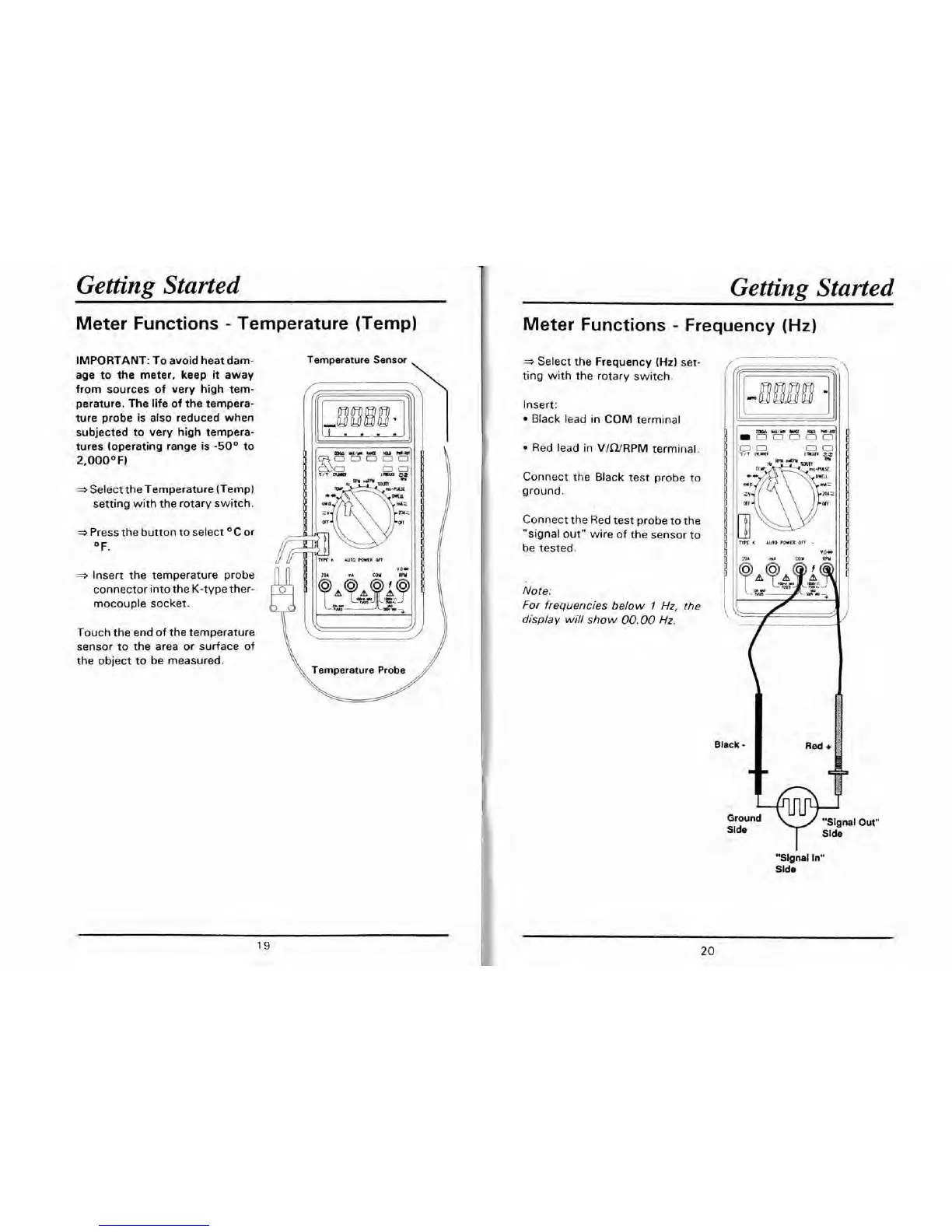
Select the Temperature (Temp)
setting with the rotary switch.
Press the button to select
OC or
OF.
*
Insert the temperature probe
connector into the K-type ther-
mocouple socket.
Touch the end of the temperature
sensor to the area or surface of
the object to
be
measured.
Temperature Probe
Meter Functions
-
Frequency
(Hz)
*
Select the Frequency
(Hz)
set-
ting with the rotary switch.
Insert:
Black lead
in
COM terminal
k
lr
u
m
YI/m
mu
mD
m-Ba
-
0
0
0
0 0
11
1
Red lead in V/Q/RPM terminal.
Connect the Black test probe to
ground.
Connect the Red test probe to the
"signal out" wire of the sensor to
be tested.
Note:
For frequencies below
7
Hz,
the
display will show
00.00
Hz.
Black
-
Slde
1
Ground
"Signal
In"
Slde
Out"


 To Next Page