Getting Started
Meter Functions
-
ms Pulse
-
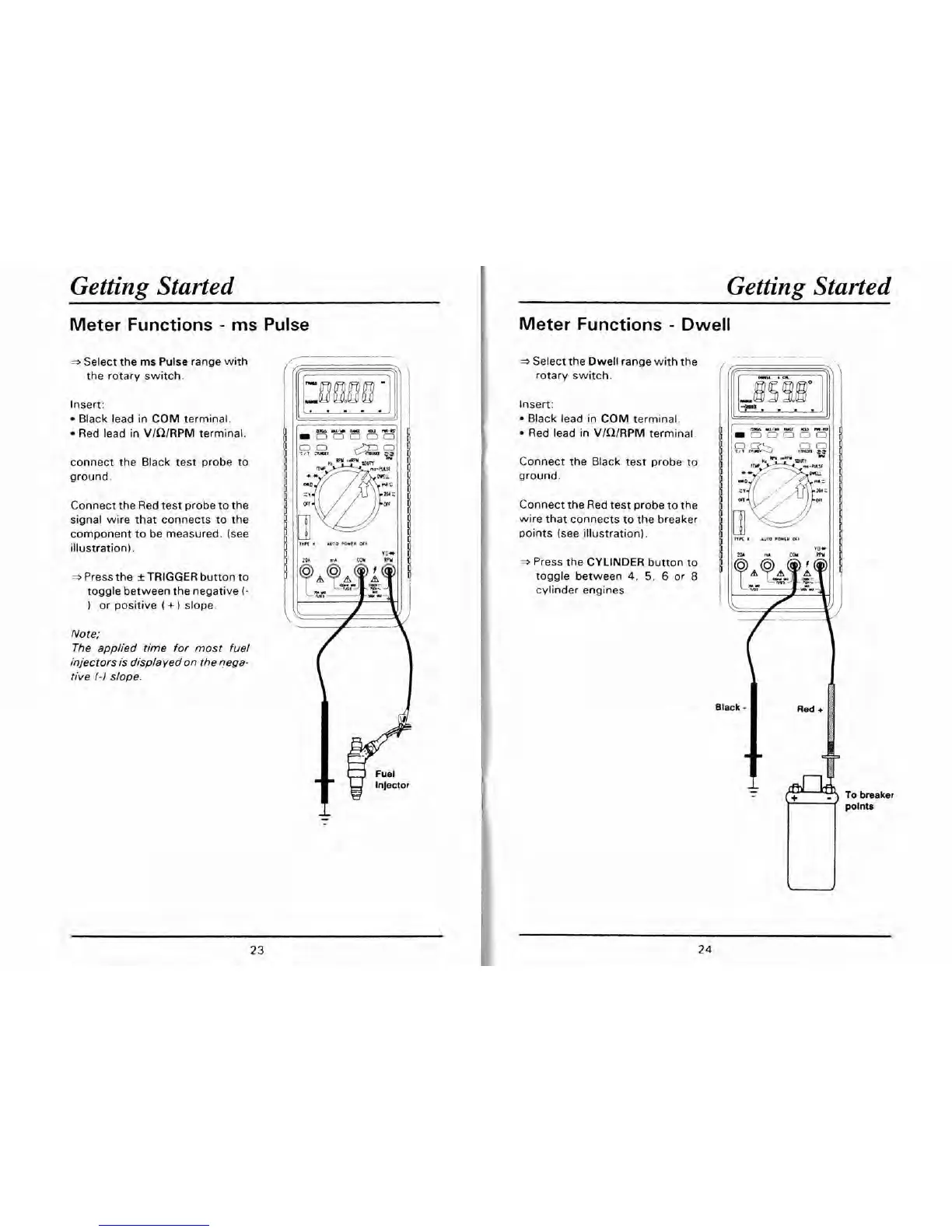
Select the ms Pulse range with
the rotary switch.
Insert:
Black lead in COM terminal.
Red lead in VlQlRPM terminal.
connect the Black test probe to
ground.
Connect the Red test probe to the
signal wire that connects to the
component to be measured. (see
illustration).
-
Press the *TRIGGER button to
toggle between the negative
(-
)
or positive
(
+
)
slope.
Note;
wlrn
um
WJ
m-m
111
0
0
0
0
01
The applied time for most fuel
injectors is displayed on the
nega-
rive
/-I
slope.
Getting Started
Meter Functions
-
Dwell
3
Select the Dwell range with the
rotary switch.
Insert:
Black lead in COM terminal.
Red lead in VlQlRPM terminal
Connect the Black test probe to
ground.
Connect the Red test probe to the
wire that connects to the breaker
points (see illustration).
2
Press the CYLINDER button to
toggle between
4,
5,
6
or
8
cylinder engines


 To Next Page