Getting Started
I
Getting Started
Meter
Basics
Con
t
'd.
.
.
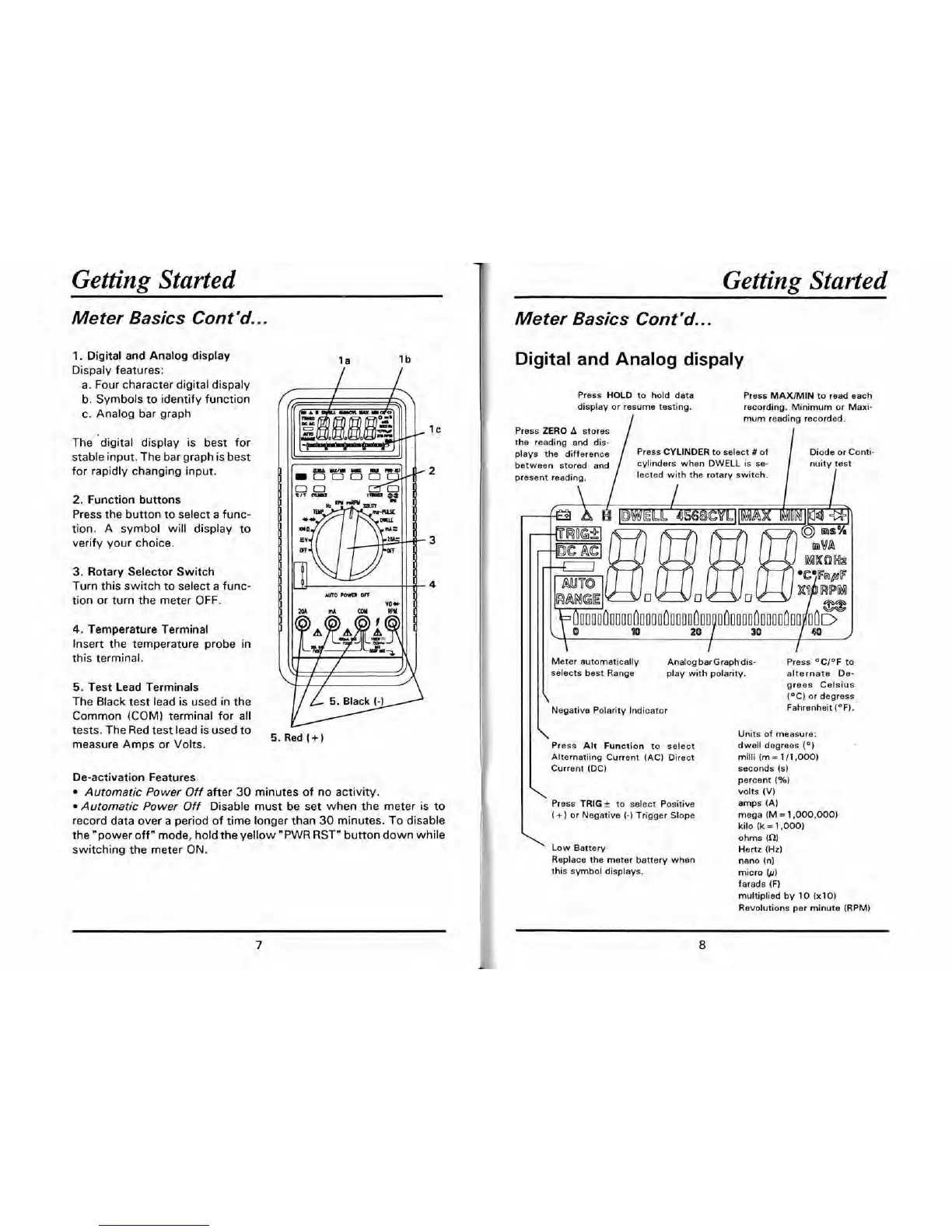
1.
Digital and Analog display
Dispaly features:
a. Four character digital dispaly
b. Symbols to identify function
c. Analog bar graph
The 'digital display is best for
stable input. The bar graph is best
for rapidly changing input.
2.
Function buttons
Press the button to select a func-
tion. A symbol will display to
verify your choice.
3.
Rotary Selector Switch
Turn this switch to select a
func-
AUTO
rcm
m
tion or turn the meter OFF.
4.
Temperature Terminal
Insert the temperature probe in
this terminal.
5.
Test Lead Terminals
The Black test lead is used in the
5.
Black
(-1
Common (COM) terminal for all
tests. The Red test lead is used to
measure Amps or Volts.
w
5.
Red
(+
1
De-activation Features
Automatic Power
Off
after 30 minutes of no activity.
Automatic Power
Off
Disable must be set when the meter is to
record data over a period of time longer than 30 minutes. To disable
the "power off" mode, hold the yellow
"PWR
RST" button down while
switching the meter ON.
Meter
Basics
Con
t
'd..
.
Digital and Analog dispaly
Press
HOLD
to hold data Press
MAXIMIN
to read each
display or resume testing.
recording. Minimum or
Maxi-
mum reading recorded.
Press
ZERO
A
stores
the reading and dis-
plays
the difference
Diode or Conti-
between stored and nuity test
present reading.
lected with the rotary switch.
I
Meter automatically Analog barGraph dis- Press OCl°F to
selects best Range play with polarity. alternate
De-
grees Celsius
(OC) or degress
Negative Polarity Indicator
Fahrenheit
(OF).
\
Press
Alt
Function to select
Alternating Current (AC) Direct
Current
(DC)
\
Press
TRIG
f
to select Positive
(
+)
or Negative
(-)
Trigger Slope
'
Low Battery
Replace the meter battery when
this symbol displays.
Units of measure:
dwell degrees
(O)
milli (m
=
111,000)
seconds (s)
percent
(%I
volts
(V)
amps (A)
mega (M
=
1,000,000)
kilo
(k
=
1.000)
ohms
(Q)
Hertz (Hz)
nano (n)
micro
(/I)
farads (F)
multiplied by
10
(x10)
Revolutions per minute (RPM)


 To Next Page