EasyManua.ls Logo

Peak Performance PKC0BU4 - User Manual

Peak Performance PKC0BU4
8 pages
Print Icon
To Next Page IconTo Next Page
Loading...
TM
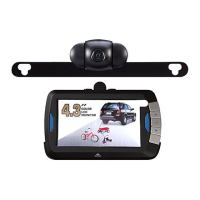
4.3-inch Back-Up
Camera
Model No.: PKC0BU4
Owner
s Manual
and Warranty Information
Read these instructions completely before using this product.
Retain this Owner
s Manual for future reference.

Questions and Answers

  • D
    David HansonJul 30, 2025
    What to do if my Peak Performance Dash Cameras monitor display is blank?
    • F
      Frank WhiteJul 30, 2025
      If the monitor display is blank or unclear on your Peak Performance Dash Camera, several factors could be at play. First, ensure that all wires are correctly connected to the monitor, transmitter, camera, and the vehicle's reverse light circuit. Check all wire connections and splices for proper connection. Also, verify that the monitor power button is turned on. If the issue persists, adjust the screen settings using the monitor buttons, and adjust the monitor angle using the adjustment knobs.
  • N
    Natasha BrownAug 14, 2025
    Why is my Peak Performance Dash Cameras monitor display unclear?
    • S
      Sarah DelgadoAug 14, 2025
      If the monitor display is unclear on your Peak Performance Dash Camera, start by checking the camera lens. It might be covered with snow, mud, ice, or other debris. Clean the lens to ensure a clear view. Also, make sure the camera is correctly aligned and hasn't moved from its intended position. Realign it if necessary. Finally, adjust the camera angle to optimize the view.

Summary

INTRODUCTION

FEATURES

Lists key features of the back-up camera system, including monitor, camera, and automatic activation.

INSTALLATION

Camera Mounting and Angle Adjustment

Mounts the camera behind the license plate and adjusts its position for optimal rear view.

Transmitter Wiring

Connects the transmitter to the vehicle's reverse light circuit using provided wire connectors.

Monitor Mounting and Power Connection

Mounts the monitor inside the vehicle and connects its power cord to a 12V socket.

OPERATION

Testing the System

Verifies the back-up camera system functions correctly by shifting the vehicle into reverse.

Monitor Controls

ON;OFF Button and Blue Power LED

Controls monitor power and indicates system status.

Adjusting Monitor Settings

Modifies screen brightness, contrast, and guideline visibility for optimal viewing.

CARE AND MAINTENANCE

Storage and Cleaning

Provides guidance on storing the device in a cool, dry place and cleaning it with a soft cloth.

Fuse Replacement and Disposal

Details how to replace the power plug fuse and properly dispose of the unit.

FCC INFORMATION

TROUBLESHOOTING

Common Issues and Solutions

Provides solutions for common problems like blank displays, incorrect angles, and power issues.

Peak Performance PKC0BU4 Specifications

General IconGeneral
Resolution1920x1080
Screen Size2.4 inches
G-SensorYes
Loop RecordingYes
Night VisionYes
StorageMicroSD card