Atlas DCA User Guide September 2014 – Rev 11
Page 5
Analysing Components
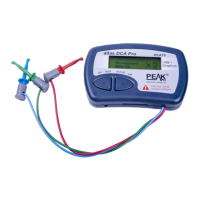
The Atlas DCA is designed to analyse discrete,
unconnected, unpowered components. This
ensures that external connections don’t influence
the measured parameters. The three test probes can be
connected to the component any way round. If the component has
only two terminals, then any pair of the three test probes can be used.
The Atlas DCA will start component
analysis when the on-test button is
pressed.
Depending on the component type, analysis may take a few seconds to
complete, after which, the results of the analysis are displayed. Information is
displayed a “page” at a time, each page can be displayed by briefly pressing the
scroll-off button.
The arrow symbol on the display indicates that more pages are available
to be viewed.
Although the Atlas DCA will switch itself off if left unattended, you
can manually switch the unit off by holding down the scroll-off
button for a couple of seconds.
Atlas DCA55 Rx.x
is analysing....



 To Next Page