EasyManua.ls Logo

Peavey Versamix - Page 10

Peavey Versamix
23 pages
Print Icon
To Next Page IconTo Next Page
To Previous Page IconTo Previous Page
Loading...
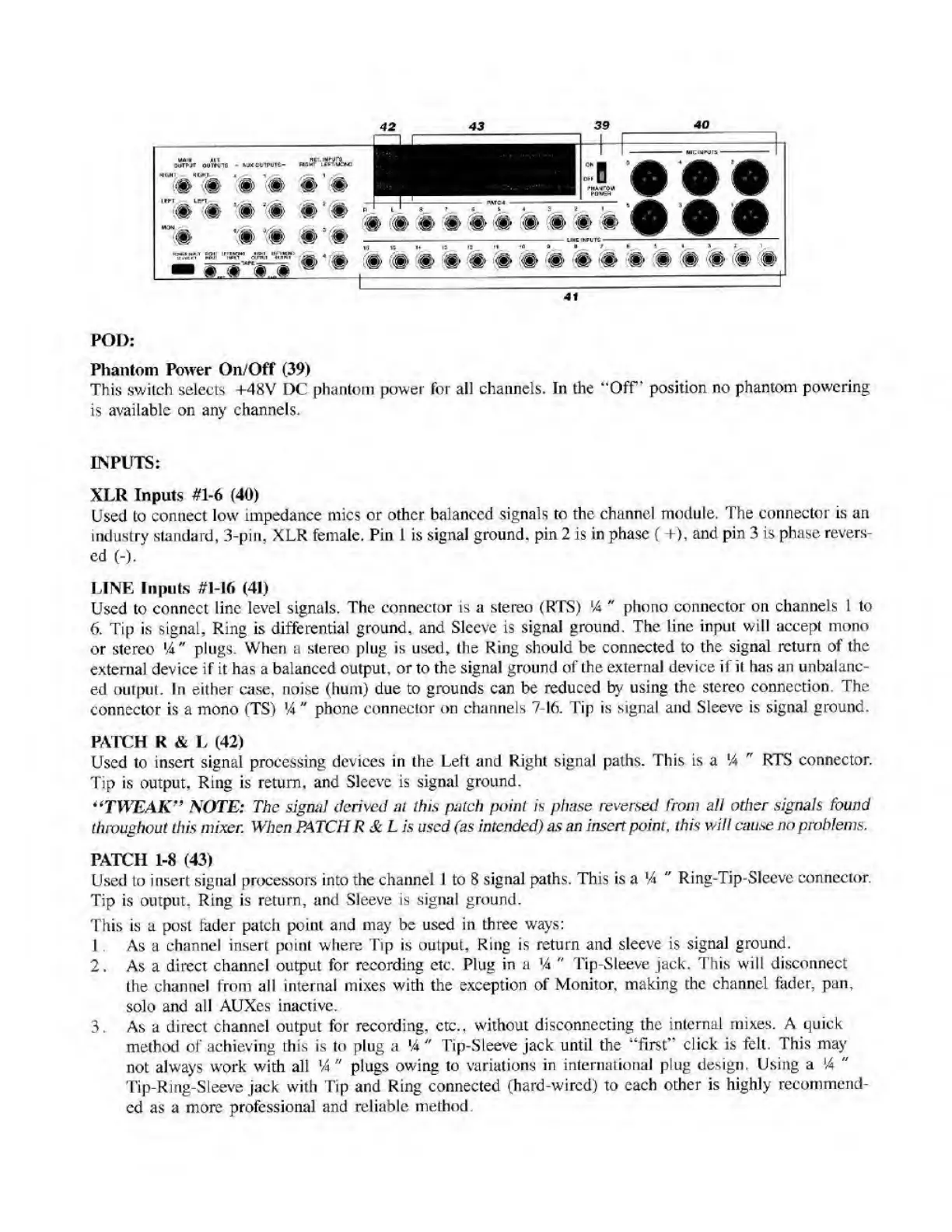
POD:
Phantom
Power
Oil/Off
(39)
This
switch
selects
+48V
DC
phantom
power
for
all
channels.
In
the
“Off'
position
no
phantom
powering
is
available
on
any
channels.
INPUTS:
XLR
Inputs
#1-6
(40)
Used
to
connect
low
impedance
mics
or
other
balanced
signals
to
the
channel
module.
The
connector
is
an
industry
standard,
3-pin.
XLR
female.
Pin
1
is
signal
ground,
pin
2
is
in
phase
(
+),
and
pin
3
is
phase
revers¬
ed
(-).
LINE
Inputs
#1-16
(41)
Used
to
connect
line
level
signals.
The
connector
is
a
stereo
(RTS)
'4
"
phono
connector
on
channels
1
to
6.
Tip
is
signal,
Ring
is
differential
ground,
and
Sleeve
is
signal
ground.
The
line
input
will
accept
mono
or
stereo
14"
plugs.
When
a
stereo
plug
is
used,
the
Ring
should
be
connected
to
the
signal
return
of
the
external
device
if
it
has
a
balanced
output,
or
to
the
signal
ground
of
the
external
device
if
it
has
an
unbalanc¬
ed
output.
In
either
case,
noise
(hum)
due
to
grounds
can
be
reduced
by
using
the
stereo
connection.
The
connector
is
a
mono
(TS)
14
"
phone
connector
on
channels
7-16.
Tip
is
signal
and
Sleeve
is
signal
ground.
PATCH
R
&
L
(42)
Used
to
insert
signal
processing
devices
in
the
Left
and
Right
signal
paths.
This
is
a
14
"
RTS
connector.
Tip
is
output,
Ring
is
return,
and
Sleeve
is
signal
ground.
“TWEAK”
NOTE:
The
signal
derived
at
this
patch
point
is
phase
reversed
from
all
other
signals
found
throughout
this
mixer.
When
PATCH
R
Sc
L
is
used
(as
intended)
as
an
insert
point,
this
will
cause
no
problems.
PATCH
1-8
(43)
Used
to
insert
signal
processors
into
the
channel
1
to
8
signal
paths.
This
is
a
14
"
Ring-Tip-Sleeve
connector.
Tip
is
output.
Ring
is
return,
and
Sleeve
is
signal
ground.
This
is
a
post
fader
patch
point
and
may
be
used
in
three
ways:
1
.
As
a
channel
insert
point
where
Tip
is
output,
Ring
is
return
and
sleeve
is
signal
ground.
2.
As
a
direct
channel
output
for
recording
etc.
Plug
in
a
*4
"
Tip-Sleeve
jack.
This
will
disconnect
the
channel
from
all
internal
mixes
with
the
exception
of
Monitor,
making
the
channel
fader,
pan,
solo
and
all
AUXcs
inactive.
3.
As
a
direct
channel
output
for
recording,
etc.,
without
disconnecting
the
internal
mixes.
A
quick
method
of
achieving
this
is
to
plug
a
'4
"
Tip-Sleeve
jack
until
the
“first”
click
is
felt.
This
may
not
always
work
with
all
'4"
plugs
owing
to
variations
in
international
plug
design.
Using
a
*4
"
Tip-Ring-Sleeve
jack
with
Tip
and
Ring
connected
(hard-wired)
to
each
other
is
highly
recommend¬
ed
as
a
more
professional
and
reliable
method.

Related product manuals