22
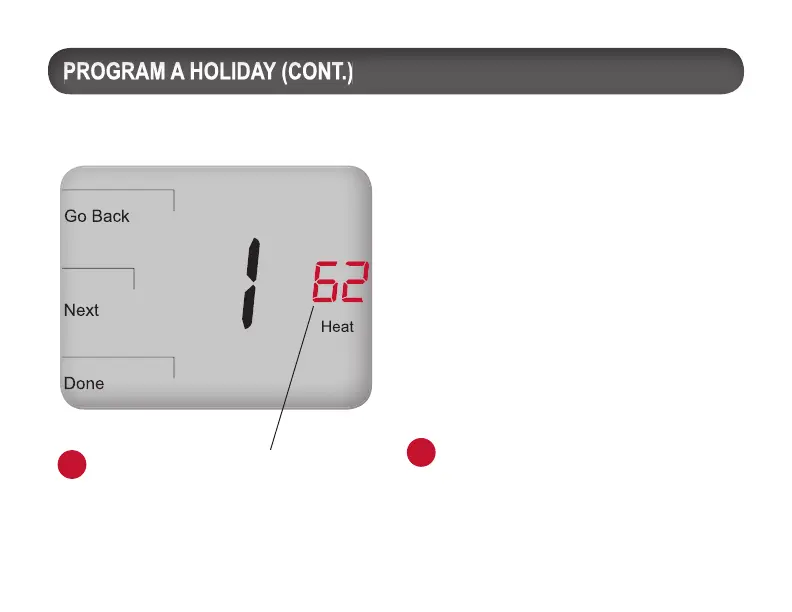
Now select the Heat and Cool Setpoints for
the same holiday number (e.g., “1”).
8. Press
▲/ ▼to select the Heat Setpoint,
then Next.
9. Press ▲/ ▼to select the Cool Setpoint,
then Next.
Optional: To program multiple holidays,
wait for the Holiday number to ash
(after step 9). Press ▲/ ▼to select a
new Holiday number; repeat steps 3-9.
10. Press DONE to complete the holiday
display mode.
PROGRAM A HOLIDAY (CONT.)PROGRAM A HOLIDAY (CONT.)PROGRAM A HOLIDAY (CONT.)
Note: Select the Heat Setpoint (and
the Cool Setpoint) for the holiday after
selecting the number of days the holiday
period lasts.
Note: If “Heat” or “Cool” flashes during
process, the deadband value will be
enforced; the opposing Heat or Cool
Setpoints will be automatically adjusted
(for an explanation of deadband value,
see Key operation).
i
i
PRESS ANY KEY TO BEGIN



 To Next Page