support@pecron.com
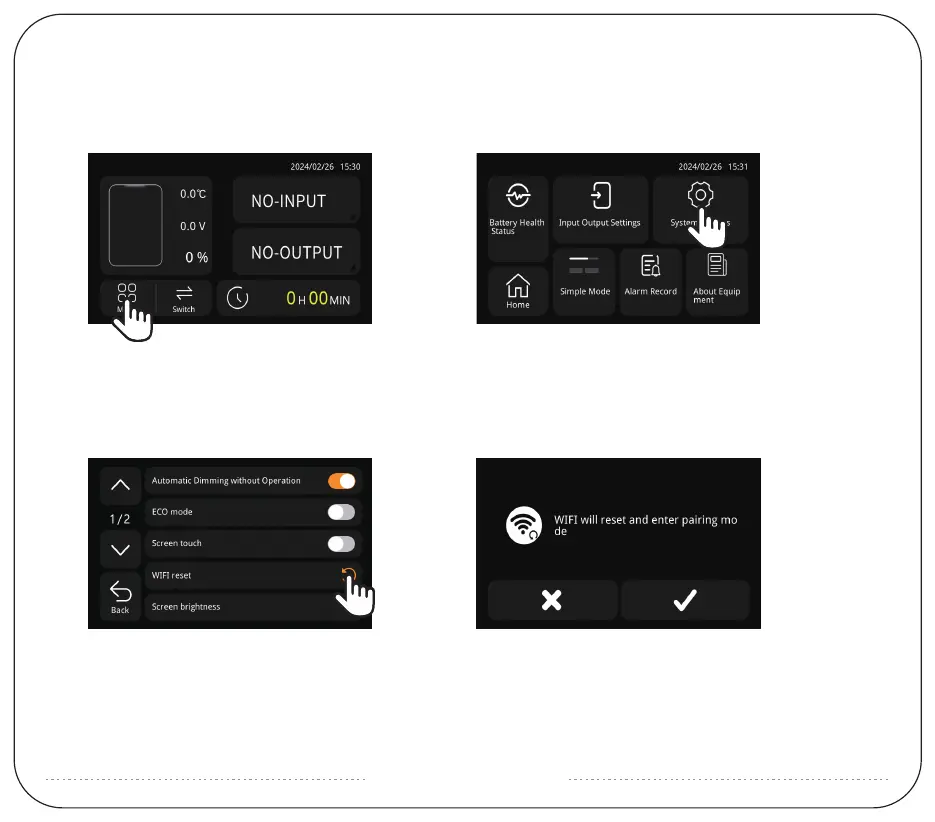
Click "Menu" showed as (Picture 1).
Then click "System Setting" showed as (Picture 2).
(Picture 1) (Picture 2)
HOW TO CONNECT WITH APP ?
1: Click "WIFI reset" showed as (Picture 5).
2: Click "√" to reset the WIFI and enter the pairing mode showed as (Picture 6).
And then search the device model through the near field on the APP.
If you connect to the APP via WIFI successfully, the WIFI symbol will be displayed.
(Picture 5) (Picture 6)


 To Next Page