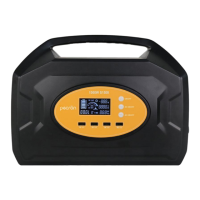
Pecron E1500 Pro Portable Power Station
The Pecron E1500 Pro is a versatile portable power station designed to provide reliable power for various applications, from outdoor adventures to emergency home backup. This user manual outlines its functions, usage, and maintenance to ensure optimal performance and longevity.
Function Introduction
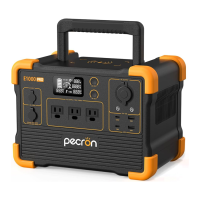
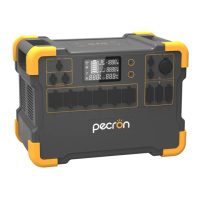
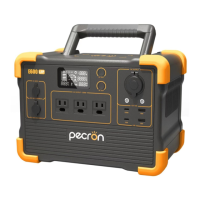
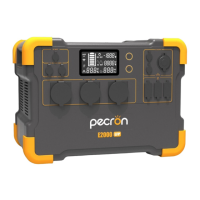
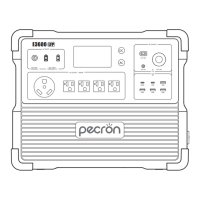
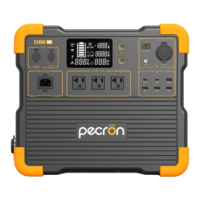
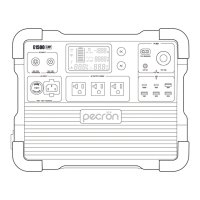
The E1500 Pro features a comprehensive set of input and output ports, all managed through an intuitive LCD display.
Input Ports:
- DC 32V~95V Charging Port (GX16MF): This is the primary charging port for solar panels or other high-voltage DC sources. It supports a wide voltage range, allowing for flexible solar charging configurations.
- DC 12V~18V Charging Port (5521): A secondary DC input, typically used for car charging or smaller solar panels.
- AC 100V~120V Input: For charging the unit directly from a standard wall outlet.
Output Ports:
- AC 100V~120V Output (x3): Provides standard household AC power for a variety of appliances. Each outlet is independently controlled.
- DC12V XT60 Output: A high-current DC output for specific devices requiring an XT60 connector.
- DC12V Auxiliary Output (Cigar Port): A standard car-style outlet for 12V accessories.
- DC12V (5525) Output: A general-purpose 12V DC output with a 5525 barrel connector.
- USB-A/USB-C Ports: Multiple USB ports for charging smartphones, tablets, and other USB-powered devices. These include both standard USB-A and modern USB-C ports, with some supporting Power Delivery (PD) for faster charging.
- Wireless Charger: A convenient top-mounted pad for wirelessly charging compatible devices.
Control and Display:
- LCD Display: A central display provides real-time information about the power station's status, including charge/discharge indicators, net input/output wattage, DC/AC output status, input voltage/wattage, AC output details (PF value, remaining time), and a time indicator.
- DC 12V/USB/Wireless Switch: Controls the activation and deactivation of the DC outputs, USB ports, and wireless charger.
- AC 100V~120V Switch: Controls the activation and deactivation of the AC output ports.
- Fuse: An integrated fuse provides protection against overcurrent.
Usage Features
The E1500 Pro is designed for ease of use and offers several key operational features:
Powering On/Off:
- To activate or deactivate the DC outputs, USB ports, and wireless charger, simply press and hold the corresponding switch.
- To activate or deactivate the AC output ports, press and hold the AC switch. It is recommended to turn off the AC function if no AC load is connected to conserve power.
LCD Smart Display:
The LCD display provides critical information at a glance:
- Charge Indicator: Shows the current charging status.
- Discharge Indicator: Indicates when the unit is actively discharging power.
- Net Input/Output Wattage: Displays the total power being drawn from or supplied to the unit.
- DC Out: Shows the status and power of the DC outputs.
- AC Input Wattage(W)/Voltage(V): Provides details about the incoming AC power.
- AC Out: Shows the status and power of the AC outputs.
- PF Value/Remaining Charging/Discharging Time(Hrs): Offers an estimate of the power factor and the remaining operational time based on current load or charging time.
- Time Indicator: Displays the current time.
- Temperature Alarm Icon: This icon flashes if the internal temperature exceeds 45°C, indicating a potential shutdown to prevent damage. The E1500 Pro operates optimally between -20°C and 45°C.
- AC Overload Alarm Icon: This icon flashes if the connected AC load exceeds 2000 watts, indicating that the power supply will stop working to protect the unit. The E1500 Pro is designed to power most devices with consumption less than 2000 watts.
Recharge Time:
The E1500 Pro offers multiple charging options:
- Wall Charger: Approximately 1.5 hours for a full charge.
- Electric Generator: Approximately 1.5 hours for a full charge.
- Car Charger: Approximately 18 hours for a full charge.
Solar Charge Time:
The solar charging time is dependent on weather conditions and the solar panel configuration. The E1500 Pro has a built-in MPPT charge controller that supports 32V~95V, 15A PV charging up to 800W.
- 200W (x1) Solar Panel: Approximately 9~10 hours.
- 400W (x2) Solar Panels: Approximately 4~5 hours.
- 600W (x3) Solar Panels: Approximately 3~3.5 hours.
- 800W (x4) Solar Panels: Approximately 2~2.5 hours.
UPS Function:
The E1500 Pro supports an Uninterruptible Power Supply (UPS) function, providing near-instantaneous (within 8~20ms) protection from unexpected power interruptions. This is ideal for devices like computers and telecommunication equipment.
- Important Note: This UPS function is not suitable for applications requiring transfer times under 8ms, such as servers and workstations.
- Load Limit: The UPS function supports loads under 1600W. To prevent overload and protection failure, it is recommended to connect only one device at a time when using the UPS feature. Pecron is not responsible for any device damage or data loss resulting from failure to follow these instructions.
Solar Panel Charging Guidelines:
- DC5521 Charging Port: For PV/DC 12V~18V, 100W maximum. The open circuit voltage (VOC) of the solar panel must be less than 25V.
- GX16MF-5 Charging Port: For PV (operating voltage) range 32V~95V, 800W maximum. The VOC of the solar panel/array must be less than 95V to prevent damage to the unit.
- Do not wire more than two 36V (AKA 24V) solar panels in series.
- Do not wire more than four 18V (AKA 12V) solar panels in series.
- (18V/36V refers to Vmp, the operating voltage, of the solar panel).
- Series vs. Parallel Connections:
- Connecting solar panels in series increases the voltage. Ensure the total voltage does not exceed the port's maximum.
- Connecting solar panels in parallel increases the current.
- Always ensure that the operating voltage of the solar panels is within the specified range for the charging port. Exceeding 95V on the GX16MF-5 port will damage the machine.
Maintenance Features
Proper maintenance ensures the longevity and optimal performance of your E1500 Pro.
Battery Care:
- Charging Frequency: Charge the E1500 Pro when the battery is running low. Even if not in use, charge it at least once every six months to maintain battery health.
- Storage Conditions: Store the E1500 Pro in a cool, dry place, away from heat sources (fire, heating furnaces), flammable or corrosive gases. Do not immerse it in water.
General Handling and Safety:
- Environmental Conditions: Avoid using the device in strong static electricity or electromagnetic environments. Do not expose the unit to rain or wet conditions.
- Physical Protection: Avoid impacts, falls, and violent vibration. If the device experiences a major exterior impact, turn it off immediately and stop using it. Secure the unit firmly during transportation.
- Ventilation: Do not block the air vents during use. Avoid leaving the device in a non-ventilated or dusty space.
- Cleaning: Wipe the device with a dry cloth to clean its surface.
- Disassembly: Do not disassemble or puncture the product with sharp objects.
- Accessories: Use only accessories and parts provided by Pecron. Visit www.pecron.com or contact support for a complete list of compatible accessories.
- Overheating/Overcooling: Using the product outside its recommended ambient temperature range (-20°C to 45°C) can degrade battery performance or even lead to self-combustion in extreme heat.
- Heavy Objects: Do not stack heavy objects on the product.
- Water Immersion (Accidental): If the device is accidentally immersed in water, place it in a safe, open area and keep away until completely dry. The dried unit should not be reused and must be disposed of properly according to local regulations.
- Fire Safety: If the device catches fire, use the following extinguishing equipment in order: water or mist, sand, fire blanket, dry chemical, carbon dioxide fire extinguisher.
- Children and Pets: Store the device out of reach of children and pets.
Disposal:
- Battery Discharge: When possible, completely discharge the battery before disposal.
- Recycling: Place the product in a designated battery recycling box. Batteries contain dangerous chemicals and must not be disposed of in ordinary trash. Follow local laws and regulations for battery recycling and disposal.
- Failed Battery: If the battery cannot be completely discharged due to product failure, do not dispose of it directly in a recycling box. Contact a professional battery recycling company for proper disposal.
- Over-Discharged Battery: An over-discharged battery will not be able to start. Dispose of it according to proper disposal principles.
Exclusions:
Pecron's warranty does not cover misuse, abuse, modification, accidental damage, or use for purposes other than normal consumer use as authorized in Pecron's product literature.

 Need help?
 General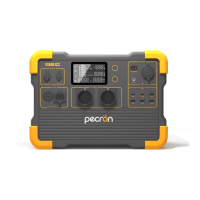

 To Next Page