support@pecron.com
HOW TO CALIBRATE THE POWER LEVEL OF THE E2000 LFP AFTER CASCADING
Solution 1 (some machines do not support Solution 1, please use Solution 2)
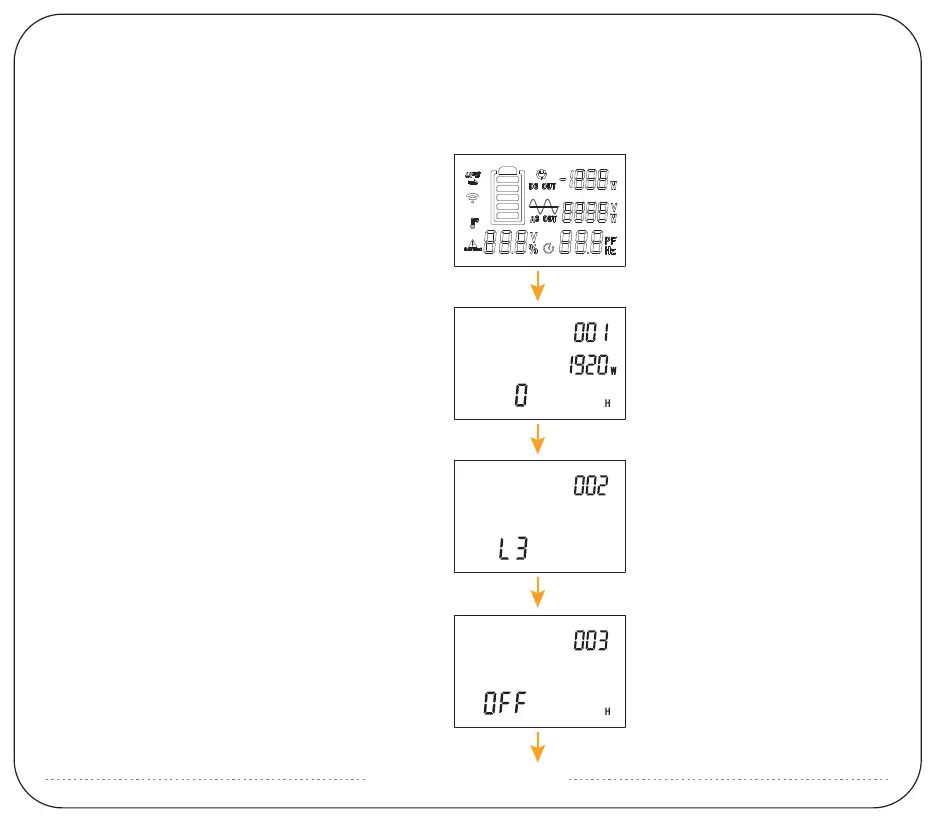
1: Press and hold DC for seven seconds in the off state
to enter the setting item.
2: Under a number-001, you will see the number of the
extra battery packs,which is 0 by default. It can be
set according to the number of connected battery
packages - shortly press DC to increase the number
and shortly press AC to decrease the number.
3: Long press AC to enter the process 002, the default
value is L3, this means screen brightness. Shortly
press DC can increase the brightness or shortly press
AC to decrease the brightness.
4: Long press AC to enter the setting of item 003. The
default value is OFF, which means the automatic
shutdown time of the machine without any load.
Shortly press DC can increase the time or shortly
press AC to decrease the time.


 To Next Page