12
IPMTB-GS Motherboard Reference Guide
4 System memory
IMPORTANT: Always install DIMMs with the same CAS latency. For optimum
compatibility, it is recommended that you obtain memory modules from the
same vendor.
Memory types
The motherboard comes with Double Data Rate 3 (DDR3) Dual Inline Memory
Modules (DIMM) sockets.
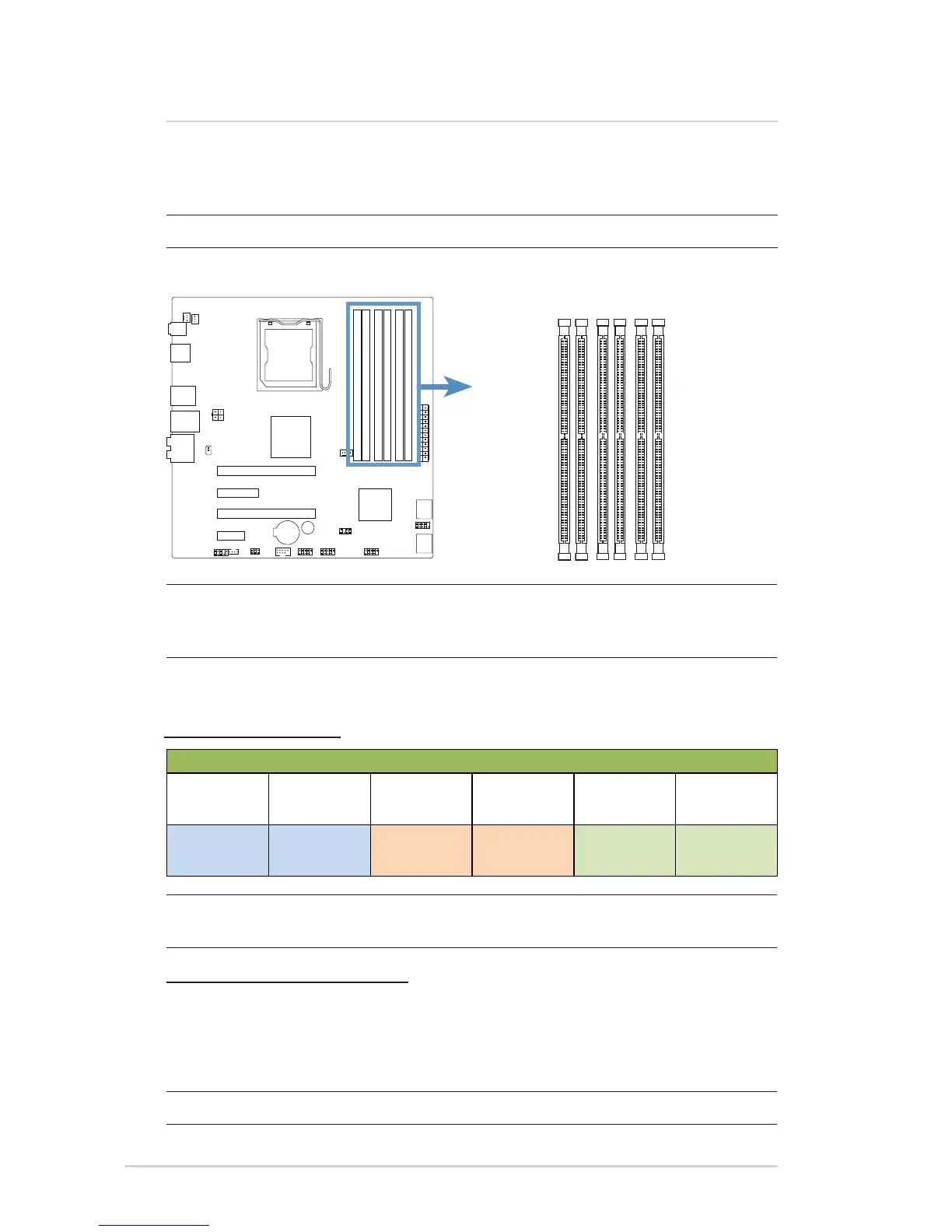
The gure illustrates the location of the DDR3 DIMM sockets:
2 1 4 3 6 5
WARNING: Only DDR3 RAM modules can be used on this motherboard.
Memory module rules and congurations
Note: DIMM2 is the socket closest to the CPU and DIMM5 is the socket farthest
from the CPU.
Memory Module Insertion Rule
1. Insert modules starting from the DIMM closest to the CPU.
2. Insert 2GB modules rst, then 1GB modules if both are used.
3. Fill each channel (two sockets) with modules to fully utilize triple channel
performance.
IMPORTANT: One of the blue sockets (DIMM1/3/5) must be populated.
DIMM Socket Labeling
Socket Color and Channel
DIMM2
Black
DIMM1
Blue
DIMM4
Black
DIMM3
Blue
DIMM6
Black
DIMM5
Blue
(Channel A) (Channel A) (Channel B) (Channel B) (Channel C) (Channel C)



 To Next Page