PS48/PS80 Advantage Series Salt Based Water Softeners
© 2015 Enviro Water Solutions LLC
3060 Performance Circle, Suite 2. DeLand, FL 32724
— Rev K
Page 6
www.pelicanwater.com
(877) 842-1635
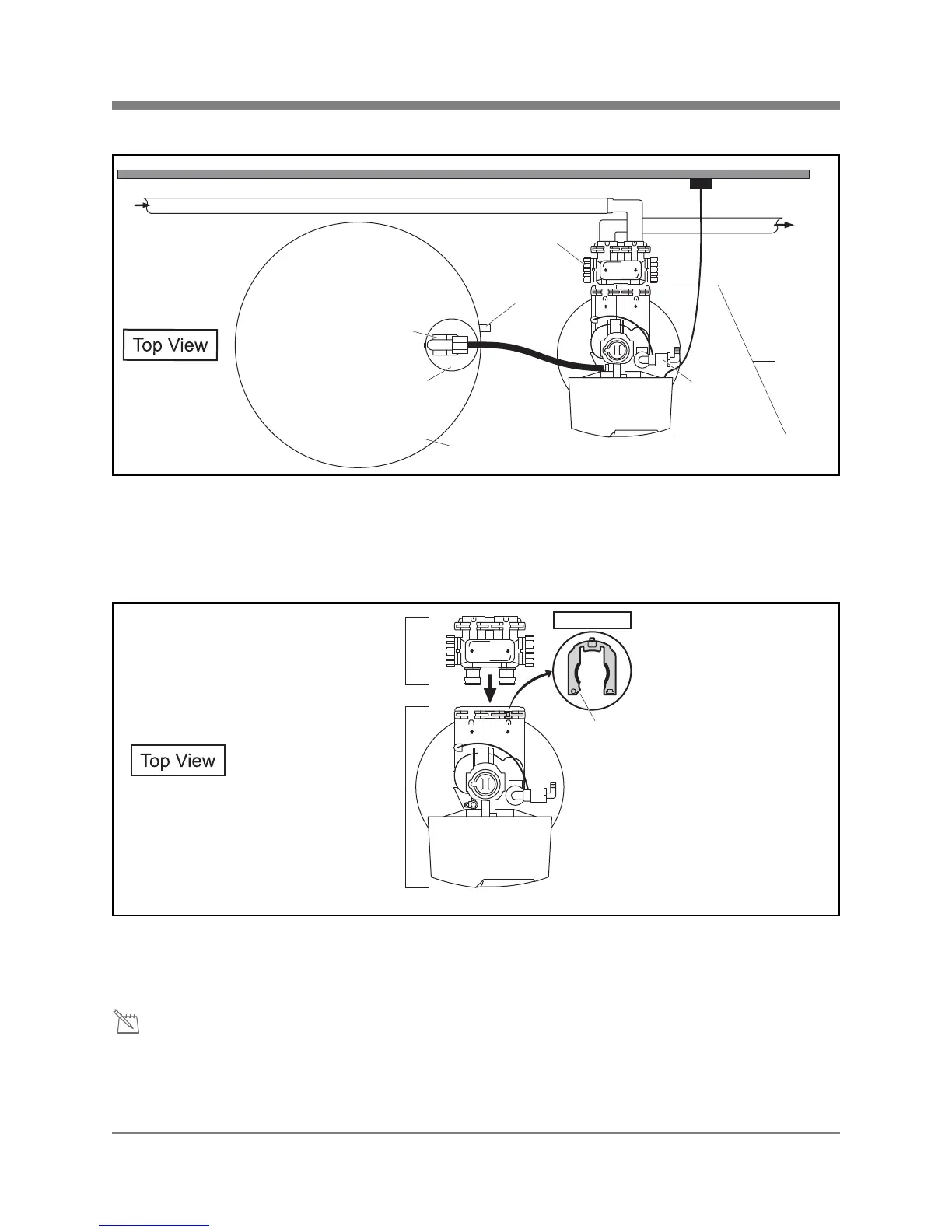
Installation Overview
Figure 1
Pre-Installation
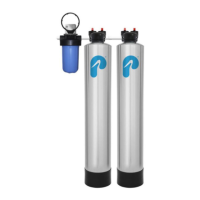
Bypass Valve Installation
Figure 2
If the Red Clips are in the slots (female opening of Electronic Head) remove them. Push the male O-Ring
side of the Bypass Valve into the female opening of the Electronic Head. Push the Red Clips back into the
slots to tighten.
The Bypass Valve on the Electronic Head can be set to Bypass or Service by turning the knobs on the side
of the valve. If the holes are up and down then the tank is in the Bypass Mode. If the holes are side to side
then the tank is in the Service Mode. Do not remove the red clips from the Bypass Valve after connecting
to main water supply.
Softener Tank
Electronic
Head
Discharge
Line
Bypass
Valve
Overflow
Barb
Outgoing
Water to
House
Wall
Incoming
Water
Supply
Brine Tank
Holding Tank
Safety Valve
Softener Tank
Electronic
Head
Bypass
Valve
Red
Clip
Front View



 To Next Page