54
8. Characteristics
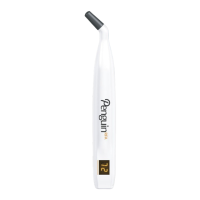
Penguin RFA is an instrument for measuring the stability (ISQ)
of dental implants. The instrument measures the resonance
frequency of a MulTipeg and presents it as an ISQ value.
The ISQ value, 1-99, reflects the stability of the implant – the
higher the value, the more stable the implant.
The instrument measures the ISQ-value with a precision of
+/- 1 ISQ unit. When mounted onto an implant, the MulTipeg
resonance frequency can vary up to 2 ISQ units depending
on the tightening torque.
Warning: Use of this equipment adjacent to or
stacked with other equipment should be avoided
because it could result in improper operation.
9. MulTipeg
The MulTipeg is made from titanium and has an integrated
grip for the MulTipeg driver on top. Inspect the MulTipeg
for damage before use. Damaged MulTipegs should not be
used due to the risk of erroneous measurements.
There are dierent MulTipegs available made to fit dierent
implant systems and types. Please refer to the updated list
from the supplier.
Measurements should only be performed using
the correct MulTipegs. Using the wrong MulTipeg
could cause erroneous measurements or damages
to the MulTipeg or implant.
The instrument emits short magnetic pulses with
pulse duration of 1 ms and strength of +/- 20 gauss,
10 mm from the instrument tip. Precautions might
be necessary when using the instrument close to
cardiac pacemakers or other equipment sensitive
to magnetic fields.
10. Technical function
For bringing the MulTipeg into vibration, short magnetic
pulses are sent from the instrument tip. The magnetic pulses
interact with the magnet inside the MulTipeg and cause
the MulTipeg to vibrate. A pickup in the instrument picks up
the alternating magnetic field from the vibrating magnet,
calculates the frequency and from that, the ISQ value.
11. ISQ-value
The stability of the implant is presented as an “ISQ value”.
The higher the value, the more stable the implant. The ISQ is
described in numerous clinical studies. A list of studies can be
ordered from the supplier.
12. Implant stability
An implant can have dierent stabilities in dierent
directions. Make sure to measure from dierent directions
around the top of the MulTipeg.
It is highly recommended to measure the ISQ value at implant
placement to have a baseline for future measurements.
When the ISQ is measured at a later stage, a change in the
ISQ value will reflect a change in the implant stability. This
way, the ISQ progression will support the decision on when
to load the implant.
Note: The stability value is an additional parameter for
deciding when to load the implant. The final treatment
decision is the responsibility of the clinician.
13. Batteries & charging
The instrument contains 2 NiMH battery cells that must
be charged before use. A full charge takes approximately
3 hours at 20°C or 68°F. Warmer room temperature will
increase the charging time. From fully charged, the
instrument can measure continuously for 60 minutes before
it needs to be recharged. The yellow LED is lit when the
battery needs recharging. The yellow LED flashes when the
battery reaches a critical level. When the battery reaches a
critical level, the instrument shuts o automatically. When the
batteries are charging, the blue LED is lit. When the batteries
are fully charged the light goes o. The charger should not
be plugged in while measuring due to the risk of power line
interference making it dicult to measure.
14. Usage
14.1 Instrument on/o
To turn the instrument on, press the operating key. A short
beep should be heard and then all display segments are lit
up for a short while. Check that all display segments are lit.
The software version is then shown briefly before the
instrument starts to measure. If any error code (EX, where
“X” is the error number) is shown during start up, please refer
to the section “Troubleshooting”.
To turn o, press and hold the operating key until the
instrument turns o. The instrument will power down
automatically after 30 seconds of inactivity.
14.2 Measurement Penguin RFA
A MulTipeg (fig 3) is mounted onto the implant by using the
MulTipeg driver (fig 2). Use hand-tightening with 6-8 Ncm
of tightening torque. Turn on the instrument and hold the
tip close to the top of the MulTipeg (fig 5). When a signal is
received, a beep is heard and then the ISQ-value is shown
on the display for a short while before the instrument starts
to measure again.
If electromagnetic noise is present, the instrument cannot
measure. The electromagnetic noise warning is audible as
well as visible on the display. Try to remove the source of the
noise. The source could be any electric equipment close to
the instrument.
Always use a thread, such as dental floss, to secure
the MulTipeg driver when working intra-orally.
15. Cleaning and maintenance
Before use, the parts should be cleaned and
disinfected.
15.1 Instrument
Cleaning
The instrument can be cleaned with wipes soaked with
detergent solution for one minute and then wiped for one
minute with water-soaked lint free wipes.
Specified detergent: Neodisher Mediclean forte.
For use in environments requiring sterility, the instrument
should be covered with a sterile cover.
Disinfection
Use a cloth soaked with 70 % isopropyl alcohol to wipe the
instrument for one minute, and then let the instrument dry
for two minutes before use.
54
7. Symbols
Warning
Catalog
number
Unique device
identifier
CE mark
Follow
instructions
foruse
Lot/
Batchcode
Keep dry
Caution: Federal law
restricts this device to sale
by or on the order of a
physician or dentist.
Magnetic field
warning
Serial number
Temperature
limit
Waste from electronic
equipment must be
handled according to
local regulations
Autoclavable
up to134°C
Atmospheric
pressurelimit
Manufacturer Type BF Applied part
Delivered
Non-sterile
Electronic
instructions
for use
Manufacturing
date
Humidity limit
Medical device
English UK
English UK


 To Next Page
 Loading...