21. EMC Information
during measurements.
function.
76
Do not autoclave the instrument.
The instrument must be used with a cover in all
uses. (Only US).
The instrument must be cleaned with a
disinfectant between patients.
15.2 MulTipeg and MulTipeg Driver
Inspect the MulTipeg and MulTipeg Driver for damage
before use. Dispose of the MulTipeg if there are visible
damages such as severe miscoloring or damage. Dispose of
the Driver if the connection part (to the MulTipeg) is visibly
worn.
Cleaning
Immerse the device in 1% Alconox solution in tap water (20-
30°C) for 5 minutes. Brush the device with an interdental
brush for 1 minute, in the solution. Rinse in running tap water
(25–35°C) for 10 seconds. Dry with a lint-free towel.
Sterilization
Sterilization should be made in a pre-vacuum steam
sterilizer (autoclave) according to ISO 17665-1. Clean the
products and put them in an FDA-cleared (USA) autoclave
bag before sterilization. The following sterilization process
shall be used:
• At least 3 minutes at 134 (-1/+4)°C or 273 (-1.6/+7.4)°F
• 30 minutes of drying time
Follow the instruction for the autoclave that is used.
Do not clean the MulTipeg by ultrasound.
Thiscould cause damage to the MulTipeg.
16. Lifetime
The batteries are expected to last >500 charge cycles before
a noticeable change in capacity. This corresponds to a life-
time of 5 years. The internal batteries can be fully charged
more than 500 times. The instrument should not be left un-
charged for more than 1 year, to avoid change in capacity.
The MulTipeg Driver is guaranteed for at least 100 autoclave
cycles, and a MulTipeg is guaranteed for at least 20 auto-
clave cycles, before they are degraded in any way.
17. Troubleshooting & testing
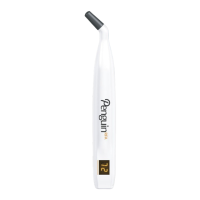
The instrument can be tested by using the ISQ tester (fig. 6).
Turn on the instrument and hold the tip close to the top of
the pin. When a signal is received, a beep is heard and then
a set ISQ-value in the range shown on the label is shown of
the display.
17.1 Possible errors
• Dicult to achieve a measurement:
In some cases, it is more dicult for the instrument
to make the MulTipeg vibrate. If so, try to hold the
instrument tip closer to the top of the MulTipeg. Check
also that no soft-tissue is touching the peg which could
aect the vibration. When the device is measuring, the
measurement symbol is shown on the display.
• Noise warning (audible and visible on the display):
An electric device close to the instrument is causing the
warning symbol to appear. Try to remove the source.
• The instrument suddenly turns o:
The instrument turns o automatically after 30 seconds of
inactivity. It may also turn o if the battery level is too low
or due to any of the error codes described below.
• Not all segments are lit up when instrument is started:
The instrument is damaged and has to be sent for repair
or exchange.
17.2 Error codes
If malfunctioning, these error codes are shown on the display
before it turns o:
E1: Hardware error. Malfunctioning electronics
E2: Noise error. Shown if constant electromagnetic noise is
present
E3: Pulse power error. Malfunctioning magnetic pulse
generation
Use of accessories and spare parts other than
those specified or provided by the manufacturer of
this equipment could result in increased emissions
or decreased electromagnetic immunity of this
equipment and result in improper operation.
18. Accessories & Spare Parts
Model MulTipeg
Driver
Sterile
Cover
Mains adapter
Model No.
UE05WCP-052080SPC
Or
UES06WNCP-052080SPA
REF 55003 55105 55093
55263
Model EU plug UK plug AU plug US plug ISQ tester
REF 55094
55264
55095
55265
55096
55266
55097
55267
55217
MulTipeg: Please refer to the updated list from the supplier.
19. Service
Any serious incident that has occurred in relation to the device
should be reported to Integration Diagnostics Sweden AB,
and the competent authority of your state.
20. Serious incidents
Any serious incident that has occurred in relation to the device
should be reported to Integration Diagnostics Sweden AB,
and the competent authority of your state.
English UK


 To Next Page
 Loading...