EasyManua.ls Logo

Penn A421 Series - User Manual

Penn A421 Series
28 pages
Print Icon
To Next Page IconTo Next Page
Loading...
A421 Series Electronic Temperature
Controls with Off-Cycle Defrost Installation
Guide
Applications
Important: Use this A421 Series Electronic Temperature Control only as an operating control.
Where failure or malfunction of the A421 Control could lead to personal injury or property
damage to the controlled equipment or other property, additional precautions must be
designed into the control system. Incorporate and maintain other devices, such as supervisory
or alarm systems or safety or limit controls, intended to warn of or protect against failure or
malfunction of the A421 Control.
Important: Utiliser ce A421 Series Electronic Temperature Control uniquement en tant que
dispositif de régulation. Lorsqu'une défaillance ou un dysfonctionnement du A421 Control
risque de provoquer des blessures ou d'endommager l'équipement contrôlé ou un autre
équipement, la conception du système de contrôle doit intégrer des dispositifs de protection
supplémentaires. Veiller dans ce cas à intégrer de façon permanente d'autres dispositifs,
tels que des systèmes de supervision ou d'alarme, ou des dispositifs de sécurité ou de
limitation, ayant une fonction d'avertissement ou de protection en cas de défaillance ou de
dysfonctionnement du A421 Control.
The A421 Series Electronic Temperature Controls are single-stage, electronic temperature controls
with a single-pole, double-throw (SPDT) output relay.
A421 Controls feature a backlit LCD with adjustable brightness and three-button touchpad interface
that you can set up to restrict user adjustments. An LED indicates the output relay's on/off status.
A421 Controls have simple on and off temperature settings for heating or cooling, an adjustable
anti-short cycle delay, temperature setback, and sensor offset capability. The temperature control
range is -40°F to 212°F or -40°C to 100°C.
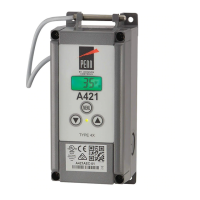
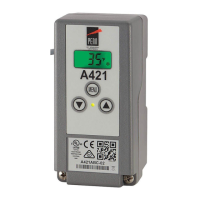
The A421 Controls are available either in Type 1 (NEMA), IP20 (CE), high-impact plastic enclosures
suitable for surface or DIN rail mounting (Figure 1), or in Type 4X (NEMA), IP66 (CE) watertight,
corrosion resistant surface mount enclosures (Figure 2).
Part No. 24-7664-3035 Rev D
2018-11-13
A421ABD-x, A421AED-x

Table of Contents

Other manuals for Penn A421 Series

Questions and Answers

  • P
    Pamela SmithJul 25, 2025
    What to do if my Penn Controller shows 'EE' error?
    • K
      Kyle JonesJul 25, 2025
      If your Penn Controller displays 'EE', it indicates a program failure. Try resetting the control by pressing the MENU button. If the issue continues, the control likely needs to be replaced.
  • M
    Mario MendezJul 30, 2025
    Why does my Penn A421 Controller flash 'SF' alternately with 'SH'?
    • H
      Holly KaneJul 30, 2025
      If your Penn Controller flashes 'SF' alternately with 'SH', it means there is a shorted temperature sensor or sensor wiring. Refer to the Troubleshooting procedure and cycle power to reset the control.
  • J
    Julie WalkerAug 3, 2025
    Why does my Penn Controller flash 'SF' alternately with 'OP'?
    • J
      Joseph BatesAug 3, 2025
      If your Penn Controller flashes 'SF' alternately with 'OP', it indicates an open temperature sensor or sensor wiring. Refer to the Troubleshooting procedure and cycle power to reset the control.
  • P
    Phillip WilliamsAug 7, 2025
    What to do if my Penn Control Systems shows 'EE' error?
    • A
      Amanda BeanAug 7, 2025
      If your Penn Control Systems displays an 'EE' error, it indicates a program failure. Try pressing the MENU button to reset the control. If the problem continues, the control needs to be replaced.
  • D
    Diane BowersAug 12, 2025
    Why does my Penn Control Systems display 'SF' flashing alternately with 'OP'?
    • A
      Andrew WilliamsAug 12, 2025
      The 'SF' flashing alternately with 'OP' on your Penn Control Systems indicates an open temperature sensor or sensor wiring issue. Refer to the Troubleshooting procedure and cycle power to reset the control.
  • B
    bleeAug 16, 2025
    How to fix 'SF' flashing alternately with 'SH' on Penn Control Systems?
    • J
      Justin LynchAug 16, 2025
      The 'SF' flashing alternately with 'SH' on your Penn Control Systems means there's a shorted temperature sensor or sensor wiring. Refer to the Troubleshooting procedure and cycle power to reset the control.
  • T
    Travis StephensAug 20, 2025
    Why is my Penn Controller flashing SF alternately with SH?
    • A
      amanda87Aug 20, 2025
      If the Penn Controller is flashing 'SF' alternately with 'SH', it indicates a shorted temperature sensor or sensor wiring. Refer to the Troubleshooting procedure and cycle the power to reset the control.

Summary

Applications

Off-Cycle Defrost Control

Mounting

Mounting a Type 1;IP20 Control on DIN Rail

Instructions for attaching the Type 1/IP20 control module to a 35 mm DIN rail.

Wiring

Setup and Adjustments

Parameter Codes and Operation Modes

Introduces parameter codes and explains how On/Off values determine heating or cooling modes.

Basic Menu

Advanced Menu

Setting Up a Regular or Timed Defrost Off-Cycle

Restricting User Adjustment

Troubleshooting

Troubleshooting Procedure

Offers a step-by-step guide for diagnosing and resolving common issues with the A421 control.

Technical Specifications

Penn A421 Series Specifications

General IconGeneral
DisplayLED
SeriesA421
Supply Voltage24 VAC/VDC
Output RelaySPDT
Sensor TypeThermistor, Thermocouple
TypeTemperature Controller
MountingDIN rail
Input Voltage24 VAC/VDC
Output Voltage120/240 VAC
Operating Temperature-40 to 158°F (-40 to 70°C)

Related product manuals