20
1
Before Using Your Camera
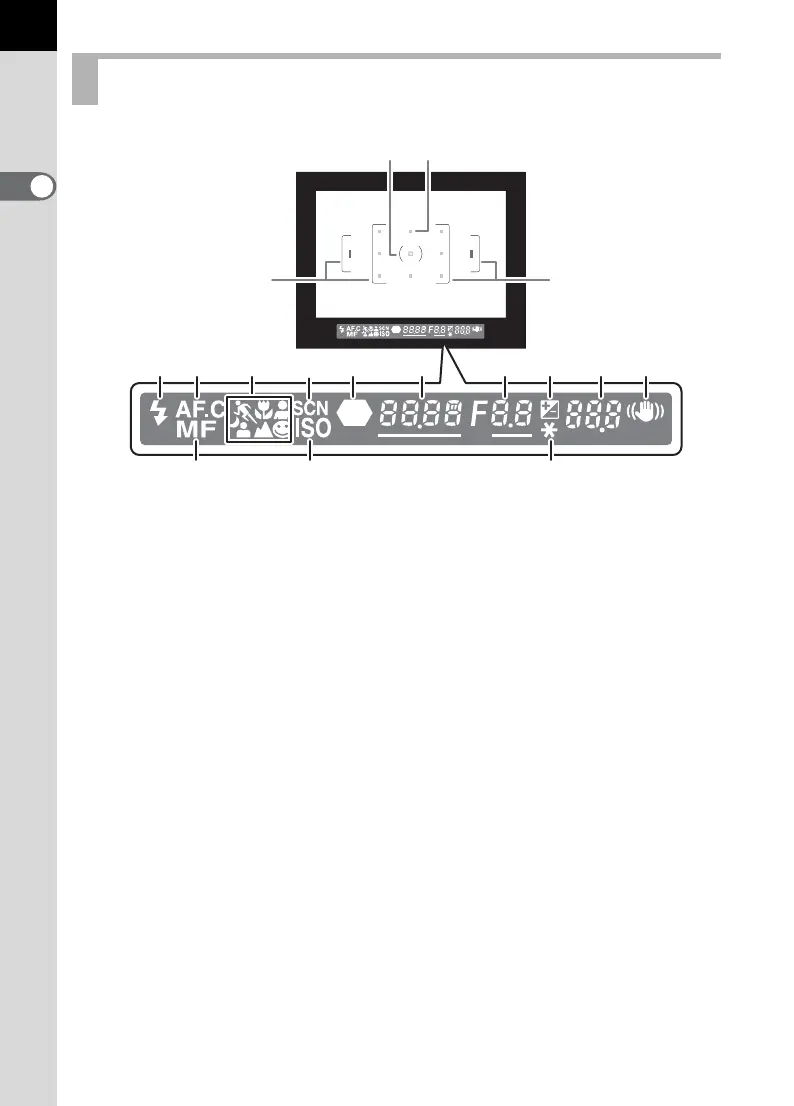
Viewfinder Indications
1 AF frame (p.39)
2 Spot metering frame (p.136)
3 AF point (p.128)
4 Flash status (p.54)
Appears when flash is available and blinks when flash is recommended but
not set.
5 Continuous mode (p.127)
Appears when [AF Mode] in the [A Rec. Mode] is set to k (Continuous
mode).
6 Picture mode icon (p.50)
Icon for Picture mode in use appears.
\ (Moving Object), q (Macro), = (Portrait), U (Normal mode in I),
. (Night Scene Portrait), s (Landscape)
7 Scene mode icon (p.50)
Appears when taking pictures in Scene mode.
8 Focus indicator (p.44)
Appears when image is focused.
9 Shutter speed (p.140)/Confirm Sensitivity
Shutter speed when capturing or adjusting (underlined when shutter speed
can be adjusted with e-dial).
The sensitivity is displayed when [OK btn when shooting] is set to [Confirm
Sensitivity] and the 4 button is pressed. (p.126)
1
4
5 6
1514 16
8
7
91011
12 13
23
1



 To Next Page