24
Common Operations
25
Common Operations
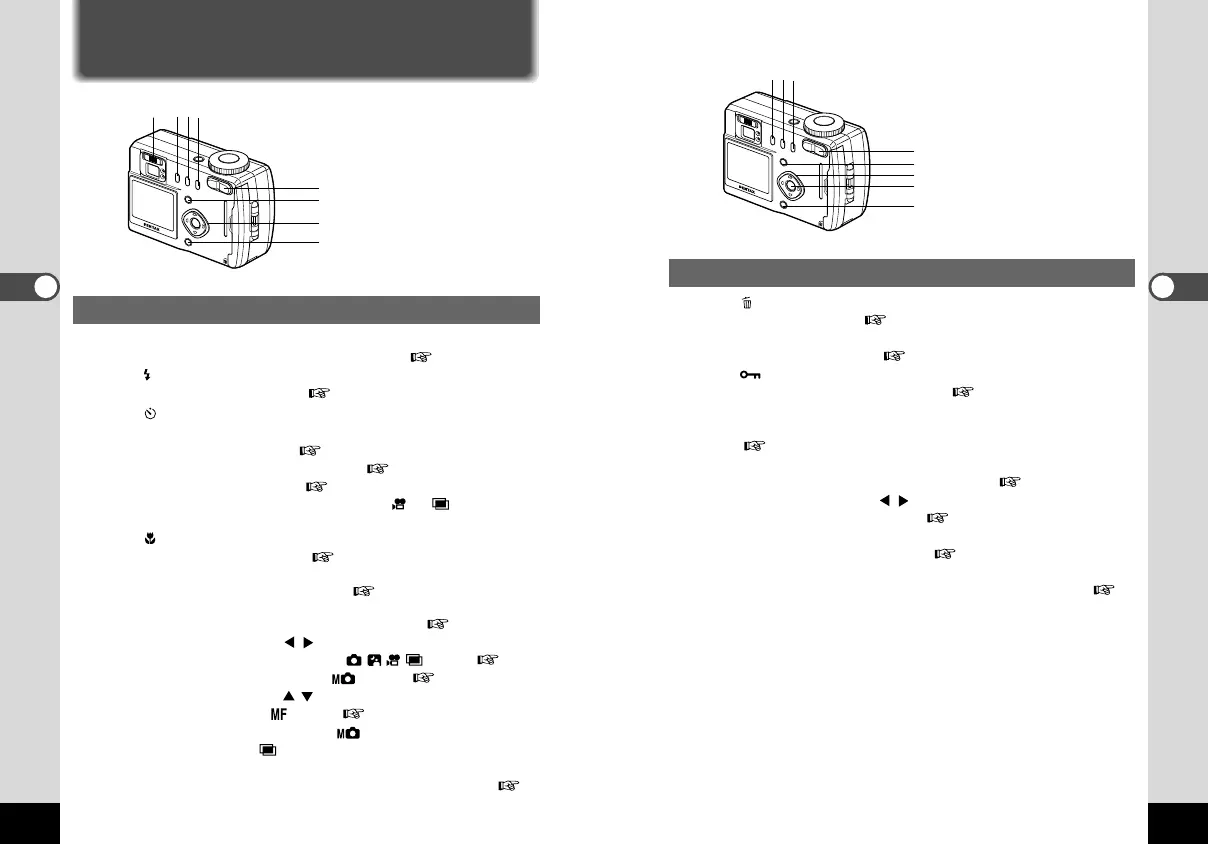
Playback Mode
q button
Deletes the image. ( p.58)
w DPOF button
Sets the print service. ( p.61)
e button
Protects the image from erasure. ( p.60)
r Zoom button
Changes the size of the image displayed on the LCD monitor.
( p.53)
t Menu button
Displays the active menus in Play mode. ( p.29)
y Four-way controller ( )
Displays images one by one. ( p.21)
u OK button
Displays nine images at once. ( p.56)
i Display button
Changes the information displayed on the LCD monitor. (
p.55)
Using the Button Functions
Capture Mode
q Diopter adjustment lever
Adjusts the viewfinder for optimum clarity. ( p.39)
w button
Changes the flash mode. ( p.43)
e button
Changes the shooting mode as follows.
Using the Self-timer ( p.36)
Using the Remote Control Unit ( p.37)
Continuous Shooting ( p.35)
* When the Capture mode is set on or , Continuous
Shooting mode will be skipped.
r button
Changes the focus mode. ( p.41)
t Zoom button
Changes the size of the subject. ( p.40)
y Menu button
Displays the active menus in Capture mode. ( p.26, p.28)
u Four-way controller ( )
Changes the EV compensation in mode. ( p.42)
Changes the shutter speed in mode. ( p.32)
i Four-way controller ( )
Adjusts the focus in mode. ( p.41)
Changes the aperture value in mode and changes the
exposure mode in mode.
o Display button
Changes the information displayed on the LCD monitor. (
p.30)
q
r
t
y
ui
o
we
e
r
t
y
u
i
qw
KB320(22-29)E.QE33 9/12/01 5:42 PM Page 24



 To Next Page