26
Common Operations
27
Common Operations
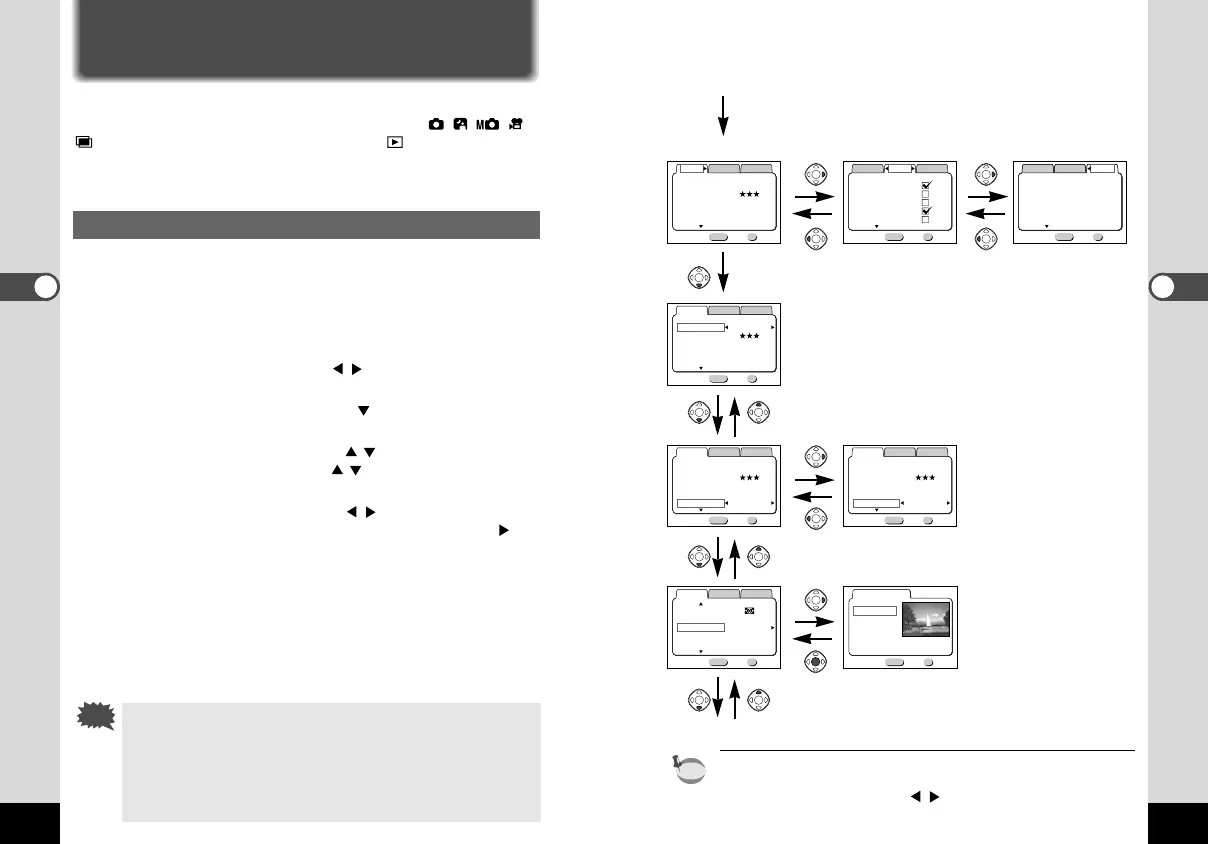
In Capture Mode
z Menu button
[Rec.Mode] menu [Memory] menu [Set-up] menu
x
cv
cv
Select screen
c
To the next screen
When you press the Menu button in Playback mode, the Playback
mode menu will be displayed.
Press the four-way controller ( ) to switch to the [Playback] or
[Set-up] menu.
Using the Menus
When you press the Menu button, the menu is displayed on the LCD moni-
tor. You can set the shooting functions in Capture mode (
) or the playback functions in Playback mode ( ).
You can set the camera functions in both Capture mode and Playback
mode.
How to Use the Menus
When you are making settings from a menu, a guide to operation
is displayed on the LCD monitor.
z Press the Menu button.
The menu screen will be displayed. The selected area will be
displayed in a green frame.
Use the four-way controller ( ) to select the menu
screen.
x Press the four-way controller ( ).
The frame will move to the menu item.
c Use the four-way controller ( ) to select an item.
Use the four-way controller ( ) to move the frame up or
down.
v Use the four-way controller ( ) to change the setting.
If there is a Select screen, use the four-way controller ( ) to
move to the Select screen.
A guide to operation of the buttons will be displayed on the
LCD monitor for a Select screen. When you have finished
making the settings, press the OK button to return to the
menu.
b Press the OK button.
The settings will be saved and the screen will return to shoot-
ing or playback status.
• If you press the Menu button and leave the menu screen,
any changes to setting will not be saved.
• Even if you press the OK button and leave the menu
screen, if you remove the battery before turning off the
camera or do not otherwise turn off the camera correctly,
any changes to setting will not be saved.
MENU OK
Memory
Flash
White Balance
Focusing Area
Exit
Digital Zoom
AE Metering
Ok
Rec.Mode
Set-up
1/2
2240×1680
MENU OK
Rec.Mode
Memory
Set-up
1/3
Resolution
Quality Level
White Balance
Auto
Wide
On
Exit
Focusing Area
Digital Zoom
Ok
MENU OK
Memory
Date Style
Date Adjust
Off
On
Exit
World Time
Beep
Ok
Format Card
mm/dd/yy
9/30/2001
Rec.Mode
Set-up
1/3
2240×1680
MENU OK
Memory
Resolution
Quality Level
White Balance
Auto
Wide
On
Exit
Focusing Area
Digital Zoom
1/3
Rec.Mode
Set-up
Ok
2240×1680
MENU OK
Memory
Resolution
Quality Level
White Balance
Auto
Wide
Off
Exit
Focusing Area
Digital Zoom
1/3 Ok
Rec.Mode
Set-up
2240×1680
MENU OK
Memory
Resolution
Quality Level
White Balance
Auto
Wide
On
Exit
Focusing Area
Digital Zoom
1/3 Ok
Rec.Mode
Set-up
MENU OK
Exit
Color
Full
B&W
Sepia
Ok
MENU OK
Memory
AE Metering
ISO Speed
Color Full
0.5sec
Auto
Normal
Exit
Instant Review
Sharpness
2/3 Ok
Rec.Mode
Set-up
KB320(22-29)E.QE33 9/12/01 2:38 PM Page 26



 To Next Page