30
3
Common Operations
Common Operations
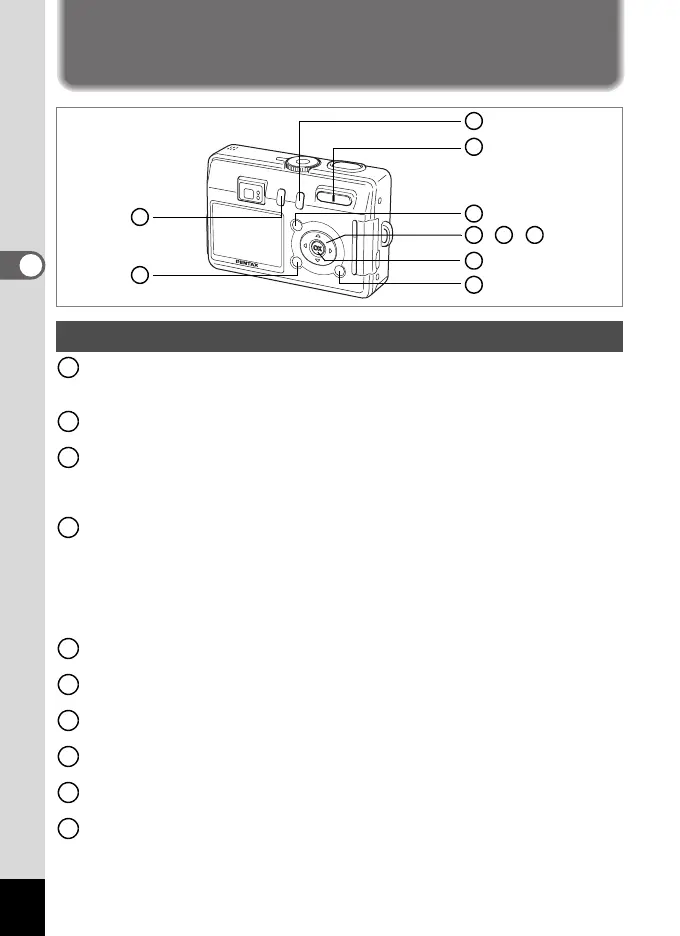
Using the Button Functions
Q Playback button
Switches to the Playback mode. Press it and hold it down to retract the lens.
(
1
p.28)
Zoom button
You can change the shooting area by pressing the Zoom button. (1p.26)
0 button
Displays the Help screen in - mode.
(
1
p.41)
Activates the function assigned by [Fn Setting] on the [
B
Set-up] menu
in any mode other than
-
,
C
or
O
mode.
(
1
p.122
)
Four-way controller (452)
b
(
4
)
Changes the flash mode. (1
p.63
)
zqs
(
5
)
Changes the focus mode as follows. (1
p.61
)
Macro mode Super Macro mode
Infinity-Landscape mode Manual Focus mode
grihj (2) Selects self-timer mode, remote control mode and
continuous shooting mode (1
p.52
-
p.54
)
Four-way controller (3)
Selects the shooting effect in + and d mode. (1
p.43, 55
-
57)
Four-way controller (23)
Adjusts the focus in z mode. (1
p.62
)
OK button
Selects a menu item. (1p.33)
DISPLAY button
Changes the information displayed on the LCD monitor. (1
p.60)
MENU button
Displays the [
A
Rec. Mode], [
Q
Playback] and [
B
Set-up] menus. (
1
p.33)
i button
Switches to X (Marine Movie mode) when pressed while U
(Marine) is selected in d mode. (1p.44, p.48)
Capture Mode
9
, ,
4 5 6
1
2
8
7
3
10
1
2
3
4
5
6
7
8
9
10
e_kb376.book Page 30 Tuesday, August 10, 2004 1:46 PM










 To Next Page