27
IDS-710 Hardware Installation Guide
Appendix F - Cables and Connectors
This appendix discusses the following topics:
• Ethernet cables
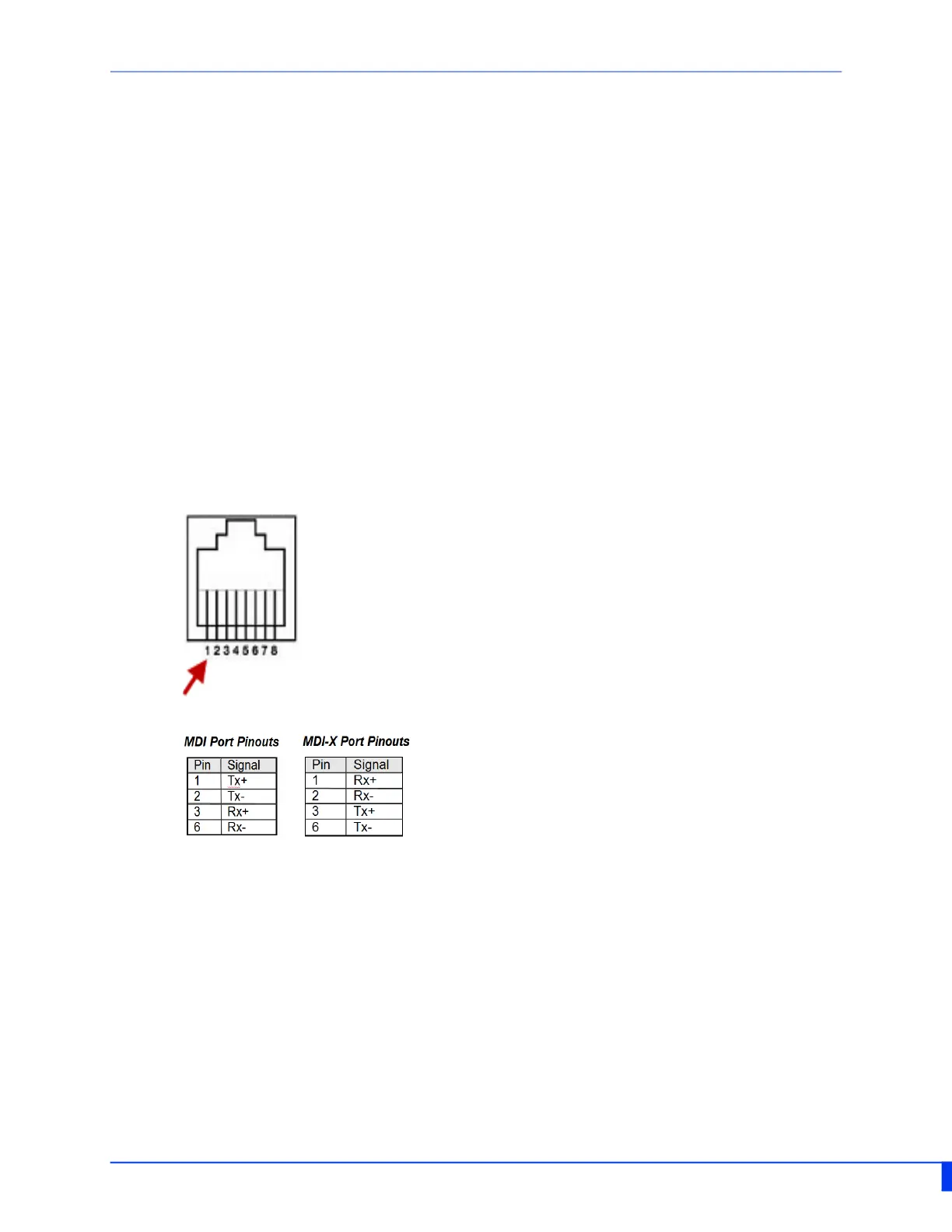
• Ethernet Connector — 8 pin RJ45
Ethernet Cables
The 10/100/1000BaseT(X) ports located on the IDS switch’s front panel are used to con-
nect to Ethernet-enabled devices. These Ethernet ports will automatically adjust depend-
ing on the type of Ethernet cable used (straight-through or cross-over), and the type of
device (NIC-type or HUB/Switch-type) connected to the port.
Requirements:
• Cat 5 UTP or STP. Cat 5e cables are preferable when running 1000Mbps speeds.
• 24-22 AWG (0.20mm
2
- 0.33mm
2
)
• Straight through or Ethernet Crossover cable
Ethnernet Connector - 8-pin RJ45


 To Previous Page