10
HEAVY! You may need
assistance with this step.
3B-3
UP
A1
01B
3/8in.(10mm)
Socket Wrench
(Not lncluded)
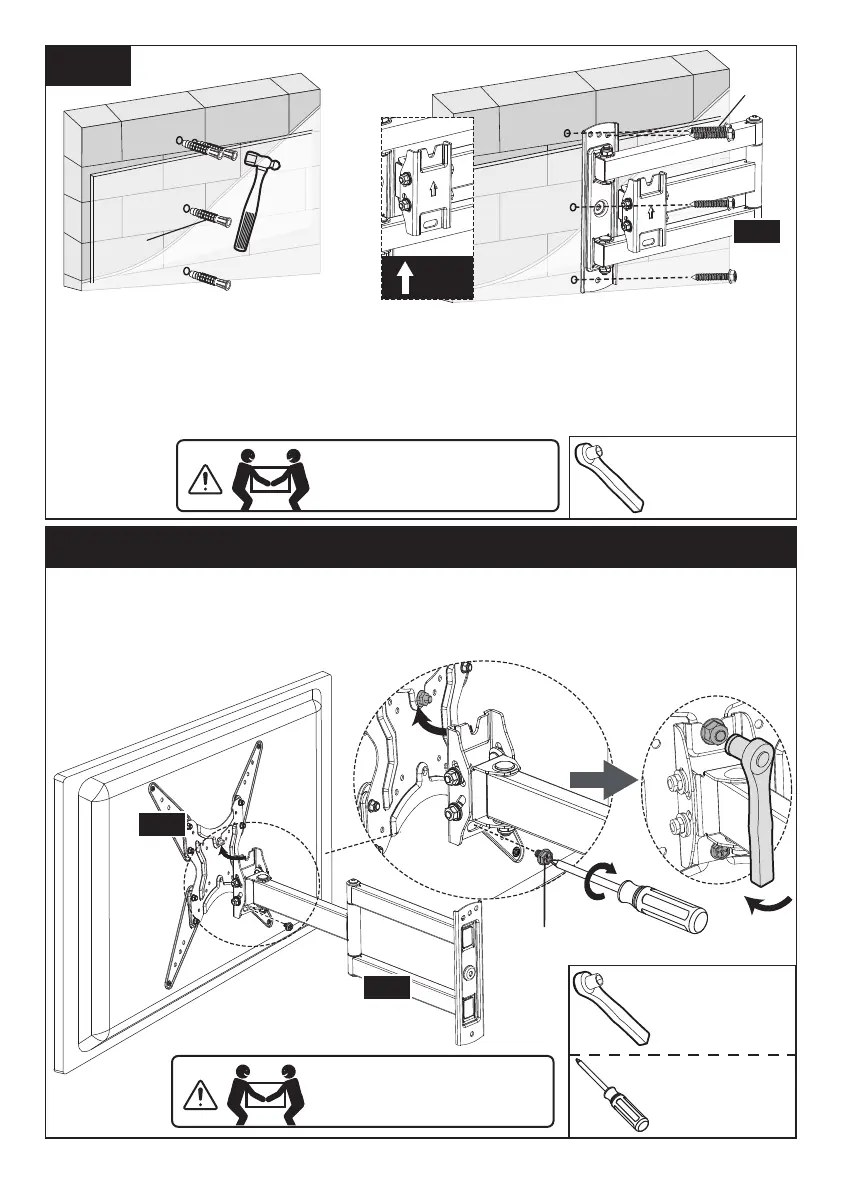
Step 4 Secure the TV onto the Arm Assembly/Wall Plate [01]
Use the hammer to knock
anchors [A2] into the wall.
Be sure the anchors [A2]
are seated flush with the
concrete surface.
Install wall plate using lag screws [A1].
Tighten the lag screws [A1] only until they
are pulled firmly against the arm assembly/
wall plate [01B]. DO NOT over-tighten the
lag screws [A1].
4-1. Hang the TV to the arm assembly/wall plate, making sure the upper bolt
hangs on the hook on the arm assembly/wall plate.
4-2. Tighten the bolt [S1] to secure the TV to the arm assembly/wall plate.
HEAVY! You may need
assistance with this step.
01A
01B
①
Phillips
Screwdriver
(Not lncluded)
1/2 in.(13mm)
Socket Wrench
(Not lncluded)
②
S1
A2
Tighten






 To Next Page