05
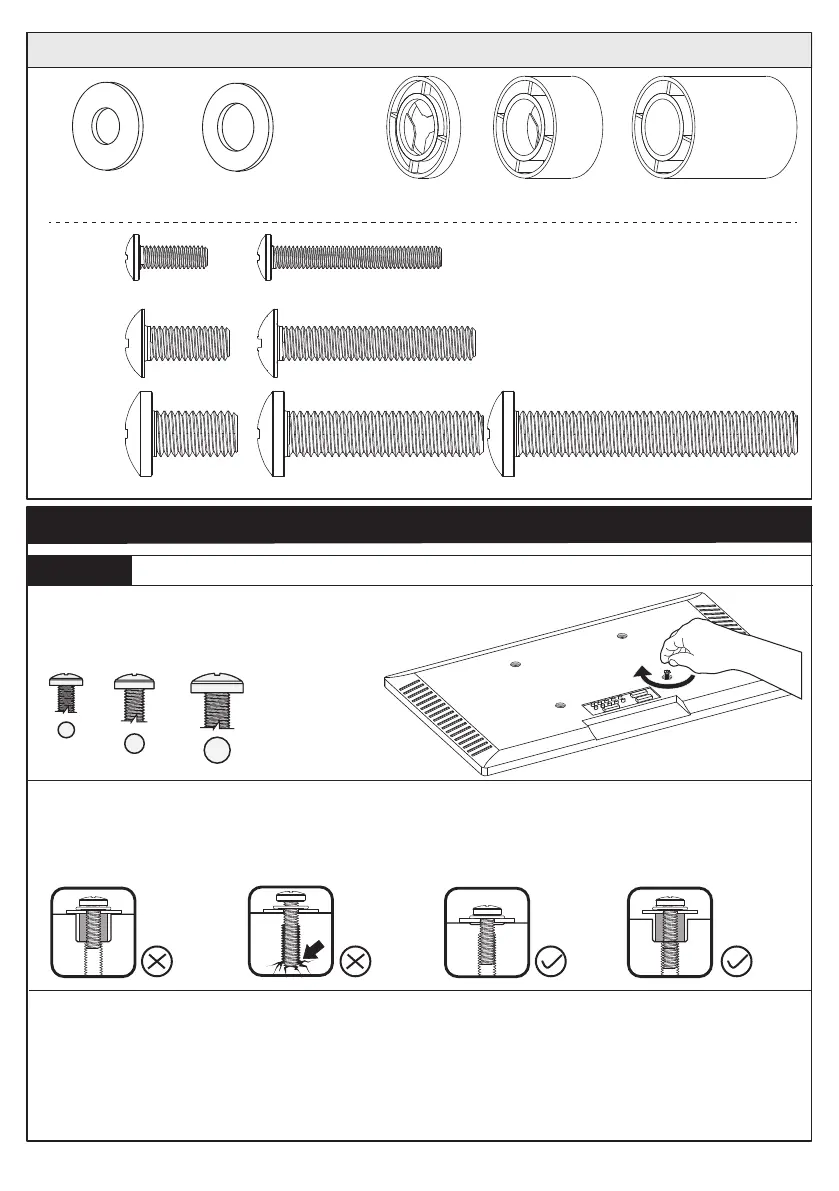
Hardware for Attaching TV Brackets to TV
L2.5mm
[F1] x 8
L10mm
[F2] x 4
L22mm
[F3] x 4
M4/M5
[B1] x 4
M6/M8
[B2] x 4
M4
M6
M8
M4 x 30mm
[C2] x 4
M4 x 12mm
[C1] x 4
M6 x 15mm
[D1] x 4
M6 x 35mm
[D2] x 4
M8 x 15mm
[E1] x 4
M8 x 35mm
[E2] x 4
M8 x 50mm
[E3] x 4
Step 1 Attach TV Brackets to TV
Select TV Bolts
Only one bolts size fits your TV.
M6 M8
Bolt length: Verify adequate thread engagement with bolts or bolts / spacers combina-
tion. We recommend thread engagement by at least 5 turns.
-Too short will not hold the TV.
-Too long will damage the TV.
M4
Step 1-1
Please Note: The provided TV bolts meet most of today's TVs design. However, some TVs
require special bolts which may not be in the hardware bag. In this case, we offffer our
“PSUHP" Universal Hardware Kit which provides a large selection of bolts that can meet
the demand of older and unique applications.
Note: If necessary, the spacers can be used in multi-layer. If the installation fails after
trying various methods, please contact customer service at supportus@perlesmith.com.
Too Long
Correct Correct
Too Short






 To Next Page