06
01
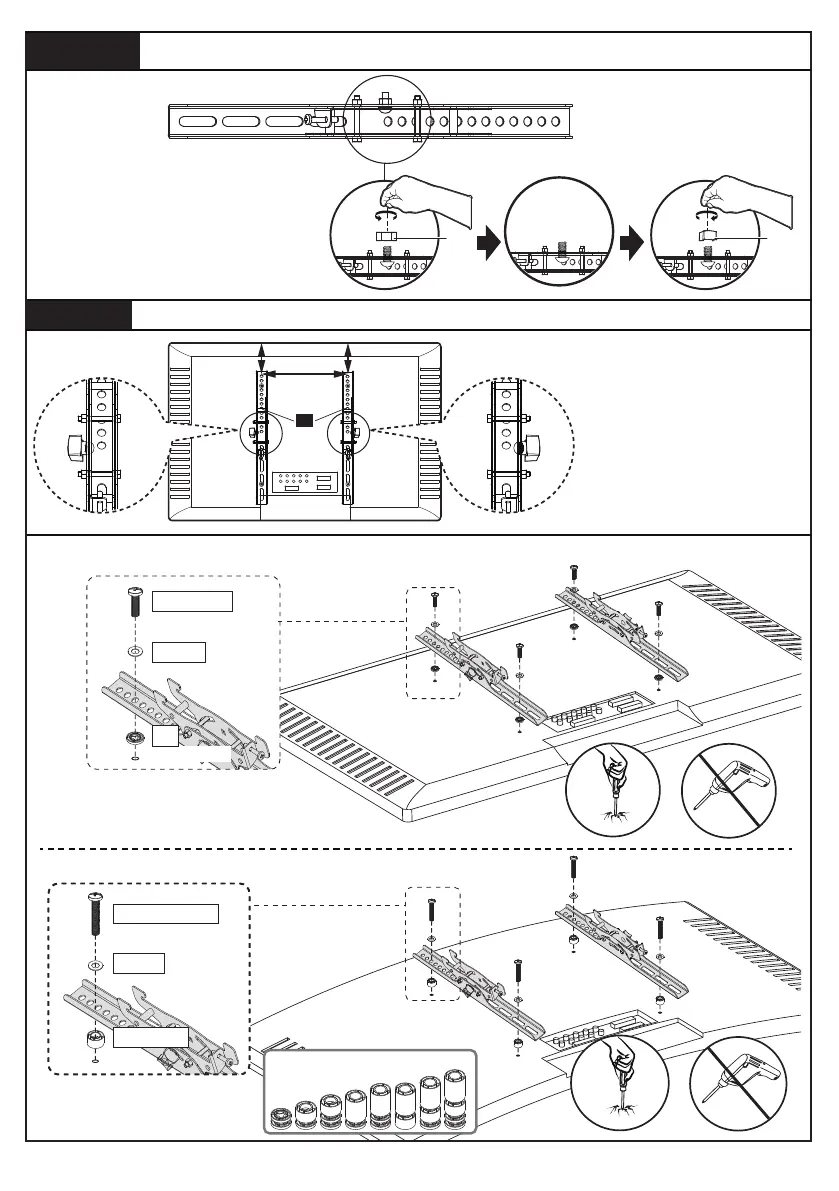
Note: Remove the pre-assembled
nuts [S] on the brackets by hand,
then secure the knobs [Z-H] to
the brackets.
Secure the Knobs [Z-H] to the Brackets [01]Step 1-2
C1/D1/E1
B1/B2
F1
(If needed)
D
O
N
O
T
o
v
e
r
t
i
g
h
t
e
n
Attach the TV Brackets to Your TV
Step 1-3
Option A (For Flat Back TV)
Option B (For Round Back TV)
D
O
N
O
T
o
v
e
r
t
i
g
h
t
e
n
Knob on outside
Knob on outside
Ensure the ends with
round holes on the TV
brackets are directed
towards the top of the
TV.
[Z-H]
S
Alternate Spacer
Setups
B1/B2
F1/F2/F3
C2/D2/E2/E3






 To Next Page