P6
[Not Included]
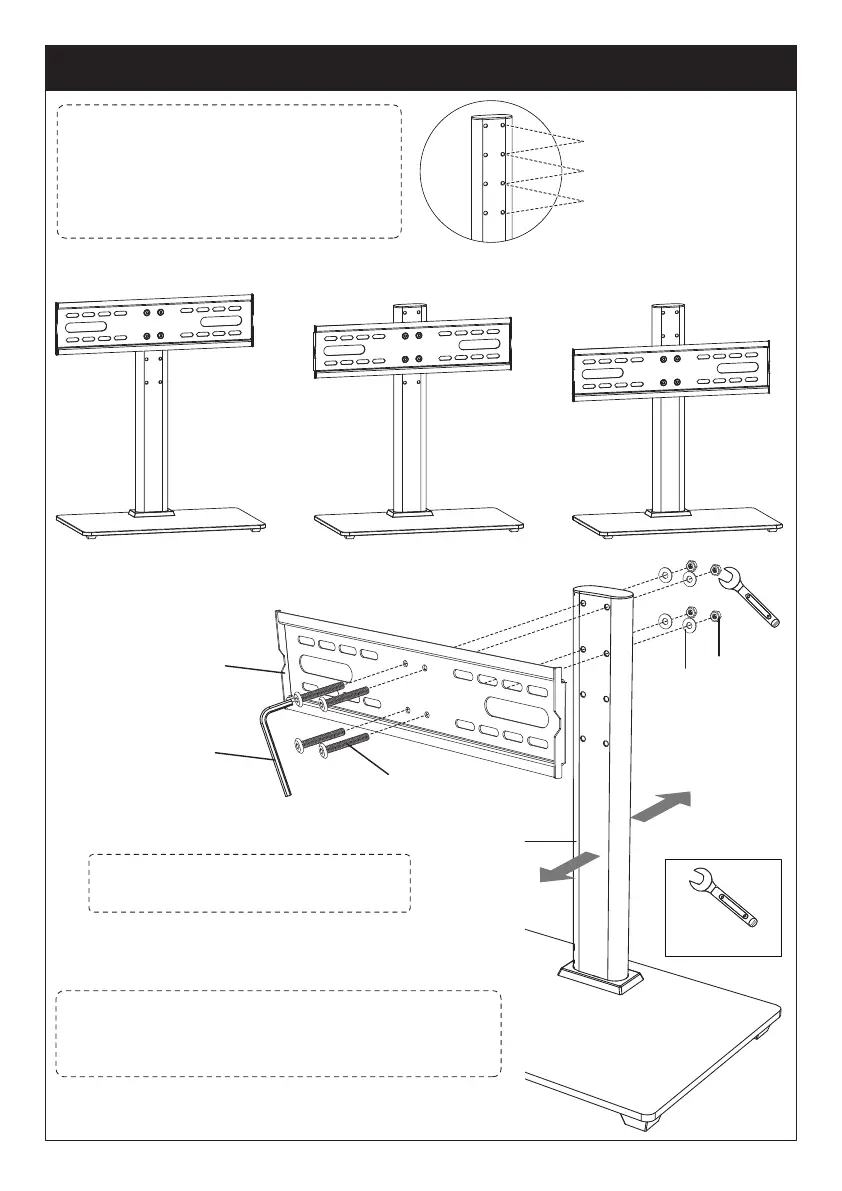
Step 2 Connect the TV Plate [M] to Support Pillar [P]
Q
P
T
M
S
V
Front
Back
Note: There are three choices for
height adjustment. You can choose
your desired height position while
connecting the TV plate [M] to
support pillar [P]
Connect TV plate [M] to support pillar [P] using
bolts [S], washers [T] and nuts [Q]
Note: Connect the TV plate [M] to the front
side of the support pillar [P] with the bump of
the TV plate facing back side of the stand.
The First Choice
The First Choice
The Second Choice
The Second Choice
The Third Choice
The Third Choice
Note: You may need assistance
with this step.






 To Next Page