P7
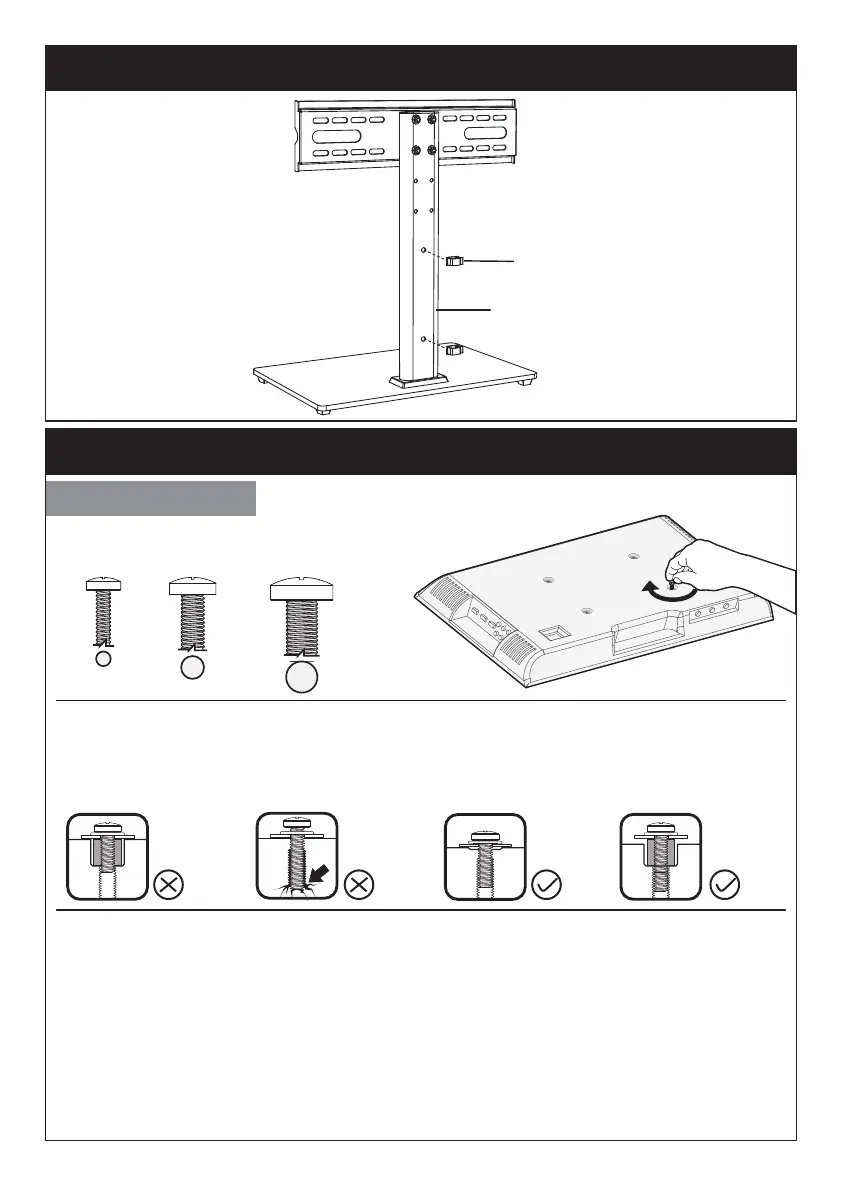
Only one bolt size fits your TV.
Select TV Bolts
Step 3 Secure the Wire Clips [K] to Support Pillar [P]
Step 4 Secure the TV Brackets [N] to TV
P
K
Too Long
Correct Correct
Too Short
Bolt length: Verify adequate thread engagement with bolts or bolts/spacers
combination. We recommend thread engagement by at least 5 turns.
-Too short will not hold the TV.
-Too long will damage the TV.
Please Note: The provided TV bolts meet most of today’s TVs design. However, some
TVs require special bolts which may not be in the hardware bag. In this case we offer
our “PSUHP" Universal Hardware Kit which provides a large selection of bolts that
can meet the demand of older and unique applications.
Please Note: When using the spacers it is important to note that they can be used in
multi-layers (meaning stacked). If you have any difficulty
understanding how to install the TV bolts or spacers, please contact
customer service at supportus@perlesmith.com (US)/
supportca@perlesmith.com (CA).
M4 M6 M8






 To Next Page